Isilon:PowerShellとプラットフォームAPIの使用 - オブジェクトとRANの作成
Résumé: この記事では、OneFSプラットフォームAPIでPowerShellを使用してオブジェクトとRANを作成する方法について説明します。
Symptômes
Cause
Résolution
JSONの概要
PAPIは、データ交換形式としてJSONを使用します。PAPIを活用してPAPIを使用してリソースを作成、変更、または削除する方法を理解することが重要です。JSON の詳細については、www.json.org
- 名前と値のペアのコレクション
- 値の順序付きリスト
API オブジェクトの取得からの出力例は、次のようになります。
{
"<object>": {
     "<property>": <value>,
     ...
}
使用可能なJSONテキスト出力を知るには、POSTコマンドを発行してオブジェクトを作成する必要があります。次の要求を送信して、PAPI の自己文書化を確認します。
GET /platform/1/quota/quotas?describe
関連するPowershellコードは次のとおりです。
#Get PAPI self documentation for quotas
$resource = "/platform/1/quota/quotas?describe"
$uri = $baseurl + $resource
$ISIObject = Invoke-RestMethod -Uri $uri -Headers $headers -Method Get
$ISIObject
次の出力例は、新しいクォータを作成するためにPOSTする必要がある内容の概要を示しています。必要なプロパティは、対応するプロパティに必要なプロパティと同じではない可能性があるため、注意してください isi に指定します。
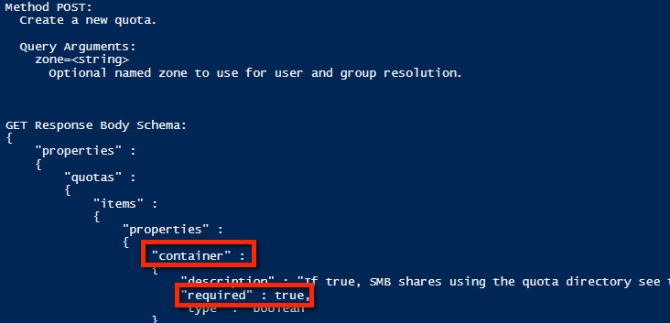
プロパティの例を使用して、ディレクトリーのハード クォータを作成するために使用できるJSON文字列の例を次に示します。
$QuotaObject = @"
{"type":"directory","include_snapshots": false,"container": true, "path": /ifs/home/user1", "enforced": true, "thresholds": {"hard":10000000},"thresholds_include_overhead": false}
"@
JSON 文字列が完成したら、あとは Invoke-RestMethod parameters と submit を実行します。以下のコード例では、JSON 文字列が POST の本文であり、コンテンツ タイプが application/json:
$headers = @{"Authorization"="Basic $($EncodedPassword)"}
$uri = $baseurl + $resource
$ISIObject = Invoke-RestMethod -Uri $uri -Headers $headers -Body $QuotaObject -ContentType "application/json; charset=utf-8" -Method POST
Write-Host "   Resulting Quota ID: "  $ISIObject.id
すべてをまとめる
例を使用して、ご使用の環境に、単一の親ディレクトリーの下にユーザー用の多数のホーム ディレクトリーがあると仮定します(例: /ifs/home)を使用して、これらの各ホーム ディレクトリーにディレクトリー クォータを設定します。Isilon RESTful Access to the namespace (RAN) APIを使用して、各ユーザーのホーム ディレクトリーへのパスを取得します。次のコードは、指定したパスのサブディレクトリーを取得し、各サブディレクトリーにディレクトリー クォータを設定します。
# Get subdirectories of path specified
$resource = '/namespace/' + $path
$uri = $baseurl + $resource
$ISIObject = Invoke-RestMethod -Uri $uri -Headers $headers -Method Get
#Loop through each directory and set the quota
ForEach($folder in $ISIObject.children) {
#Create quota
$resource ="/platform/1/quota/quotas"
Write-Host "Setting a $quotasize byte quota on $quotapath"
$QuotaObject = @"
{"type":"directory","include_snapshots": false,"container": true, "path": "$quotapath", "enforced": true, "thresholds": {"hard":$quotasize},"thresholds_include_overhead": false}
"@
$headers = @{"Authorization"="Basic $($EncodedPassword)"}
$uri = $baseurl + $resource
$ISIObject2 = Invoke-RestMethod -Uri $uri -Headers $headers -Body $QuotaObject -ContentType "application/json; charset=utf-8" -Method POST
Write-Host "   Resulting Quota ID: "  $ISIObject2.id
}
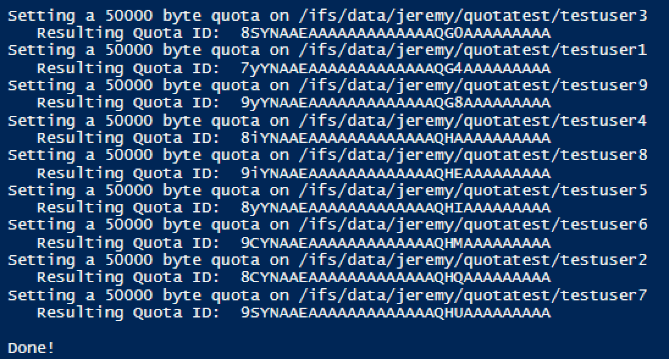
この記事に添付されたスクリプトを実行した結果は次のとおりです。