AppSync: In AppSync UI customer was unable to set the logging mode to debug as Apply button stayed disabled when debug option was selected.
Résumé: In AppSync UI customer was unable to set the logging level to debug as Apply button stayed disabled when debug option was selected.
Cet article concerne
Cet article ne concerne pas
Cet article n’est associé à aucun produit spécifique.
Toutes les versions du produit ne sont pas identifiées dans cet article.
Symptômes
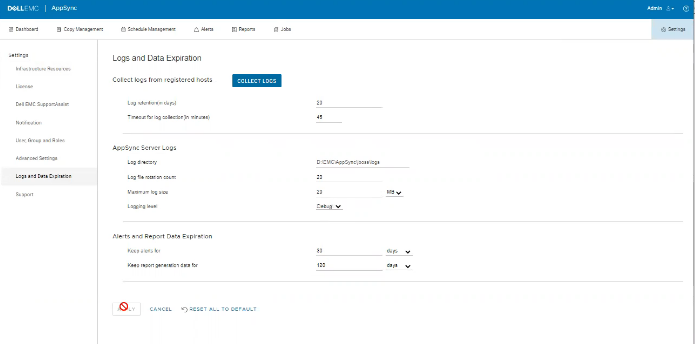
No errors in the logs but the issue can be observed on the UI as shown in the below.
Cause
The Issue is because customer on the same screen, had set "Timeout for log collection(in minutes)" option value to 45 which is invalid.
Résolution
Set The value for "Timeout for log collection(in minutes)" option to a valid value of 90 and 120.
Informations supplémentaires
AppSync 4.5 will not allow an invalid value for "Timeout for log collection(in minutes)."
Valid values can be from 90 to 120.
Valid values can be from 90 to 120.
Produits concernés
AppSync, AppSyncPropriétés de l’article
Numéro d’article: 000203604
Type d’article: Solution
Dernière modification: 09 sept. 2025
Version: 8
Trouvez des réponses à vos questions auprès d’autres utilisateurs Dell
Services de support
Vérifiez si votre appareil est couvert par les services de support.