AppSync:AppSync UIで、デバッグ オプションが選択されたときに[適用]ボタンが無効のままになったため、お客様はログ モードをデバッグに設定できませんでした。
Résumé: AppSync UIでは、デバッグ オプションが選択されたときに[適用]ボタンが無効のままになったため、ログ レベルをデバッグに設定できませんでした。
Cet article concerne
Cet article ne concerne pas
Cet article n’est associé à aucun produit spécifique.
Toutes les versions du produit ne sont pas identifiées dans cet article.
Symptômes
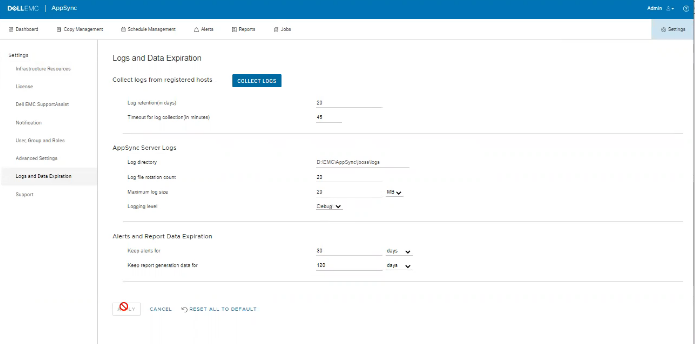
ログにエラーはありませんが、次に示すように、UIで問題が発生する可能性があります。
Cause
この問題は、お客様が同じ画面で、[Timeout for log collection(in minutes)]オプション値を無効な45に設定していたためです。
Résolution
[ログ収集のタイムアウト(分単位)]オプションの値を90および120に設定します。
Informations supplémentaires
AppSync 4.5では、「Timeout for log collection(in minutes)」
の無効な値は許可されません。有効な値は90~120です。
の無効な値は許可されません。有効な値は90~120です。
Produits concernés
Data Protection, Data Backup & Protection Software, AppSync, AppSyncPropriétés de l’article
Numéro d’article: 000203604
Type d’article: Solution
Dernière modification: 09 sept. 2025
Version: 8
Trouvez des réponses à vos questions auprès d’autres utilisateurs Dell
Services de support
Vérifiez si votre appareil est couvert par les services de support.