AppSync: AppSync UI에서 고객은 디버그 옵션을 선택할 때 적용 버튼이 비활성화된 상태로 유지됨에 따라 로깅 모드를 디버그로 설정할 수 없습니다.
Résumé: AppSync UI에서 고객은 디버그 옵션을 선택할 때 적용 버튼이 비활성화된 상태로 유지됨에 따라 로깅 수준을 디버그로 설정할 수 없었습니다.
Cet article concerne
Cet article ne concerne pas
Cet article n’est associé à aucun produit spécifique.
Toutes les versions du produit ne sont pas identifiées dans cet article.
Symptômes
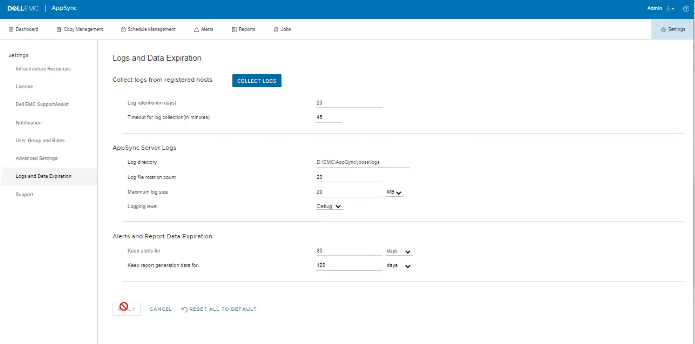
로그에 오류가 없지만 아래와 같이 UI에서 문제를 확인할 수 있습니다.
Cause
이 문제는 동일한 화면에서 고객이 "Timeout for log collection(분 단위)" 옵션 값을 45로 설정했기 때문에 유효하지 않습니다.
Résolution
"Timeout for log collection(분 단위)" 옵션의 값을 유효한 값인 90 및 120으로 설정합니다.
Informations supplémentaires
AppSync 4.5에서는 "Timeout for log collection(분)"에 대한 잘못된 값을 허용하지 않습니다.
유효한 값은 90~120일 수 있습니다.
유효한 값은 90~120일 수 있습니다.
Produits concernés
Data Protection, Data Backup & Protection Software, AppSync, AppSyncPropriétés de l’article
Numéro d’article: 000203604
Type d’article: Solution
Dernière modification: 09 sept. 2025
Version: 8
Trouvez des réponses à vos questions auprès d’autres utilisateurs Dell
Services de support
Vérifiez si votre appareil est couvert par les services de support.