如何识别 Dell Encryption Enterprise for Mac 的版本?
Résumé: 可按照这些说明识别 Dell Encryption Enterprise for Mac/Dell Data Protection Enterprise Edition for Mac 的版本。
Cet article concerne
Cet article ne concerne pas
Cet article n’est associé à aucun produit spécifique.
Toutes les versions du produit ne sont pas identifiées dans cet article.
Instructions
注:
- 从 2021 年 2 月起,Dell Encryption Enterprise for Mac 停止维护。戴尔不再更新本产品及其文章。有关详细信息,请参阅 Dell Data Security 产品生命周期(结束支持和停售)政策。如果您对其他文章有任何疑问,请联系您的销售团队或联系 endpointsecurity@dell.com。
- 请参阅端点安全性,了解有关当前产品的其他信息。
务必要了解 Dell Encryption Enterprise for Mac(以前称为 Dell Data Protection | Enterprise Edition for Mac)的版本,以便执行下列操作:
- 识别已知问题
- 确定UI差异
- 了解工作流程更改
- 验证操作系统兼容性。
受影响的产品:
- Dell Encryption Enterprise for Mac
- Dell Data Protection | Enterprise Edition(Mac 版)
受影响的操作系统:
- macOS
- Mac OS X
可以通过产品用户界面 (UI) 或产品安装程序确定版本。单击相应方法以了解更多信息。
UI
在通过 UI 识别版本之前,必须安装 Dell Encryption Enterprise for Mac。
- 登录到 Mac 端点。
- 单击 System Preferences。

- 在“System Preferences”中,单击 Dell Encryption Enterprise。
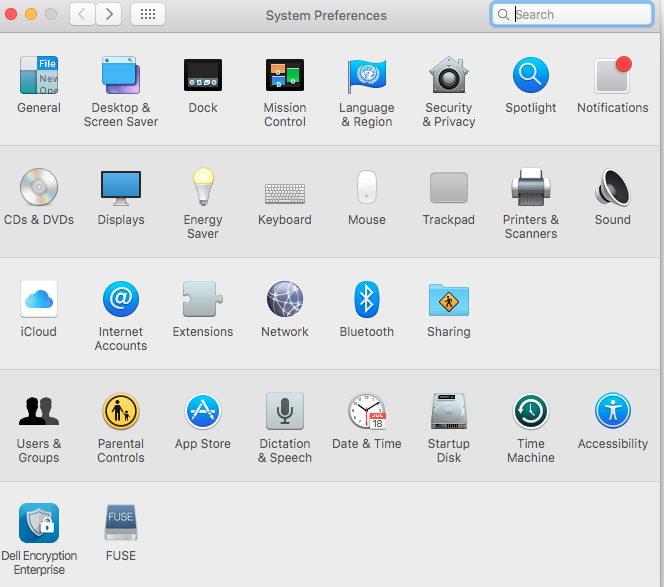
- 在 Dell Encryption Enterprise UI 的右下角记录版本号。
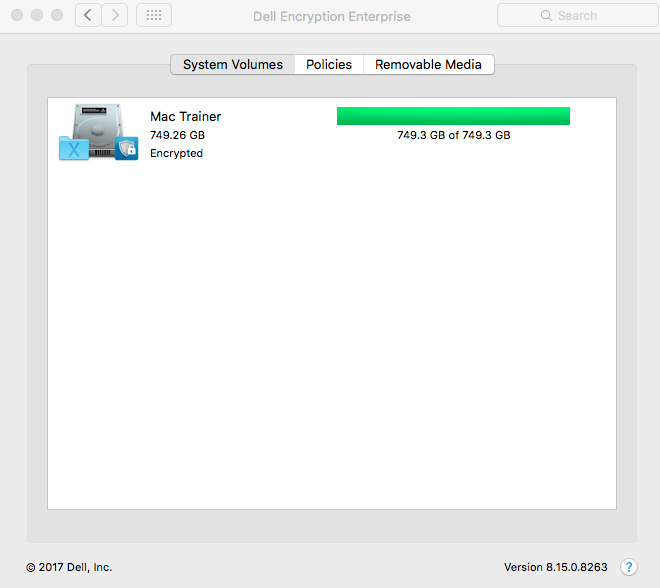 您的客户端的版本可能与上面的屏幕截图不同。
安装程序
- 右键单击安装程序,然后选择 Get Info。
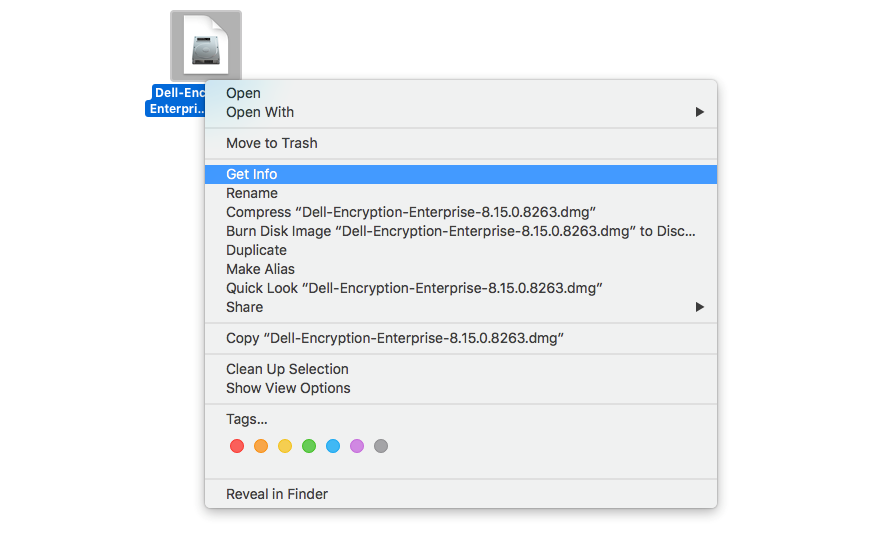
- 展开 Name & Extension,然后记录版本。
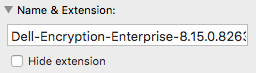 您的安装程序的版本可能与上面的屏幕截图不同。
Informations supplémentaires
Vidéos
Produits concernés
Dell EncryptionPropriétés de l’article
Numéro d’article: 000124916
Type d’article: How To
Dernière modification: 05 Aug 2026
Version: 16
Trouvez des réponses à vos questions auprès d’autres utilisateurs Dell
Services de support
Vérifiez si votre appareil est couvert par les services de support.