如何识别 Dell Threat Defense 版本
Résumé: 了解如何按照以下说明识别 Dell BitLocker Manager 或 Dell Data Protection BitLocker Manager 的版本。
Cet article concerne
Cet article ne concerne pas
Cet article n’est associé à aucun produit spécifique.
Toutes les versions du produit ne sont pas identifiées dans cet article.
Instructions
务必要了解 Dell BitLocker Manager(以前称为 Dell Data Protection | BitLocker Manager)的版本,以便您可以:
- 识别已知问题
- 确定UI差异
- 了解工作流程更改
- 验证系统要求
受影响的产品:
- Dell BitLocker Manager
- Dell Data Protection | BitLocker Manager
受影响的操作系统:
- Windows
可以通过产品用户界面 (UI) 或产品安装程序确定版本。单击相应选项,以了解更多信息。
UI
在通过 UI 识别版本之前,必须安装 Dell BitLocker Manager/Dell Data Protection BitLocker Manager。
- 登录 Windows 计算机。
- 在 Windows 桌面上,双击 [Product] Console。根据版本,将显示三种图标之一:
- v8.15.0 及更高版本: Dell Data Security Console

- v8.5.0 至 8.13.0: DDP 控制台

- v8.0.0 至 8.4.0: DDP 安全控制台
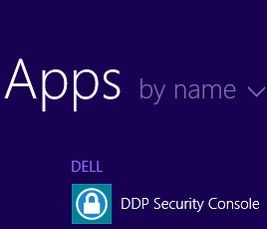
注:- <PRODUCT> = 控制台的变量名称,具体取决于安装的版本
- 或者,您可以使用资源管理器访问 [Product] Console,具体位置为:
- v8.5.0 及更高版本:
%SYSTEMDRIVE%\Program Files\Dell\Dell Data Protection\Security Tools\Dell.SecurityFramework.Console.exe - v8.0.0 至 8.4.0:
%SYSTEMDRIVE%\Program Files\Dell\Dell Data Protection\Security Tools\Dell.SecurityManager.SystrayApp.exe
- v8.5.0 及更高版本:
- 在示例中,
%SYSTEMDRIVE%在此示例中,%SYSTEMDRIVE% 是操作系统分区驱动器的 Windows 系统变量。
- v8.15.0 及更高版本: Dell Data Security Console
- 在“[Product] Console”的右上角,单击齿轮图标,然后选择 About。根据安装的版本,UI 会略有不同。
- v8.5.0 至 8.13.0: Dell Encryption Enterprise UI

- v8.5.0 至 8.13.0: 安全工具 UI

- v8.0.0 至 8.4.0: 安全控制台 UI
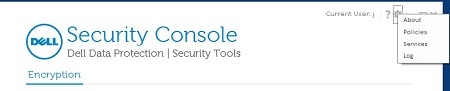
- v8.5.0 至 8.13.0: Dell Encryption Enterprise UI
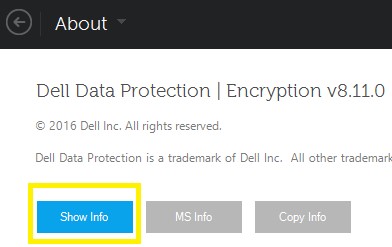
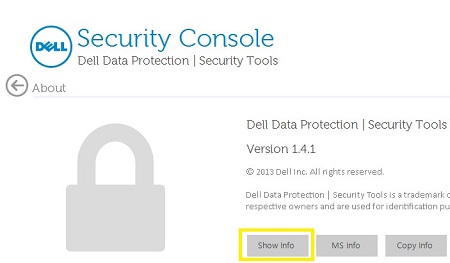
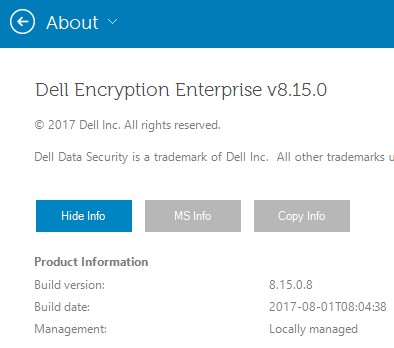
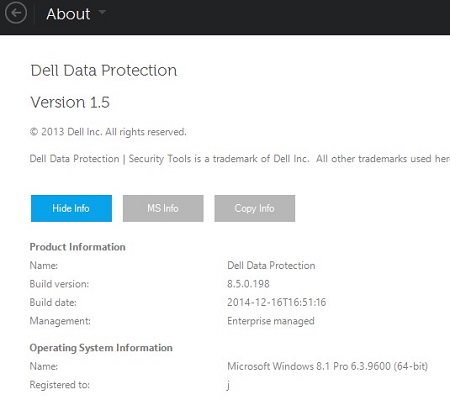
- 在“About”菜单中,单击 Show Info 可了解产品详细信息。根据安装的版本,UI 会略有不同。
- v8.5.0 及更高版本: Dell Data Protection Encryption UI
- v8.0.0 至 8.4.1: 安全控制台 UI
- v8.5.0 及更高版本: Dell Data Protection Encryption UI
- 记录列出的版本。
- v8.15.0 及更高版本: Dell Encryption Enterprise UI
- v8.5.0 至 8.13.0: Dell Data Protection UI
- v8.0.0 至 8.4.0: 安全控制台 UI
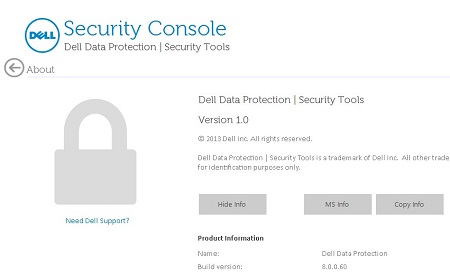
该内部版本可能与以上屏幕截图中的版本不同。 - v8.15.0 及更高版本: Dell Encryption Enterprise UI
安装程序
有关下载安装程序的信息,请参阅如何下载 Dell Encryption Enterprise 或 Dell Encryption Personal。
- 从 Dell Data Security(以前称为 Dell Data Protection)主安装程序中解压提取子安装程序。
有关更多信息,请参阅如何从 Dell Data Security 主安装程序中解压子安装程序(英文版)。
- 在解压的主安装程序路径(步骤 1)中,找到
EMAgent_<BITDEPTH>_setup.exe在以下任一位置:- v8.15 及更高版本:
<EXTRACTEDPATH>\Encryption Management Agent\EMAgent_<BITDEPTH>_setup.exe - v8.0 至 8.14.X:
<EXTRACTEDPATH>\Security Tools\EMAgent_<BITDEPTH>_setup.exe
注:<BITDEPTH>= 文件的位深度<EXTRACTEDPATH>= 文件的完整解压路径
- v8.15 及更高版本:
- 右键单击
EMAgent_<BITDEPTH>_setup.exe然后选择 属性。
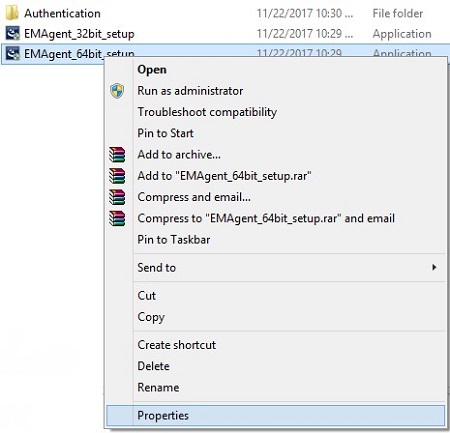
- 单击详细信息选项卡。
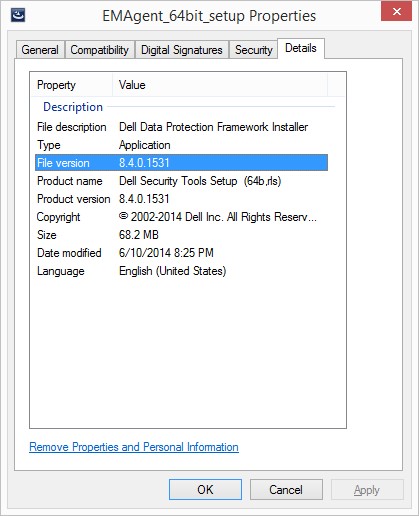
- 记录 File version 的前三个数字。在此示例中,8.4.0 即为前三个数字。
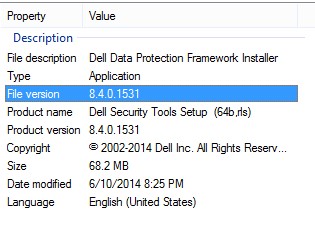 该文件版本可能与以上屏幕截图中的版本不同。
Informations supplémentaires
Vidéos
Produits concernés
Dell EncryptionPropriétés de l’article
Numéro d’article: 000123784
Type d’article: How To
Dernière modification: 17 Aug 2026
Version: 14
Trouvez des réponses à vos questions auprès d’autres utilisateurs Dell
Services de support
Vérifiez si votre appareil est couvert par les services de support.