Test article: This article is ONLY for testing purpose.
Résumé: testing summary update
Instructions
PCIe Multi-Segment is a feature introduced in Dell’s 17th generation of servers based on AMD Turin processors. PCIe Multi-Segment provides scalability by supporting more PCIe devices by having multiple segments and each of them having multiple PCIe bus segments.
This KB is created to mention about VMware ESXi support stance for PCIe Multi-segment support. Dell supports ESXi 8.0 Update3 on their 17th generation of AMD servers based on Turin processors. To begin with, Dell supports PE R7715 and R6715 1S servers with ESXi 8.0 Update 3. The 2S support is soon.
However, ESXi 8.0 Update 3 do not support PCIe Multi-Segment when this article is released initially. It may change as and when the support is added. Hence, it is required to disable PCIe Multi-Segment support in Server BIOS to install and use ESXi 8.0 Update 3 on these server models. To do the same, traverse to server BIOS settings, select Processor Settings and set One Segment as the value for PCI Multi-Segment Support BIOS token. Then save the changes, reboot the system, and install VMware ESXi.
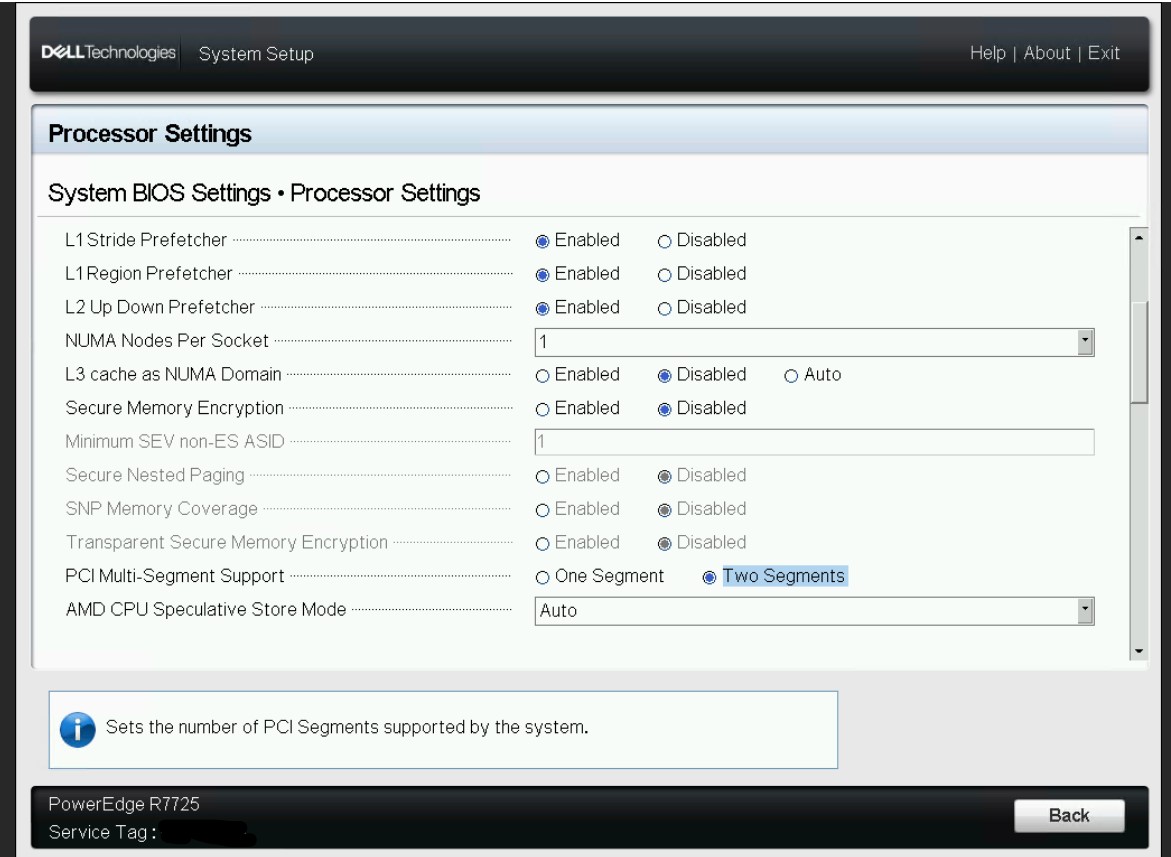
NOTE that if the PCIe Multi-Segment support BIOS token is set to Two Segments, you may face issues while using VMware ESXi.