从 PXE 启动以使用 Windows 部署服务部署操作系统时没有启动映像加载进度条
Résumé: 本文介绍如何在 PXE 启动时显示加载进度条,以使用 Windows 部署服务部署操作系统。
Cet article concerne
Cet article ne concerne pas
Cet article n’est associé à aucun produit spécifique.
Toutes les versions du produit ne sont pas identifiées dans cet article.
Symptômes
未显示加载进度条
从 PXE 启动至 Windows 部署服务以部署要安装的操作系统时,您可能不会看到加载进度条。这是因为某些 PXE 服务器上的 wdsmgfw.efi 会切换到 wgl4 字体,而不使用从 bootmgr. efi 获取的调整分辨率。
当从 wdsmgfw.efi 加载文件时,这会导致显示不匹配。因此,在加载引导映像时,加载进度条未按预期显示(图 1 和图 2)。
图1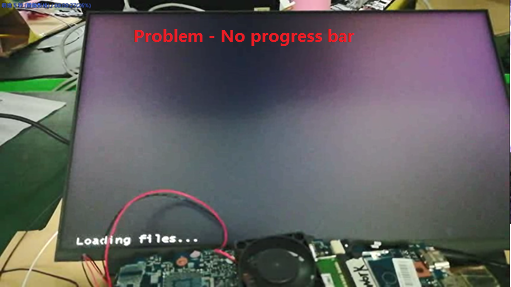
图2
受影响的系统:
- Inspiron 灵越 5402
- Inspiron 灵越 5409
- Inspiron 灵越 7500
- Inspiron 灵越 7501
- Inspiron 灵越 5502
- Inspiron 灵越 5509
- Latitude 3410
- Latitude 3510
- Vostro 成就 5402
- Vostro 成就 5502
- Vostro 成就 7500
Cause
无原因信息
Résolution
Produits concernés
Inspiron 7500, Inspiron 7501, Latitude 3410, Latitude 3510, Vostro 7500Propriétés de l’article
Numéro d’article: 000132044
Type d’article: Solution
Dernière modification: 22 Apr 2025
Version: 5
Trouvez des réponses à vos questions auprès d’autres utilisateurs Dell
Services de support
Vérifiez si votre appareil est couvert par les services de support.