執行 Dell Encryption 時 CPU 使用率過高
Résumé: 執行 Dell Encryption 的客戶可能會注意到系統程序中的 CPU 使用率很高。
Cet article concerne
Cet article ne concerne pas
Cet article n’est associé à aucun produit spécifique.
Toutes les versions du produit ne sont pas identifiées dans cet article.
Symptômes
受影響的產品:
- Dell Encryption
受影響的版本:
- 10.10 版
- 11.0 版
- 11.1 版
受影響的作業系統:
- Windows
系統程序是一個容器,可讓驅動程式以核心模式背景關係執行其執行緒。執行 Dell Encryption 檔案或資料夾加密時, FFE 在系統程序下載入驅動程式執行緒。系統程序有時會耗用 CPU 時間,導致 CPU 使用率過高。下列步驟顯示如何確認 Dell Encryption 是系統程序中 CPU 使用率高的原因。
在執行 Dell Encryption 的電腦上,客戶可能會在系統程序中發現 CPU 使用率較高 (12-25%)。
注意:若要確認,我們必須使用 Process Explorer。
- 從 Process Explorer 下載 Process Explorer
- 解壓縮 .zip 檔案的內容,然後執行
procexp.exe。 - 找到系統程序。
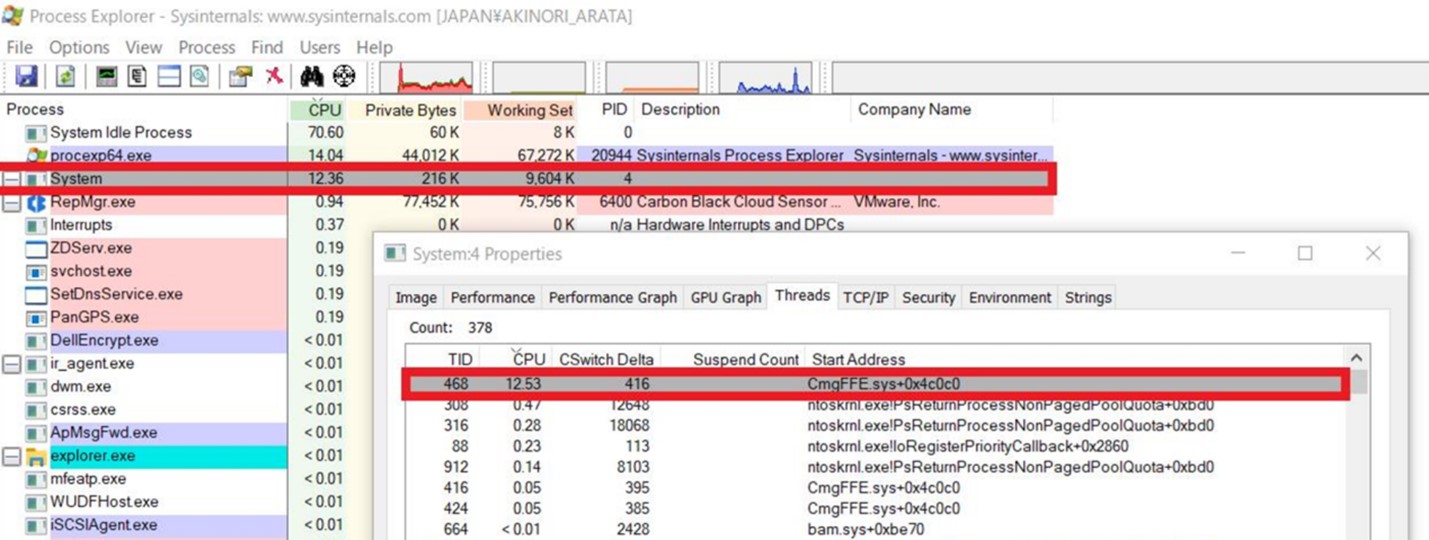

Cause
如果系統程序顯示 CPU 使用率很高,請按照以下步驟操作:
- 按兩下以開啟內容視窗。
- 按一下執行緒標籤。
如果有一個線程顯示高 CPU 利用率,且位址以 開頭, CmgFFE.sys, 這與客戶回報的問題相符。
Résolution
此問題已在 Dell Encryption 11.3.0 及更新版本中解決,網址為: https://www.dell.com/support/home/product-support/product/dell-data-protection-encryption/drivers
如要聯絡支援部門,請參閱 Dell Data Security 國際支援電話號碼。
請前往 TechDirect,以線上產生技術支援要求。
如需更多深入見解與資源,請加入 Dell 安全性社群論壇。
Produits concernés
Dell EncryptionPropriétés de l’article
Numéro d’article: 000190525
Type d’article: Solution
Dernière modification: 11 May 2026
Version: 9
Trouvez des réponses à vos questions auprès d’autres utilisateurs Dell
Services de support
Vérifiez si votre appareil est couvert par les services de support.