PowerProtect: Sanal makine SQL Server Uygulamaya Duyarlı yedeklemesi "kimlik doğrulanamıyor" ABV0007 başarısız oluyor
Résumé: Microsoft SQL Server uygulamaya duyarlı yedeklemesinin ilk yapılandırması "kimlik doğrulanamıyor" ABV0007 oluşturur.
Cet article concerne
Cet article ne concerne pas
Cet article n’est associé à aucun produit spécifique.
Toutes les versions du produit ne sont pas identifiées dans cet article.
Symptômes
PowerProtect Data Manager, Microsoft SQL Server uygulamaya duyarlı çözümü ile sanal makineleri (VM) korur. Microsoft SQL Server uygulamaya duyarlı yedeklemesinin ilk yapılandırması "Kimlik doğrulanamıyor ABV0007 oluşturur.
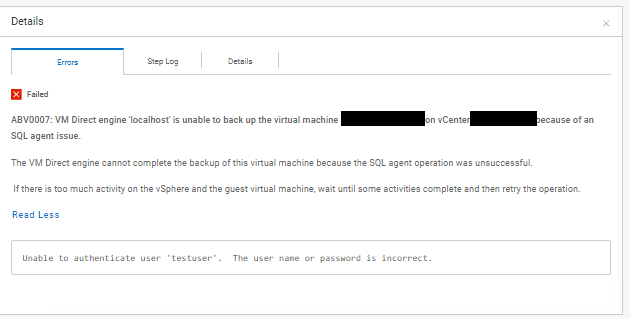
ABV0007: VM Direct engine 'localhost' is unable to back up the virtual machine 'my-vm-name' on vCenter 'my-vcenter.my-domain.com' because of an SQL agent issue.

The VM Direct engine cannot complete the backup of this virtual machine because the SQL agent operation was unsuccessful.

 If there is too much activity on the vSphere and the guest virtual machine, wait until some activities complete and then retry the operation.

Read Less
Unable to authenticate user 'testuser'.  The user name or password is incorrect.
Komutta "PowerProtect Data Manager_*.log" Dışa aktarma günlüğünde şu gösterilir:
vmdm.log: YYYY-MM-DD HH:MM:SS INFO [] [vproxyMonitor] [00000000-0000-4000-a000-000000000000][][][TRACE_ID:82ad56e103a61a50;JOB_ID:bce8e2cddeabcbcf][] [c.e.b.v.v.a.VPEProtectOp.statusChanged(226)] -  MONITOR BackupJob:  state changed BackupJobSession(state=Failure, id=f6f3c7e0-6b62-4f9b-87f6-0c01f0f6780c, error: code=500, text=Backup has FAILED.  Backup of the application "MSSQLDM" on the virtual machine "my-vm-name" is unsuccessful.  Unable to authenticate user 'testuser'.  The user name or password is incorrect., target=my-vm-name): Queued -> Failure, progress=100
vmdm.log: YYYY-MM-DD HH:MM:SS INFO [] [vpe-completion-0] [00000000-0000-4000-a000-000000000000][][][TRACE_ID:82ad56e103a61a50;JOB_ID:bce8e2cddeabcbcf][] [c.e.b.v.v.a.VPEProtectOp.resume(326)] -  Resuming session for asset=my-vm-name -- BackupJobSession(state=Failure, id=f6f3c7e0-6b62-4f9b-87f6-0c01f0f6780c, clean, error: code=500, text=Backup has FAILED.  Backup of the application "MSSQLDM" on the virtual machine "my-vm-name" is unsuccessful.  Unable to authenticate user 'testuser'.  The user name or password is incorrect., target=my-vm-name), isNew=true, taskId=346ca4b0-ae26-4937-864b-9a576685e4a5
vmdm.log: YYYY-MM-DD HH:MM:SS INFO [] [vpe-completion-0] [00000000-0000-4000-a000-000000000000][][][TRACE_ID:82ad56e103a61a50;JOB_ID:bce8e2cddeabcbcf][] [c.e.b.v.v.a.VPEProtectOp.completeSessionFailure(921)] -  Session complete with failure BackupJobSession(state=Failure, id=f6f3c7e0-6b62-4f9b-87f6-0c01f0f6780c, clean, error: code=500, text=Backup has FAILED.  Backup of the application "MSSQLDM" on the virtual machine "my-vm-name" is unsuccessful.  Unable to authenticate user 'testuser'.  The user name or password is incorrect., target=my-vm-name)
vmdm.log: YYYY-MM-DD HH:MM:SS INFO [] [vpe-completion-0] [00000000-0000-4000-a000-000000000000][][][TRACE_ID:82ad56e103a61a50;JOB_ID:bce8e2cddeabcbcf][] [c.e.b.v.v.a.VPEProtectOp.shouldIndexBackup(1584)] -  Backup type SYNTHETIC_FULL
vmdm.log: YYYY-MM-DD HH:MM:SS INFO [] [vpe-completion-0] [00000000-0000-4000-a000-000000000000][][][TRACE_ID:82ad56e103a61a50;JOB_ID:bce8e2cddeabcbcf][] [c.e.b.v.v.u.VMDMErrorHelper.getEEMI(269)] -  Matched messageID=ABV0007, classificationKey=AGENT, keys=[vproxy, vmName, vCenterName]
Komutta "Vmdirect_*.log" Dışa aktarma günlüğünde şu gösterilir:
YYYY-MM-DD HH:MM:SS ERROR:  [82ad56e103a61a50;bce8e2cddeabcbcf] MSSQLDM: MSSQLDM: connect: network: Unable to authenticate user 'testuser'.  The user name or password is incorrect.
YYYY-MM-DD HH:MM:SS ERROR:  [82ad56e103a61a50;bce8e2cddeabcbcf] MSSQLDM: MSSQLDM: connect: network: Unable to receive message:  io: read/write on closed pipe
YYYY-MM-DD HH:MM:SS INFO:   [82ad56e103a61a50;bce8e2cddeabcbcf] MSSQLDM: MSSQLDM: connect: Host agent lock released.
YYYY-MM-DD HH:MM:SS ERROR:  [82ad56e103a61a50;bce8e2cddeabcbcf] MSSQLDM: Backup of the application "MSSQLDM" on the virtual machine "my-vm-name" is unsuccessful.
...
YYYY-MM-DD HH:MM:SS NOTICE: [82ad56e103a61a50;bce8e2cddeabcbcf]     "Status": {
YYYY-MM-DD HH:MM:SS NOTICE: [82ad56e103a61a50;bce8e2cddeabcbcf]         "State": "Failure",
YYYY-MM-DD HH:MM:SS NOTICE: [82ad56e103a61a50;bce8e2cddeabcbcf]         "Description": "Backup of the application \"MSSQLDM\" on the virtual machine \"my-vm-name\" is unsuccessful.  Unable to authenticate user 'testuser'.  The user name or password is incorrect.",
YYYY-MM-DD HH:MM:SS NOTICE: [82ad56e103a61a50;bce8e2cddeabcbcf]         "Progress": 0,
YYYY-MM-DD HH:MM:SS NOTICE: [82ad56e103a61a50;bce8e2cddeabcbcf]         "Error": {
YYYY-MM-DD HH:MM:SS NOTICE: [82ad56e103a61a50;bce8e2cddeabcbcf]             "Text": "Backup has FAILED.  Backup of the application \"MSSQLDM\" on the virtual machine \"my-vm-name\" is unsuccessful.  Unable to authenticate user 'testuser'.  The user name or password is incorrect.",
YYYY-MM-DD HH:MM:SS NOTICE: [82ad56e103a61a50;bce8e2cddeabcbcf]             "Code": 1007,
YYYY-MM-DD HH:MM:SS NOTICE: [82ad56e103a61a50;bce8e2cddeabcbcf]             "Classifications": [
YYYY-MM-DD HH:MM:SS NOTICE: [82ad56e103a61a50;bce8e2cddeabcbcf]                 "Authentication",
YYYY-MM-DD HH:MM:SS NOTICE: [82ad56e103a61a50;bce8e2cddeabcbcf]                 "Agent",
YYYY-MM-DD HH:MM:SS NOTICE: [82ad56e103a61a50;bce8e2cddeabcbcf]                 "Connection"
YYYY-MM-DD HH:MM:SS NOTICE: [82ad56e103a61a50;bce8e2cddeabcbcf]             ],
YYYY-MM-DD HH:MM:SS NOTICE: [82ad56e103a61a50;bce8e2cddeabcbcf]             "Retryable": false,
YYYY-MM-DD HH:MM:SS NOTICE: [82ad56e103a61a50;bce8e2cddeabcbcf]             "Remedy": null
YYYY-MM-DD HH:MM:SS NOTICE: [82ad56e103a61a50;bce8e2cddeabcbcf]         },
...
Cause
Koruma Politikası için yapılandırılan kasa kimlik bilgileri Active Directory Etki Alanı hesabı kullanır. Kimlik bilgileri yapılandırması, kullanıcı hesabının Etki Alanı Adını içermez. Koruma Politikası kimlik bilgileri hesabı için "User@Domain" biçimi kullanılmalıdır.
Résolution
Koruma İlkesi kimlik bilgileri için depolanmış kimlik doğrulama ayrıntılarını düzenleyin.
- Sol gezinti bölmesinden "Administration > Credentials" öğesini seçerek Credentials detail penceresini görüntüleyin.
- Depolanmış kimlik bilgileri listesinde kimlik bilgisini bulun. Kimlik bilgileri listesini düzenlemek için filtreleri ve sütun sıralama seçeneklerini kullanın.
- Listeden kimlik bilgisini seçip Edit öğesine tıklayın. Edit Credential iletişim kutusu açılır.
- 'Kullanıcıadı' alanını "testuser" yerine "testuser@my-domain" olarak değiştirin.
- Depolanan kimlik bilgilerini güncelleştirmek için Save öğesine tıklayın.
- Koruma İlkesini güncelleştirilmiş kimlik bilgileriyle test edin.
Propriétés de l’article
Numéro d’article: 000221779
Type d’article: Solution
Dernière modification: 18 Nov 2025
Version: 2
Trouvez des réponses à vos questions auprès d’autres utilisateurs Dell
Services de support
Vérifiez si votre appareil est couvert par les services de support.