Precision 5530 二合一笔记本:键盘功能指南
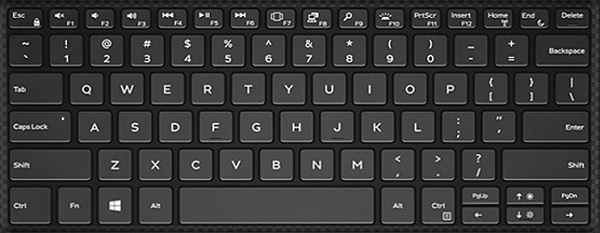
Résumé: 以下指南列出了戴尔 Precision 5530 二合一移动工作站上的可用键盘快捷键及其执行的功能。
Cet article concerne
Cet article ne concerne pas
Cet article n’est associé à aucun produit spécifique.
Toutes les versions du produit ne sont pas identifiées dans cet article.
Symptômes
Cause
| 功能键组合 | 结果 |
|---|---|
| Fn + F1 | 扬声器静音 |
| Fn + F2 | 调低音量 |
| Fn + F3 | 调高音量 |
| Fn + F4 | 倒带 |
| Fn + F5 | 播放/暂停 |
| Fn + F6 | 前进 |
| Fn + F7 | 启动任务视图 |
| Fn + F8 | 显示屏切换 (Win + P) |
| Fn + F9 | 搜索 |
| Fn + F10 | 切换背光 |
| Fn + F11 | PrtScr |
| Fn + F12 | 插入 |
| Fn + Esc | 切换 Fn 键锁定 |
| Fn + Home | 打开/关闭无线功能 |
| Fn + End | 睡眠 |
| Fn + 向上光标 | LCD 亮度增加 |
| Fn + 向下光标 | LCD 亮度降低 |
Résolution
 有关其他资源和信息,请访问我们的
 有关其他文章和信息,请访问
 更多文章和信息也可在我们的
Produits concernés
Precision 5530 2 in 1Propriétés de l’article
Numéro d’article: 000148637
Type d’article: Solution
Dernière modification: 03 mai 2026
Version: 6
Trouvez des réponses à vos questions auprès d’autres utilisateurs Dell
Services de support
Vérifiez si votre appareil est couvert par les services de support.