NetWorker: Restore performed through NetWorker User reports the error "Please Specify AM or PM" When attempting to change browse time.
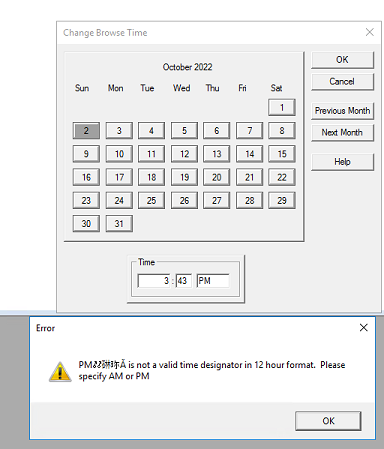
Résumé: A recovery is being performed from the NetWorker User software, when attempting to change browse time an error appears stating: "PM@#$%# is not a valid time designation in 12-hour format. Please Specify AM or PM" ...
Cet article concerne
Cet article ne concerne pas
Cet article n’est associé à aucun produit spécifique.
Toutes les versions du produit ne sont pas identifiées dans cet article.
Symptômes
- A restore is being performed using the NetWorker User program.
- The following error when changing browse time using 12-hour format.
Cause
Code defect. Observed using NetWorker 19.7.0.1 client on Windows Server 2016. NetWorker 19.7 is End of Support Life (EOSL).
Résolution
This issue was not observed when using NetWorker 19.11.0 (or later) client on Windows Server 2022 or 2025. This issue is unlikely on current NetWorker releases and operating systems. If encountered, use the workaround below.
Workaround:
- From NetWorker User, select View->Change Browse Time
- Specify a time (in a 12-hour format) that you would like to set the browse period to. Insert a space before AM or PM.
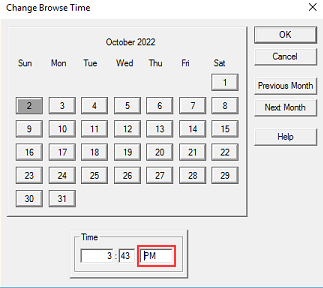
- Click Ok
- The browse time should now reflect the time that is specified.
Produits concernés
NetWorker Family, NetWorkerProduits
NetWorker SeriesPropriétés de l’article
Numéro d’article: 000201625
Type d’article: Solution
Dernière modification: 30 déc. 2025
Version: 3
Trouvez des réponses à vos questions auprès d’autres utilisateurs Dell
Services de support
Vérifiez si votre appareil est couvert par les services de support.