PowerFlex Manager 3.x 備份失敗,並顯示錯誤「無法備份資料庫」
Résumé: PowerFlex Manager 3.x 備份失敗,並顯示錯誤「無法備份資料庫」。
Cet article concerne
Cet article ne concerne pas
Cet article n’est associé à aucun produit spécifique.
Toutes les versions du produit ne sont pas identifiées dans cet article.
Symptômes
PowerFlex Manager 3.x 備份失敗,並出現下列錯誤:
AsmManager.log shows
2024-08-01 04:33:42 [JobMgrQuartzScheduler_Worker-56] (BackupDatabaseJob.java:122) [ERROR] Backup Database Job : Failed to Backup Database
2024-08-01 04:33:42 [JobMgrQuartzScheduler_Worker-56] (AsmDefaultJob.java:74) [ERROR] Backup Database Job : Failed to Backup Database
[vxfm-es-node-1] failed to put mappings on indices [[[snmp-traps-2024.07.31/9Kcv1tM0Tn2dN061eVfpLQ]]], type [snmptraps]
java.lang.IllegalArgumentException: Limit of total fields [2000] in index [snmp-traps-2024.07.31] has been exceeded
Cause
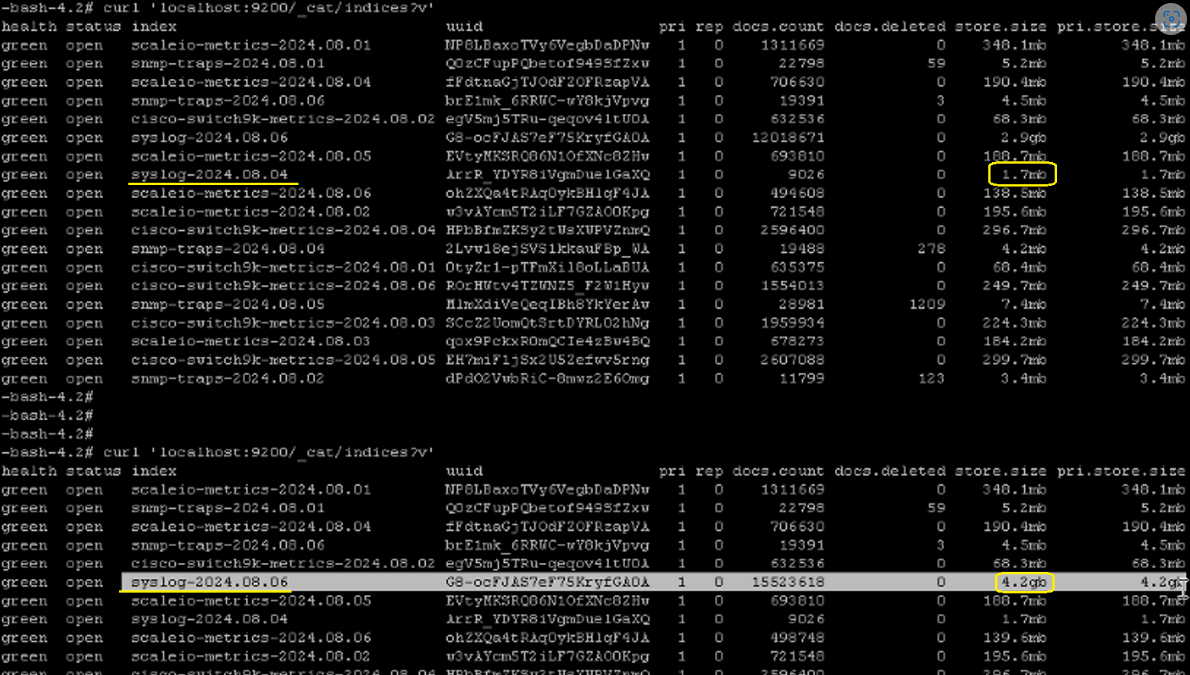
由於索引增長太快,備份未運行。
以下命令顯示系統記錄索引正在迅速成長:
注意:清除系統日誌索引然後再次檢查,並繼續快速增長。
以下命令顯示系統記錄索引正在迅速成長:
curl 'localhost:9200/_cat/indices?v'
注意:清除系統日誌索引然後再次檢查,並繼續快速增長。
Résolution
程序:
若要檢查備份進度的即時狀態,請在 PFxM CLI 上使用下列命令:
- 使用以下命令驗證索引的狀態:
curl 'localhost:9200/_cat/indices?v'
- 檢查狀態,並使用下列命令停止服務 :
systemctl status rsyslog

systemctl stop rsyslog
- 使用下列命令刪除系統記錄索引:
curl -X DELETE ' http://localhost:9200/syslog*'
- 執行下列命令並未顯示系統記錄,因為服務已停止:
curl 'localhost:9200/_cat/indices?v'
- 再次執行備份,應該可正常運作。備份完成後, 請啟動服務:
systemctl start rsyslog
若要檢查備份進度的即時狀態,請在 PFxM CLI 上使用下列命令:
tail -f /opt/Dell/ASM/logs/asmManager.log
Propriétés de l’article
Numéro d’article: 000227742
Type d’article: Solution
Dernière modification: 02 janv. 2026
Version: 2
Trouvez des réponses à vos questions auprès d’autres utilisateurs Dell
Services de support
Vérifiez si votre appareil est couvert par les services de support.