NVP-vProxy : Échec de la sauvegarde « Logs Only » de la machine virtuelle SQL « le niveau de sauvegarde n’est pas valide »
Résumé: La solution NetWorker VMware Protection (NVP) est configurée pour effectuer des sauvegardes Microsoft SQL Server à l’aide de MSVMAPPAGENT. L’action de sauvegarde a été planifiée à l’aide du niveau de sauvegarde « Logs Only ». Toutefois, la tâche échoue immédiatement avec le message « Le niveau de sauvegarde n’est pas valide ». Cet article explique comment configurer les sauvegardes des fichiers log des transactions pour les bases de données SQL. ...
Symptômes
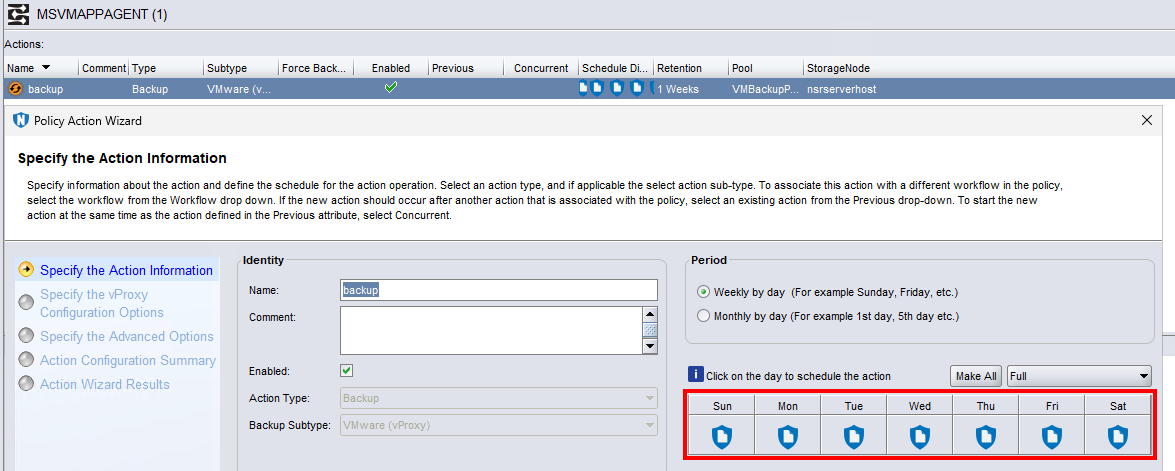
Un serveur Microsoft SQL Server est configuré pour être sauvegardé par une action de sauvegarde utilisant le niveau de sauvegarde « Logs Only » :
L’action de sauvegarde échoue immédiatement :
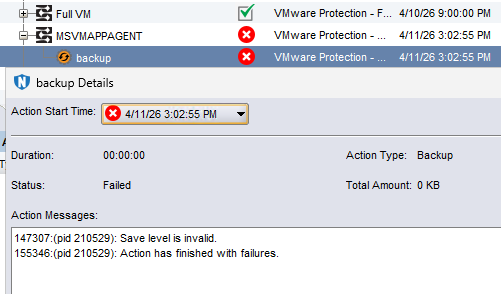
Si le niveau de sauvegarde est défini sur un autre niveau (par exemple : incrémentielle ou complète), la sauvegarde de machine virtuelle (VM) SQL réussit.
Cause
Il s’agit d’un problème de configuration.
Résolution
Pour configurer la sauvegarde des journaux uniquement. La sauvegarde « Image level » de la VM et la « sauvegarde de base de données » doivent être séparées du fichier log des transactions (txnlog) de sauvegarde.
Configurer le niveau image et la sauvegarde de la base de données :
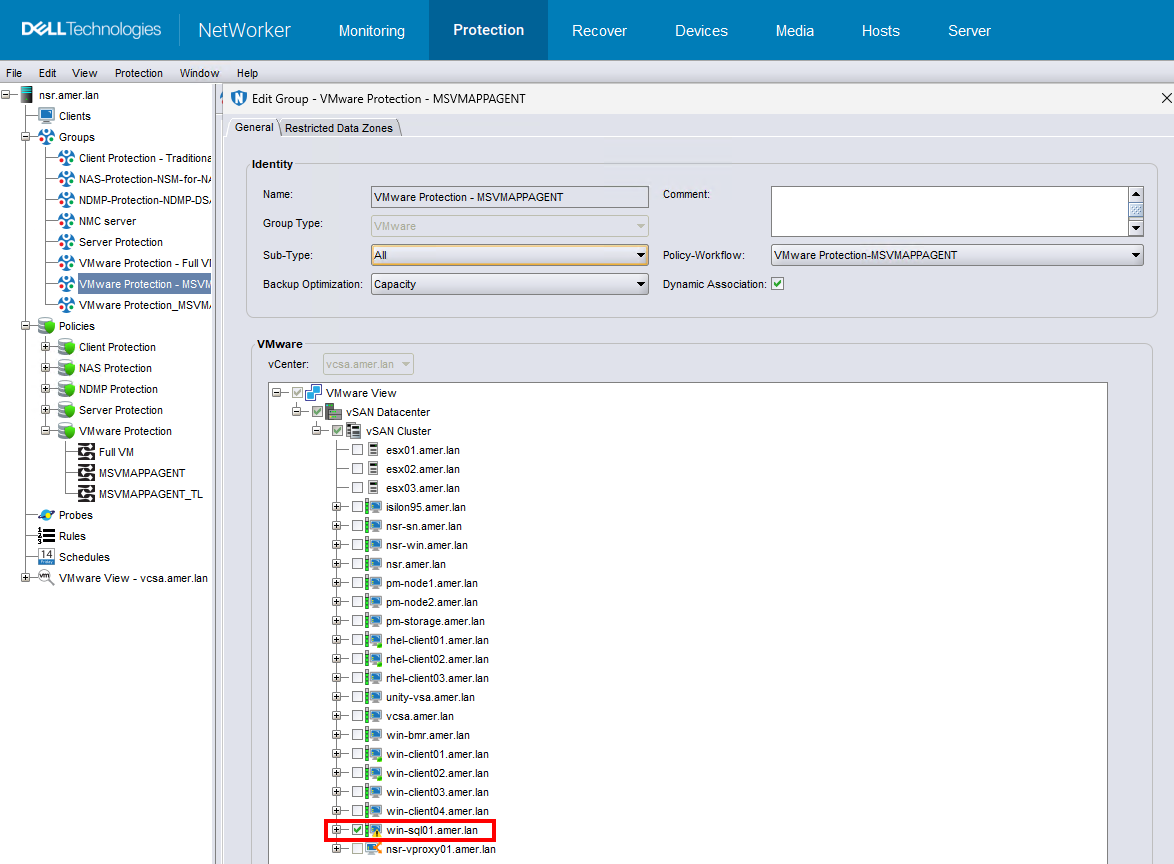
- Créez un groupe de sauvegarde contenant la machine virtuelle SQL :
- Configurez une politique et un workflow pour sauvegarder la machine virtuelle SQL.
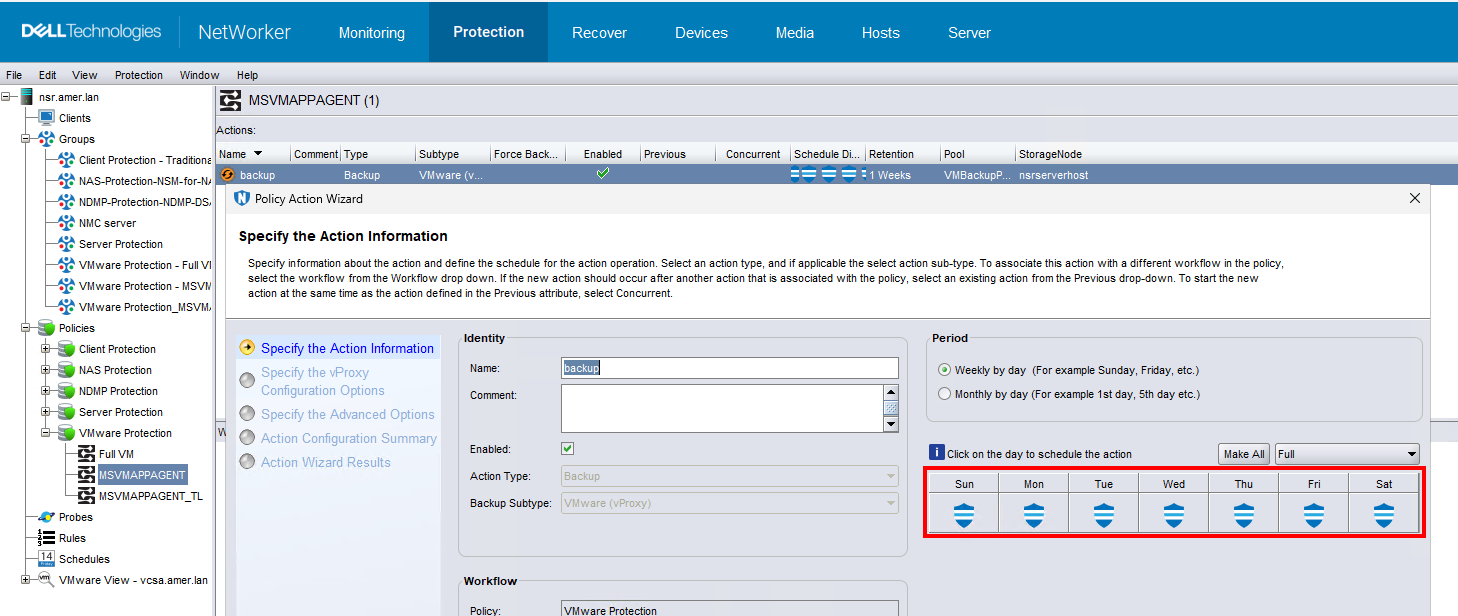
- La sauvegarde peut être configurée à l’aide du niveau « Incremental ». La sauvegarde initiale est un niveau complet et toutes les sauvegardes suivantes sont incrémentielles.
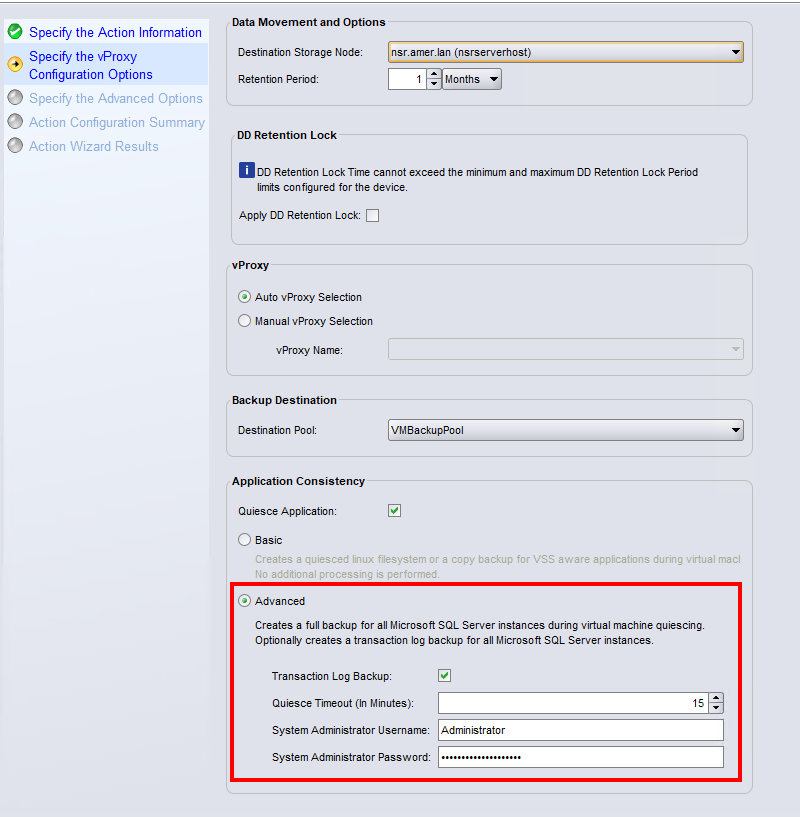
- Dans la fenêtre Spécifier les opérations vProxy , sélectionnez Mise en veille Application, puis Avancé. (Facultatif) Sélectionnez l’option Sauvegarde du fichier log des transactions pour inclure les fichiers log des transactions dans la sauvegarde de la base de données. Saisissez un utilisateur administrateur pour l’instance SQL Server. Le compte d’utilisateur doit avoir :
sysadminrôle dans le serveur SQL.
.
- Effectuez une sauvegarde de la machine virtuelle.
Cette sauvegarde crée une sauvegarde au niveau du disque de machine virtuelle (VMDK) de la machine virtuelle, qui contient une copie de la base de données cohérente avec les applications. Les journaux suivants s’affichent dans la visionneuse de journaux SQL Server Management Studio (SSMS).

Le log suivant existe également sur la machine virtuelle SQL : C:\Program Files\DPSAPPS\MSVMAPPAGENT\logs\msvmcatsnap.log
La sauvegarde apparaît comme une sauvegarde complète de niveau dans la base de données des médias du NetWorker Server, même lorsqu’une sauvegarde incrémentielle est planifiée (et exécutée) : mminfo -avot -q vmname=SQL_VM-NAME,level=full
[root@nsr ~]# mminfo -avot -q vmname=win-sql01.amer.lan
 volume        type   client           date     time         size ssid      fl   lvl name
...
VMBackupPool.002 Data Domain vcsa.amer.lan 04/11/2026 11:38:14 AM 104 GB 4124732135 cr full vm:503ea434-0331-8ed6-8b19-b9cd408cce7a:vcsa.amer.lan
Configurez les sauvegardes des fichiers log des transactions :
Configuration requise :
- La base de données SQL doit utiliser la commande
FULLouBULK_LOGGEDmodèle de récupération. Bases de données avec unSIMPLELe modèle de récupération ne prend pas en charge les sauvegardes des fichiers log des transactions. Il s’agit de paramètres SQL Server externes à NetWorker. La commande SQL suivante répertorie le mode de récupération :
SELECT
    name AS database_name,
    recovery_model_desc
FROM sys.databases
ORDER BY name;
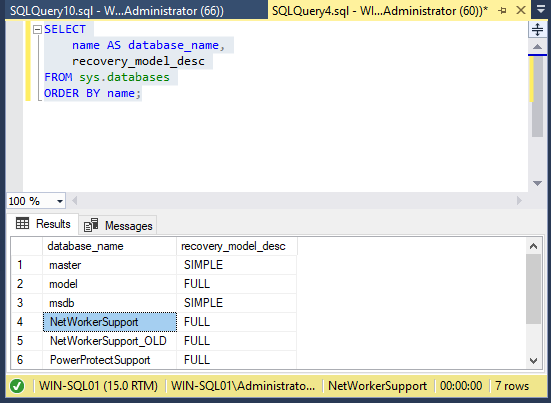
- La commande
NT AUTHORITY\SYSTEMLe compte doit avoirsysadminrôle dans SQL Server Sécurité ->Paramètres de connexion : -
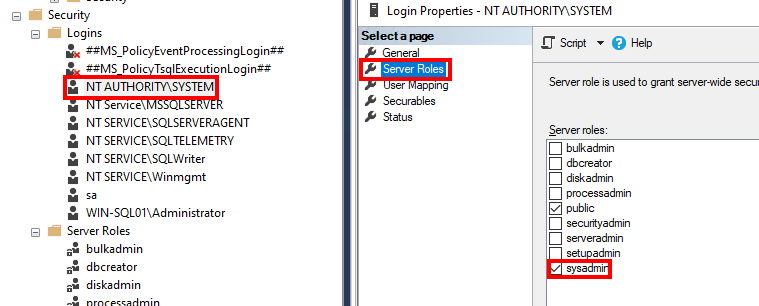
Journal des transactions (txnlog) doivent être effectuées dans un workflow avec un intervalle défini. Un groupe distinct doit être créé contenant la machine virtuelle SQL. Lorsque vous effectuez une sauvegarde du fichier log des transactions, seuls les fichiers log des transactions sont sauvegardés, aucun fichier VMware n’est protégé.
- Créez un autre groupe contenant la machine virtuelle SQL.
- Créez un nouveau workflow pour les sauvegardes des fichiers log des transactions. Dans les propriétés du workflow, définissez un intervalle :
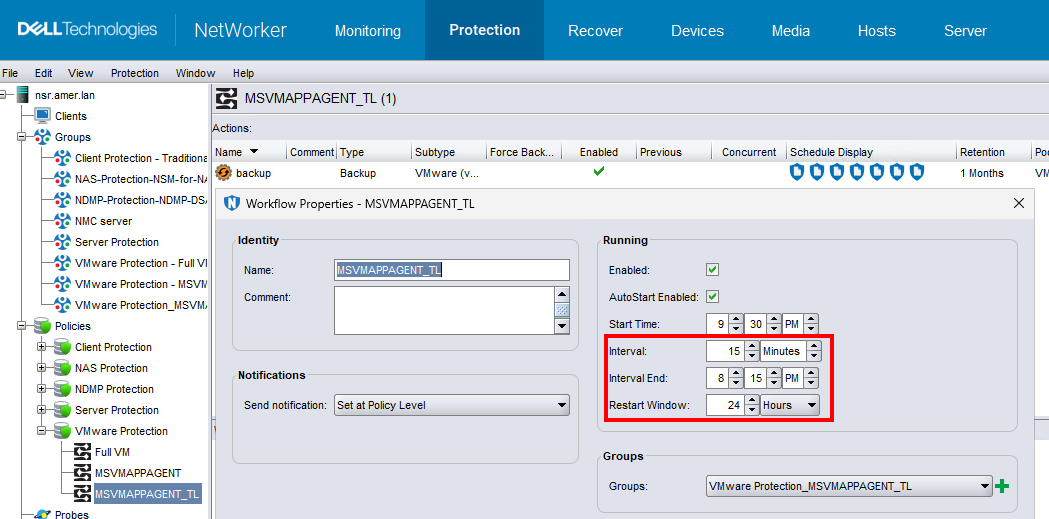
Dans cet exemple de configuration, la sauvegarde de l’image et de la base de données est configurée pour démarrer à 21:00 dans le workflow MSVMAPPAGENT. Le fichier log des transactions (txnlog) est configuré pour effectuer une sauvegarde dans le workflow MSVMAPPAGENT_TL toutes les 15 minutes. Les sauvegardes du fichier log des transactions démarrent 30 minutes après la sauvegarde initiale de la base de données et s’exécutent par intervalles de 15 minutes jusqu’à 20h45. L’intervalle et la planification dépendent de vos besoins en matière de protection et des délais d’exécution des sauvegardes dans votre environnement.
- Créez une action de sauvegarde avec le niveau Logs Only :

- Dans la fenêtre Spécifier les opérations vProxy , sélectionnez Application de mise en veille, Avancé et Sauvegarde du fichier log des transactions. Saisissez un utilisateur administrateur pour l’instance SQL Server. Le compte d’utilisateur doit avoir :
sysadminrôle dans le serveur SQL.
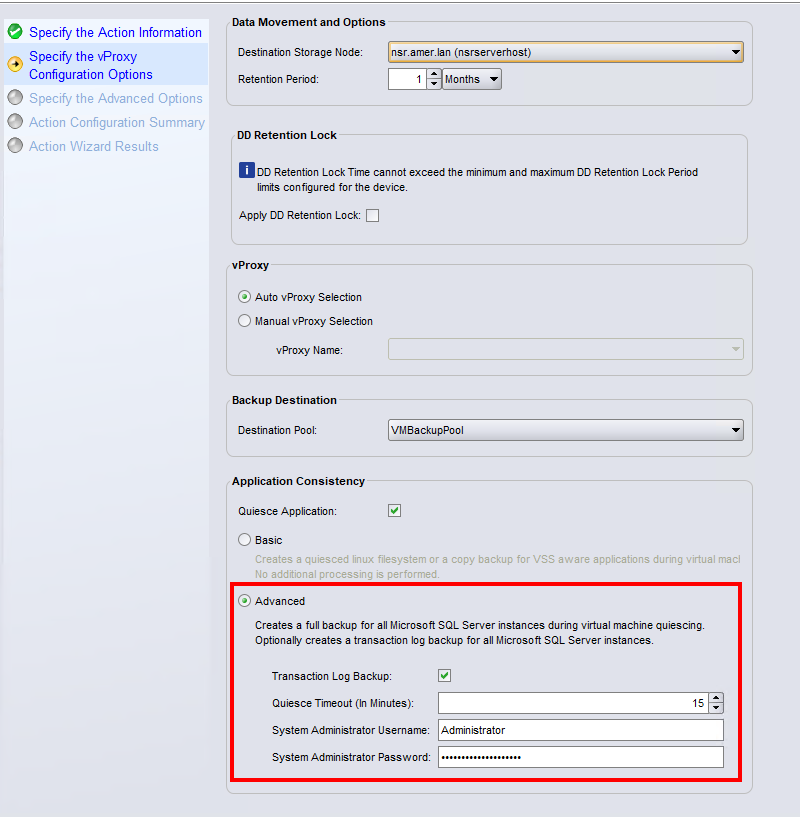
- Terminez la configuration de l’action.
Lorsque la sauvegarde est effectuée, les journaux suivants s’affichent dans la visionneuse de journaux SQL Server Management Studio (SSMS) :

Le log suivant existe également sur la machine virtuelle SQL : C:\Program Files\DPSAPPS\MSVMAPPAGENT\logs\msvmagent_appbackup.log
La commande mminfo du serveur NetWorker répertorie ces sauvegardes avec le niveau de sauvegarde txnlog: mminfo -avot -q vmname=SQL_VM-NAME,level=txnlog
[root@nsr ~]# mminfo -avot -q vmname=win-sql01.amer.lan,level=txnlog
 volume        type   client           date     time         size ssid      fl   lvl name
...
VMBackupPool.002 Data Domain vcsa.amer.lan 04/11/2026 03:01:02 PM 228 KB 4074412655 cr txnlog vm:503ea434-0331-8ed6-8b19-b9cd408cce7a:vcsa.amer.lan
VMBackupPool.002 Data Domain vcsa.amer.lan 04/11/2026 03:15:09 PM 229 KB 4057636287 cr txnlog vm:503ea434-0331-8ed6-8b19-b9cd408cce7a:vcsa.amer.lan
VMBackupPool.002 Data Domain vcsa.amer.lan 04/11/2026 03:30:09 PM 229 KB 4040859971 cr txnlog vm:503ea434-0331-8ed6-8b19-b9cd408cce7a:vcsa.amer.lan
VMBackupPool.002 Data Domain vcsa.amer.lan 04/11/2026 03:45:09 PM 230 KB 4024083655 cr txnlog vm:503ea434-0331-8ed6-8b19-b9cd408cce7a:vcsa.amer.lan
Informations supplémentaires
Les logs suivants sur la machine virtuelle SQL décrivent les opérations MSVMAPPAGENT :
- Journal de découverte :
C:\Program Files\DPSAPPS\MSVMAPPAGENT\logs\msvmagent_discovery.log - Sauvegarde complète :
C:\Program Files\DPSAPPS\MSVMAPPAGENT\logs\msvmcatsnap.log - Sauvegarde du fichier log des transactions :
C:\Program Files\DPSAPPS\MSVMAPPAGENT\logs\msvmagent_appbackup.log - Restauration de la sauvegarde complète :
C:\Program Files\DPSAPPS\MSVMAPPAGENT\logs\msvmagent_snapshotrestore.log - Restauration de la sauvegarde du fichier log des transactions :
C:\Program Files\DPSAPPS\MSVMAPPAGENT\logs\msvmagent_apprestore.log