NetWorker: PostgreSQL Versions Used By NetWorker
Résumé: This article details the different PostgreSQL versions used by the NetWorker Management Console (NMC) and NetWorker Web User Interface (NWUI) servers. It also demonstrates how to identify the PostgreSQL version used by the active NMC and NWUI databases. ...
Instructions
The NetWorker Management Console (NMC) and NetWorker Web User Interface (NWUI) servers include a Postgres database. The version of Postgres used by each component differs depending on the NetWorker version installed. NetWorker typically upgrades the Postgres versions in major and cumulative hotfix releases.
NetWorker Management Console (NMC) PostgreSQL Versions:
- NetWorker version 19.10.0.0 uses 11.21
- NetWorker versions 19.10.0.4, 19.11.0.0 use 12.18
- NetWorker versions 19.10.0.7, 19.11.0.3, 19.12.0.0 use 16.4
- NetWorker versions 19.11.0.5, 19.12.0.1 use 16.6
- NetWorker versions 19.11.0.6, 19.12.0.2, 19.13.0.0 use 16.8
- NetWorker versions 19.12.0.3, 19.13.0.2 uses 16.9
- NetWorker versions 19.13.0.3, 19.14.0.0 use 16.10
- NetWorker version 19.14.0.1 is expected to us 16.14 (or newer)
NetWorker Web User Interface (NWUI) PostgreSQL Versions:
- NetWorker version 19.10.0.0 uses 12.16
- NetWorker versions 19.10.0.4, 19.11.0.0 use 12.18
- NetWorker version 19.13.0.0 uses 16.6
- NetWorker versions 19.13.0.3, 19.14.0.0 use 16.10
- NetWorker version 19.14.0.1 is expected to use 16.14 (or newer)
How to Verify PostgreSQL Version In Use:
Linux:
- NetWorker Management Console (NMC) Server: From an elevated prompt on the NMC server, run:
systemctl status gst
gst service must be running.
The output shows the path of the nmcdb, which includes the PostgreSQL version:
[root@nsr ~]# systemctl status gst
● gst.service - NetWorker Management Console
   Loaded: loaded (/usr/lib/systemd/system/gst.service; enabled; vendor preset: disabled)
   Active: active (running) since Fri 2026-07-24 16:20:03 EDT; 2 weeks 2 days ago
 Main PID: 190533 (gstd)
    Tasks: 35 (limit: 35992)
   Memory: 145.8M
   CGroup: /system.slice/gst.service
           ├─190533 /opt/lgtonmc/bin/gstd
           ├─190540 /opt/lgtonmc/apache/bin/httpd -f /opt/lgtonmc/apache/conf/httpd.conf
           ├─190541 /opt/lgtonmc/apache/bin/httpd -f /opt/lgtonmc/apache/conf/httpd.conf
           ├─190588 /opt/lgtonmc/postgres/16.10/bin/postgres -D /nsr/nmc/nmcdb/pgdata
           ├─190589 postgres: logger
           ├─190590 postgres: checkpointer
           ├─190591 postgres: background writer
           ├─190593 postgres: walwriter
           ├─190594 postgres: autovacuum launcher
           ├─190595 postgres: logical replication launcher
           ├─190622 postgres: lgtogst lgto_gst ::1(15058) idle
           └─190652 /opt/lgtonmc/bin/gstsnmptrapd -d -Le -f -C -c /opt/lgtonmc/etc/snmptrapd.conf

Jul 24 16:20:02 nsr.amer.lan systemd[1]: Starting NetWorker Management Console...
Jul 24 16:20:03 nsr.amer.lan gst_linux.sh[190508]: Starting GST:
Jul 24 16:20:03 nsr.amer.lan gst_linux.sh[190527]: GST Services, Version 19.14.0
Jul 24 16:20:03 nsr.amer.lan gst_linux.sh[190508]: done.
Jul 24 16:20:03 nsr.amer.lan systemd[1]: Started NetWorker Management Console.
Alternatively, if the NMC gst service is not running, look at the postgres_latest symbolic link used in the /opt/lgtonmc folder.
[root@nsr ~]# ls -l /opt/lgtonmc/
total 20
drwxr-xr-x. 8 nsrnmc nsrnmc   82 Jul 24 16:19 apache
drwxr-xr-x. 2 nsrnmc nsrnmc 4096 Jul 24 16:20 bin
drwx------. 3 nsrnmc nsrnmc   42 Aug 11 09:25 cores
drwxr-xr-x. 2 nsrnmc nsrnmc 4096 Jul 24 16:20 cst
drwxr-xr-x. 2 nsrnmc nsrnmc 4096 Jul 24 16:20 etc
drwxr-xr-x. 3 nsrnmc nsrnmc   17 Jul 24 16:19 lib64
drwxr-xr-x. 2 nsrnmc nsrnmc  105 Aug 10 14:00 logs
drwxr-xr-x. 2 nsrnmc nsrnmc 4096 Jul 24 16:19 mod
drwxr-xr-x. 6 nsrnmc nsrnmc   56 Jul 24 16:19 postgres
lrwxrwxrwx. 1 root   root     27 Jul 24 16:19 postgres_latest -> /opt/lgtonmc/postgres/16.10
drwxr-xr-x. 4 nsrnmc nsrnmc 4096 Jul 24 16:20 web
- NetWorker Web User Interface (NWUI): From an elevated prompt on the NWUI server, run:
systemctl status nwui
nwui service must be running.
The output shows the major PostgreSQL version that the nwuidb is using:
[root@nsr ~]# systemctl status nwui
● nwui.service - NetWorker Management Web UI Server
   Loaded: loaded (/opt/nwui/scripts/nwui.service; enabled; vendor preset: disabled)
   Active: active (running) since Wed 2026-07-22 15:02:01 EDT; 2 weeks 5 days ago
 Main PID: 66189 (nwuictld)
    Tasks: 68 (limit: 35992)
   Memory: 368.6M
   CGroup: /system.slice/nwui.service
           ├─  66189 /opt/nwui/bin/nwuictld -s
           ├─  66192 /bin/sh /nsr/nwui/monitoring/nwuidb/bin/nwuidb start
           ├─  66207 /opt/nwui/monitoring/postgres/16/bin/postgres -D /nsr/nwui/monitoring/nwuidb/pgdata
           ├─  66208 postgres: logger
           ├─  66209 postgres: checkpointer
           ├─  66210 postgres: background writer
           ├─  66212 postgres: walwriter
           ├─  66213 postgres: autovacuum launcher
           ├─  66214 postgres: logical replication launcher
           ├─  66215 /opt/nre/java/latest/bin/java -Dlogsdir=/nsr/nwui/monitoring/app/logs -Dpropertiesfile=/nsr/nwui/monitoring/app/conf/monitoring-app.properties -Dlogging.config=/nsr/nwui/monitoring/app/conf/log4j2.xml -jar monitoring-app.>
           ├─2679799 postgres: nwuiuser nwui 127.0.0.1(13064) idle
           ├─2679857 postgres: nwuiuser nwui 127.0.0.1(34414) idle
           ├─2679906 postgres: nwuiuser nwui 127.0.0.1(47692) idle
           ├─2679941 postgres: nwuiuser nwui 127.0.0.1(43294) idle
           ├─2680021 postgres: nwuiuser nwui 127.0.0.1(26064) idle
           ├─2680050 postgres: nwuiuser nwui 127.0.0.1(19822) idle
           ├─2680102 postgres: nwuiuser nwui 127.0.0.1(38068) idle
           ├─2680118 postgres: nwuiuser nwui 127.0.0.1(52826) idle
           ├─2680721 postgres: nwuiuser nwui 127.0.0.1(18198) idle
           └─2681330 postgres: nwuiuser nwui 127.0.0.1(60860) idle

Jul 22 15:02:01 nsr.amer.lan systemd[1]: Starting NetWorker Management Web UI Server...
Jul 22 15:02:01 nsr.amer.lan nwui.sh[66161]: Starting nwuictld...
Jul 22 15:02:01 nsr.amer.lan nwui.sh[66161]: done.
Jul 22 15:02:01 nsr.amer.lan systemd[1]: Started NetWorker Management Web UI Server.
To see what minor PostgreSQL version is used, run the following command using the PostgreSQL path returned from the above command: strings /opt/nwui/monitoring/postgres/##/bin/postgres | grep "(PostgreSQL)"
[root@nsr ~]# strings /opt/nwui/monitoring/postgres/16/bin/postgres | grep "(PostgreSQL)"
postgres (PostgreSQL) 16.10
[root@nsr ~]#
Windows:
- NetWorker Management Console (NMC):
-
- Open Windows Task Manager on the NMC server.
- Go to the Details tab.
- Ensure that the Command line column is enabled.
- Look for the
postgres.exethat is associated with the NetWorker Management Console server'snmcdbinstallation path. The Command line path shows the PostgreSQL version:

gstd (EMC GST Service) must be running.
Alternatively, from a PowerShell prompt use the following command to check the postgres_latest symbolic link in your NMC install path: (Get-Item "C:\Program Files\EMC NetWorker\Management\GST\postgres_latest").Target

- NetWorker Web User Interface (NWUI):
-
- Open Windows Task Manager on the NWUI server.
- Go to the Details tab.
- Ensure that the Command line column is enabled.
- Look for the
postgres.exethat is associated with the NetWorker Web UI server'snwuidbinstallation path. The Command line path shows the major PostgreSQL version
nwui (NetWorker WebUI Database) service must be running.

-
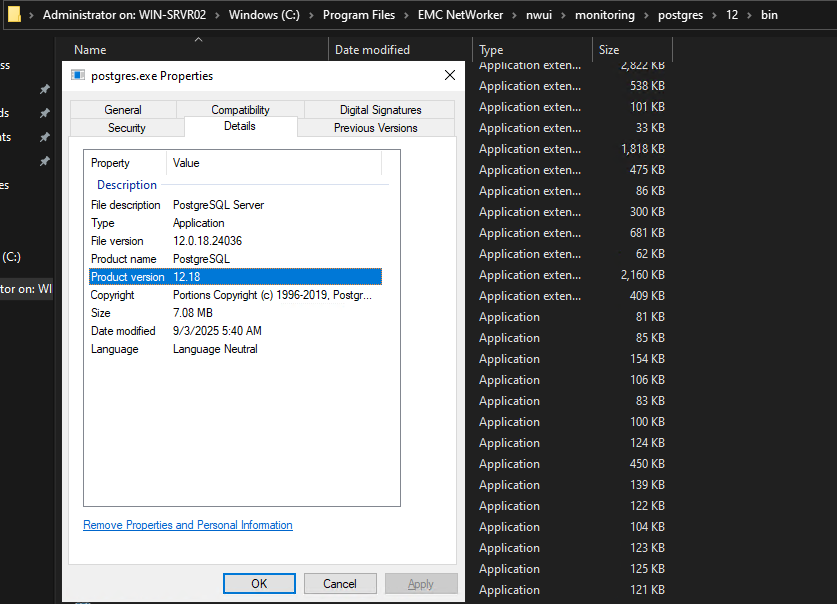
- To get the minor Postgres version, open Windows File explorer and go to the
postgres.exepath shown in the Command line column. - Right click
postgres.exeand click Properties. - The Details tab shows the full Postgres version:
- To get the minor Postgres version, open Windows File explorer and go to the
Informations supplémentaires
Related articles: