OneFS - CloudPools AWS 帳戶必要的權限
Résumé: 在無法接受建議的「Admin」帳戶權限的稽核環境中建立具有最低權限的使用者。
Cet article concerne
Cet article ne concerne pas
Cet article n’est associé à aucun produit spécifique.
Toutes les versions du produit ne sont pas identifiées dans cet article.
Instructions
針對建立供 CloudPools 使用的 Amazon Web Services 帳戶,我們記錄的最佳實務建議建議您提供下列權限原則:
AmazonS3FullAccess
AdministratorAccess
這是建立帳戶的簡單工作方法,可讓 CloudPools 建立資料容器並與資料互動。但是,在某些環境中,帳戶許可權會進行審核,並且管理員訪問許可權需要有關其使用方式的支持文檔。 如果這是一個問題,則只能創建具有最低要求訪問許可權的使用者。
如需一般最佳實務的完整指示,請參閱下列文章:
設定 EMC Isilon CloudPools 以將資料分層至 Amazon S3
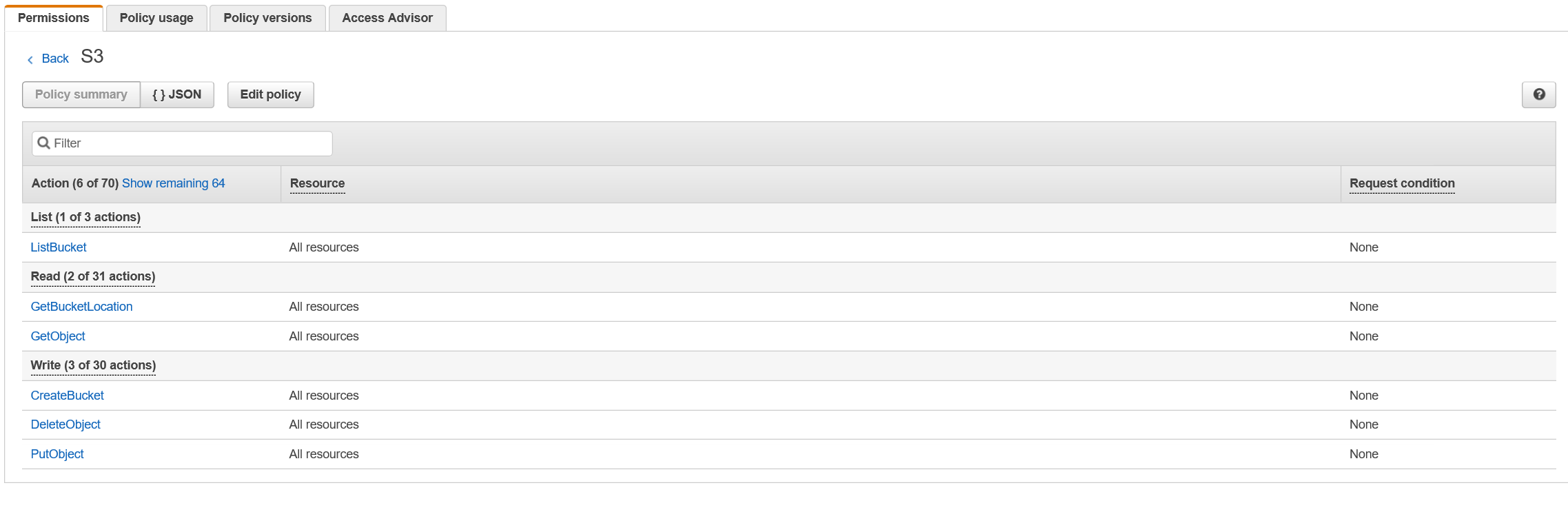
CloudPools 要求使用者設定為具有包含下列權限的原則:
這需要為所有資源啟用,如此才能由 CloudPools 控制儲存桶和物件名稱。
AmazonS3FullAccess
AdministratorAccess
這是建立帳戶的簡單工作方法,可讓 CloudPools 建立資料容器並與資料互動。但是,在某些環境中,帳戶許可權會進行審核,並且管理員訪問許可權需要有關其使用方式的支持文檔。 如果這是一個問題,則只能創建具有最低要求訪問許可權的使用者。
如需一般最佳實務的完整指示,請參閱下列文章:
設定 EMC Isilon CloudPools 以將資料分層至 Amazon S3
CloudPools 要求使用者設定為具有包含下列權限的原則:
“s3:ListBucket”,
「s3:GetBucketLocation」,
“s3:GetObject”,
“s3:放置物件”,
“s3:刪除物件”,
「s3:CreateBucket」
這需要為所有資源啟用,如此才能由 CloudPools 控制儲存桶和物件名稱。
Produits concernés
Isilon X200Produits
Isilon X200Propriétés de l’article
Numéro d’article: 000019428
Type d’article: How To
Dernière modification: 29 Mar 2025
Version: 3
Trouvez des réponses à vos questions auprès d’autres utilisateurs Dell
Services de support
Vérifiez si votre appareil est couvert par les services de support.