Dell Data Security Server/Dell Data Protection Server Front Endのバージョンを確認する方法
Résumé: Dell Data Security(旧Dell Data Protection)サーバーのフロントエンドのバージョンを特定する手順について説明します。
Cet article concerne
Cet article ne concerne pas
Cet article n’est associé à aucun produit spécifique.
Toutes les versions du produit ne sont pas identifiées dans cet article.
Instructions
次の場合に、Dell Data Security(旧Dell Data Protection)Server Front Endのバージョンを把握しておくことが重要です。
- 既知の問題の確認
- ワークフローの変更の理解
- システム要件の確認
対象製品:
- Dell Security Management Server
- Dell Data Protection | Enterprise Edition Server
対象オペレーティング システム:
- Windows
この記事では、Dell Security Management ServerまたはDell Security Management Server Virtualのフロント エンド サーバーのバージョンを確認する方法について説明します。バックエンドのバージョンを確認するには、「Dell Data Security/Dell Data Protection Serverのバージョンを確認する方法」を参照してください。
バージョンは、次の方法で確認できます。
- インストーラ
- ユーザー インターフェイス(UI)の再設計
詳細については、適切なプロセスをクリックしてください。
インストーラ
- Security Management Server .zipを抽出します。
- 参照:
[LOCATION]\Security Management Server\x64。注:[LOCATION]= 抽出された.zipファイルの場所 - 右クリック
setup.exeをクリックし、[ プロパティ] を選択します。

- 詳細タブをクリックします。
![[Details(詳細)]タブ](https://supportkb.dell.com/img/ka0Do0000005xetIAA/ka0Do0000005xetIAA_ja_2.jpeg)
- 製品のバージョンを記録します。この例では、製品のバージョンは9.9.2です。
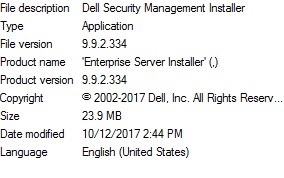 ファイルのバージョンは、上記のスクリーンショットとは異なる場合があります。
Windows
- 管理者としてWindowsのスタート メニューを右クリックし、[Run(実行)]をクリックします。

- [ファイル名を指定して実行]のUIで、
appwiz.cplと入力して[OK]を押します。
![[ファイル名を指定して実行]UI](https://supportkb.dell.com/img/ka0Do0000005xetIAA/ka0Do0000005xetIAA_ja_5.jpeg)
- [プログラムと機能]で、Dell Security Management Server x64を探します。
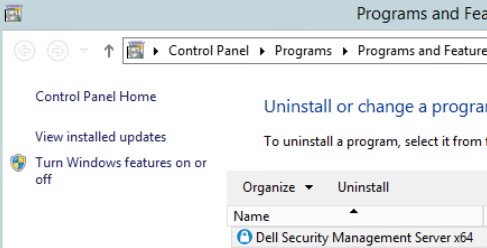 サーバーの一部のバージョンでは、Dell Security Management ServerではなくDell Enterprise Serverと表示される場合があります。
 - バージョンを記録します。この例では、製品のバージョンは10.2.3です。
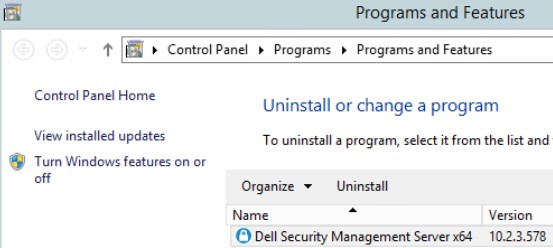 バージョンは、上記のスクリーンショットと異なる場合があります。
Informations supplémentaires
Vidéos
Produits concernés
Dell EncryptionPropriétés de l’article
Numéro d’article: 000130588
Type d’article: How To
Dernière modification: 10 Aug 2026
Version: 12
Trouvez des réponses à vos questions auprès d’autres utilisateurs Dell
Services de support
Vérifiez si votre appareil est couvert par les services de support.