PowerFlex : Failed to Add Acceleration Device DAX after NVDIMM Replacement
Résumé: After sanitizing or replacing an NVDIMM, adding the acceleration/dax devices back into PowerFlex Manager will generate an IO error if the namespace or region is in an error state. This will hinder the ability to add the devices back into PowerFlex as expected. ...
Cet article concerne
Cet article ne concerne pas
Cet article n’est associé à aucun produit spécifique.
Toutes les versions du produit ne sont pas identifiées dans cet article.
Symptômes
When attempting to add the dax device back after sanitizing or replacing an NVDIMM, an error is given for IO errors on the dax device, despite being healthy.
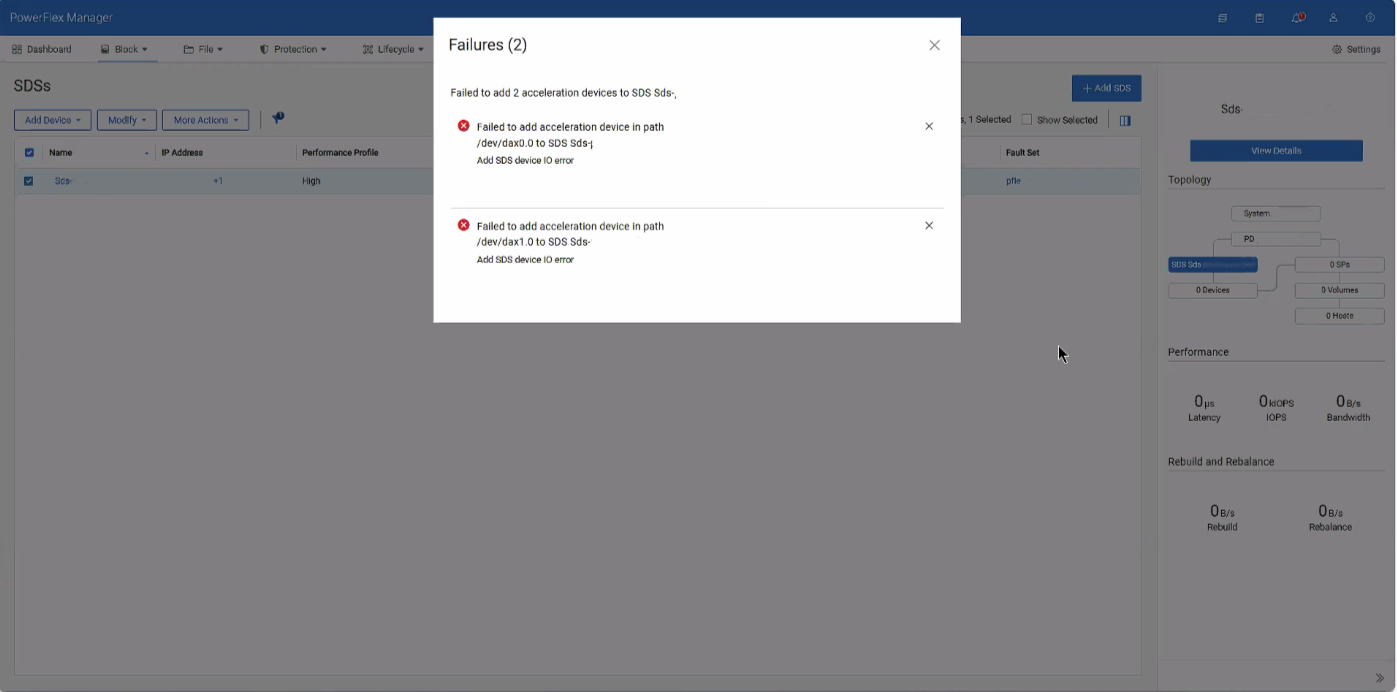
Cause
These errors occur due to conflicting namespace and regions within the SDS after removing the dax devices.
Résolution
1- SSH into the impacted SDS and destroy both namespaces of the dax devices
ndctl destroy-namespace namespace0.0

ndctl destroy-namespace namespace1.0
2- Disable the corresponding region of the dax devices
ndctl disable-region region0

ndctl disable-region region1
3- Re-enable the regions for the dax devices
ndctl enable-region region0

ndctl enable-region region1
4- Create the namespace for each dax device based on the namespace you destroyed from above
ndctl create-namespace --mode=devdax --region +region0 --align +4k

ndctl create-namespace --mode=devdax --region +region1 --align +4k
5- Afterwards, go to PowerFlex Manager and add the dax devices as needed.
Related article: PowerFlex: How to Replace NVDIMM in 15G and later PowerEdge Node
Produits concernés
ScaleIOPropriétés de l’article
Numéro d’article: 000496145
Type d’article: Solution
Dernière modification: 07 Aug 2026
Version: 1
Trouvez des réponses à vos questions auprès d’autres utilisateurs Dell
Services de support
Vérifiez si votre appareil est couvert par les services de support.