Come identificare la versione del programma di installazione master di Dell Data Security
Résumé: Informazioni su come identificare la versione del programma di installazione principale di Dell Data Security (in precedenza Dell Data Protection) seguendo queste istruzioni dettagliate. ...
Cet article concerne
Cet article ne concerne pas
Cet article n’est associé à aucun produit spécifique.
Toutes les versions du produit ne sont pas identifiées dans cet article.
Instructions
Nota:
- A maggio 2022, Dell Endpoint Security Suite Enterprise ha raggiunto la fine della manutenzione. Questo prodotto e i relativi articoli non vengono più aggiornati da Dell.
- A gennaio 2019, Dell Endpoint Security Suite Pro ha raggiunto la fine della manutenzione. Questo prodotto e i relativi articoli non vengono più aggiornati da Dell.
- Per ulteriori informazioni, consultare Policy sul ciclo di vita del prodotto (fine del supporto/fine del ciclo di vita) per Dell Data Security. Per eventuali domande sugli articoli alternativi, rivolgersi al proprio team di vendita o contattare endpointsecurity@dell.com.
- Fare riferimento alla pagina Sicurezza degli endpoint per ulteriori informazioni sui prodotti correnti.
La versione del programma di installazione master di Dell Data Security (in precedenza Dell Data Protection) può essere utilizzata per:
- Identificare i problemi noti.
- Comprendere le modifiche del flusso di lavoro.
- Verificare i requisiti di sistema.
Prodotti interessati:
- Dell Encryption Enterprise
- Dell Data Protection | Enterprise Edition
- Dell Encryption Personal
- Dell Data Protection | Personal Edition
- Dell Endpoint Security Suite Enterprise
- Dell Endpoint Security Suite Pro
Sistemi operativi interessati:
- Windows
- Per identificare la versione è necessario scaricare il [PROGRAMMA DI INSTALLAZIONE MASTER].
- Il nome di prodotto del [PROGRAMMA DI INSTALLAZIONE MASTER] varia in base all'applicazione:
DDSSetup.exeDDSSetup.exe per Dell Encryption EnterpriseDDSSetup.exeDDSSetup.exe per Dell Encryption PersonalDDSSuite.exeDell Endpoint Security Suite EnterpriseDDSSuite.exeper Dell Endpoint Security SuiteDDPSetup.exeDDPSetup.exe per Dell Data Protection | Enterprise EditionDDPSetup.exeDDPSetup.exe per Dell Data Protection | Personal EditionDDPSuite.exeDDPSuite.exe per Dell Data Protection | Endpoint Security SuiteDDPSuite.exeDDPSuite.exe per Dell Data Protection | Endpoint Security Suite Enterprise
Per informazioni sul download di DDSSetup o DDPSetup, consultare Come scaricare Dell Encryption Enterprise o Dell Encryption Personal.
- Cliccare con il pulsante destro del mouse sul [PROGRAMMA DI INSTALLAZIONE MASTER] e scegliere Proprietà.
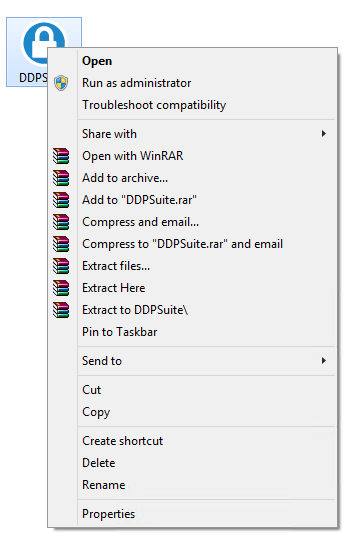
- Fare clic sulla scheda Dettagli.

- Documentare la versione del prodotto.
 la versione del prodotto del client potrebbe differire dalla schermata sopra.
Informations supplémentaires
Vidéos
Produits concernés
Dell Encryption, Dell Endpoint Security Suite Pro, Dell Endpoint Security Suite EnterprisePropriétés de l’article
Numéro d’article: 000124917
Type d’article: How To
Dernière modification: 06 Aug 2026
Version: 12
Trouvez des réponses à vos questions auprès d’autres utilisateurs Dell
Services de support
Vérifiez si votre appareil est couvert par les services de support.