Dell EMC Unity : Limitations du système de la baie (corrigible par l’utilisateur).
Résumé: Dell EMC Unity : Limitations du système de la baie (corrigible par l’utilisateur).
Cet article concerne
Cet article ne concerne pas
Cet article n’est associé à aucun produit spécifique.
Toutes les versions du produit ne sont pas identifiées dans cet article.
Instructions
Chaque modèle de baie est défini par certaines limitations du système ; Nombre maximal de logements de disque, nombre maximal de LUN configurables, etc.
Pour afficher les limites du système, reportez-vous aux listes Support Matrix, Unisphere, Data Collects, UEMCLI ou Driver Properties Objects.
- Support Matrix (Matrice de prise en charge)
Accédez à la matrice de support et consultez les tableaux 6, 7 et 8. Cliquez ici Matrice de support.
- Unisphere
-
Démarrez Unisphere en saisissant l’adresse IP de gestion du SP, puis connectez-vous.
-
Cliquez sur Paramètres.
-
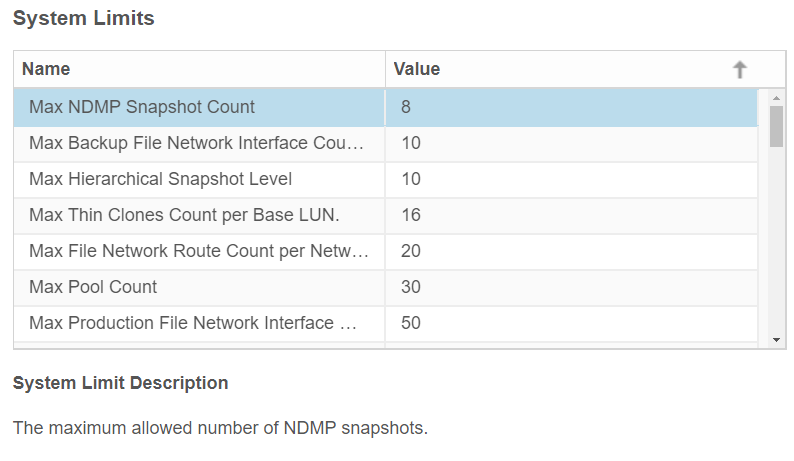
Sous l’onglet Logiciels et licences , recherchez les limites du système.
-
Cliquez sur System limits.
Exemple du modèle Unity 350F :

- UEMCLI
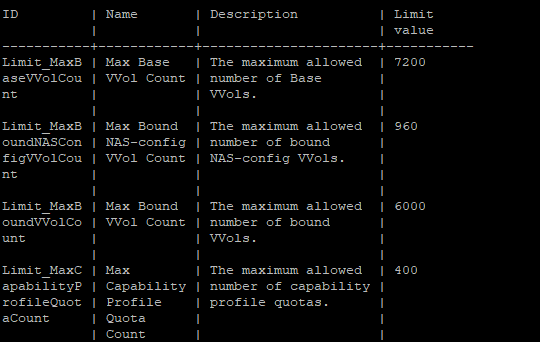
service@spa :~/user# uemcli /sys/limit show -output table -wrap
Exemple du modèle Unity 350F :
- Liste des objets Propriétés du pilote
service@spa :~/user# svc_storagecheck --list | grep -i Max_
ou
service@spa :~/user# svc_storagecheck --list | sed -n '/Driver Properties Object List/,/<< new objects >>/p'
Max_Pools : 30
Max_LUs : 1500
Max_DrivesPerPool : 250
Max_DrivesPerOperation : 250
Max_DrivesUsableForAllPools : 250
Max_LUSizeInBlocks : 549755813888 (0x8000000000)
Max_CompressLUs : 500
Max_CompressBackgroundProcesses : 10
Max_PrivateFLUs : 126
Max_LUs : 1500
Max_DrivesPerPool : 250
Max_DrivesPerOperation : 250
Max_DrivesUsableForAllPools : 250
Max_LUSizeInBlocks : 549755813888 (0x8000000000)
Max_CompressLUs : 500
Max_CompressBackgroundProcesses : 10
Max_PrivateFLUs : 126
Informations supplémentaires
Ce contenu est traduit en 15 langues :
| https://downloads.dell.com/TranslatedPDF/DE_KB540548.pdf |
| https://downloads.dell.com/TranslatedPDF/ES_KB540548.pdf |
| https://downloads.dell.com/TranslatedPDF/ES-XL_KB540548.pdf |
| https://downloads.dell.com/TranslatedPDF/FR_KB540548.pdf |
| https://downloads.dell.com/TranslatedPDF/IT_KB540548.pdf |
| https://downloads.dell.com/TranslatedPDF/JA_KB540548.pdf |
| https://downloads.dell.com/TranslatedPDF/KO_KB540548.pdf |
| https://downloads.dell.com/TranslatedPDF/NL_KB540548.pdf |
| https://downloads.dell.com/TranslatedPDF/PT_KB540548.pdf |
| https://downloads.dell.com/TranslatedPDF/PT-BR_KB540548.pdf |
| https://downloads.dell.com/TranslatedPDF/RU_KB540548.pdf |
| https://downloads.dell.com/TranslatedPDF/SV_KB540548.pdf |
| https://downloads.dell.com/TranslatedPDF/ZH-CN_KB540548.pdf |
| https://downloads.dell.com/TranslatedPDF/ZH-TW_KB540548.pdf |
| https://downloads.dell.com/TranslatedPDF/AR_KB540548.pdf |
Produits concernés
Dell EMC Unity Family |Dell EMC Unity All FlashProduits
Dell Unity 300, Dell EMC Unity 300F, Dell EMC Unity 350F, Dell EMC Unity XT 380, Dell EMC Unity XT 380F, Dell EMC Unity 400, Dell EMC Unity 400F, Dell EMC Unity 450F, Dell EMC Unity XT 480, Dell EMC Unity XT 480F, Dell EMC Unity 500
, Dell EMC Unity 500F, Dell EMC Unity 600, Dell EMC Unity 600F, Dell EMC Unity 650F, Dell EMC Unity XT 680, Dell EMC Unity XT 880, Dell EMC Unity XT 880F, Dell EMC Unity Family |Dell EMC Unity All Flash, Dell EMC Unity Hybrid, Dell EMC UnityVSA Professional Edition/Unity Cloud Edition
...
Propriétés de l’article
Numéro d’article: 000021404
Type d’article: How To
Dernière modification: 17 Apr 2026
Version: 6
Trouvez des réponses à vos questions auprès d’autres utilisateurs Dell
Services de support
Vérifiez si votre appareil est couvert par les services de support.