Mac용 Dell Encryption Enterprise 버전은 어떻게 확인합니까?
Résumé: 다음 지침에 따라 Mac용 Dell Encryption Enterprise/Mac용 Dell Data Protection Enterprise Edition 버전을 확인할 수 있습니다.
Cet article concerne
Cet article ne concerne pas
Cet article n’est associé à aucun produit spécifique.
Toutes les versions du produit ne sont pas identifiées dans cet article.
Instructions
참고:
- 2021년 2월부터 Mac용 Dell Encryption Enterprise에 대한 유지 보수가 종료됩니다. 이 제품 및 관련 문서는 더 이상 Dell에서 업데이트하지 않습니다. 자세한 내용은 Dell Data Security의 제품 수명주기(지원 종료 및 EOL(End Of Life)) 정책을 참조하십시오. 다른 문서에 대한 질문이 있는 경우 영업 팀에 문의하거나 endpointsecurity@dell.com으로 문의하십시오.
- 최신 제품에 대한 자세한 내용은 엔드포인트 보안을 참조하십시오.
다음을 수행하려면 Mac용 Dell Encryption Enterprise(이전 Mac용 Dell Data Protection | Enterprise Edition) 버전을 알아야 합니다.
- 알려진 문제 식별
- UI 차이점 확인
- 워크플로 변경 이해
- 운영 체제 호환성 확인
영향을 받는 제품:
- Mac용 Dell Encryption Enterprise
- Mac용 Dell Data Protection | Enterprise Edition
영향을 받는 운영 체제:
- macOS
- Mac OS X
버전 관리는 제품 UI(User Interface) 또는 제품 설치 프로그램을 통해 확인할 수 있습니다. 자세한 내용을 확인하려면 해당 방법을 클릭하십시오.
UI
UI를 통해 버전을 확인하기 전에 Mac용 Dell Encryption Enterprise를 설치해야 합니다.
- Mac 엔드포인트에 로그인합니다.
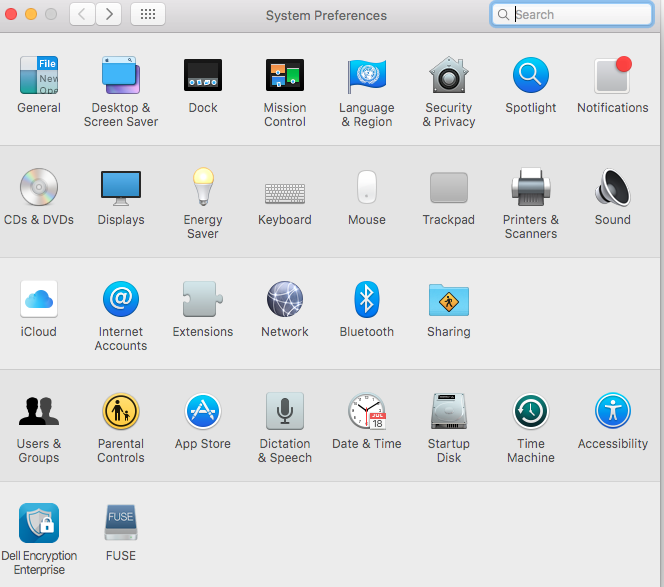
- System Preferences를 클릭합니다.

- System Preferences에서Dell Encryption Enterprise를 클릭합니다.
- Dell Encryption Enterprise UI의 오른쪽 하단 모서리에 있는 버전 번호를 기록합니다.
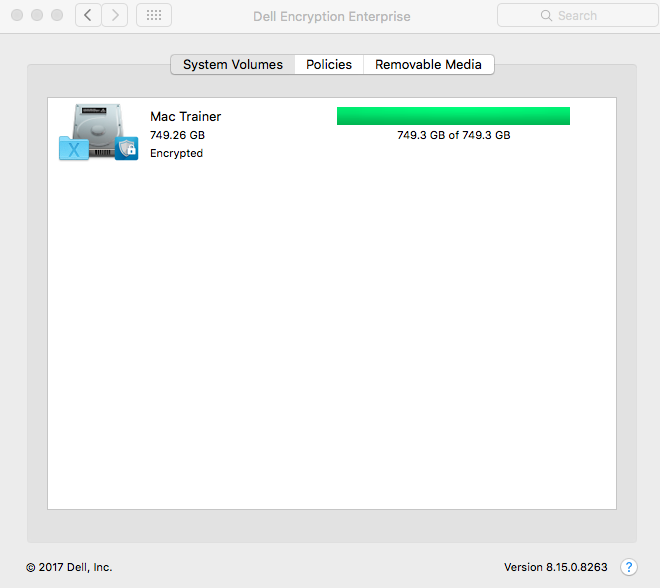 클라이언트 버전이 위의 스크린샷과 다를 수 있습니다.
설치 관리자
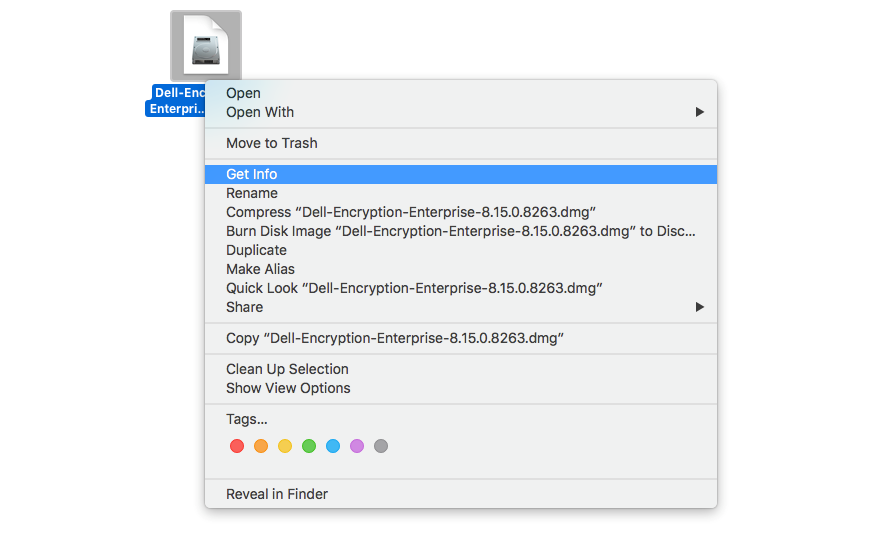
- 설치 프로그램을 오른쪽 클릭한 다음 Get Info를 선택합니다.
- Name & Extension을 확장한 다음 버전을 기록합니다.
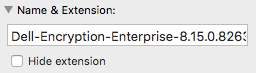 설치 프로그램 버전은 위의 스크린샷과 다를 수 있습니다.
Informations supplémentaires
Vidéos
Produits concernés
Dell EncryptionPropriétés de l’article
Numéro d’article: 000124916
Type d’article: How To
Dernière modification: 05 Aug 2026
Version: 16
Trouvez des réponses à vos questions auprès d’autres utilisateurs Dell
Services de support
Vérifiez si votre appareil est couvert par les services de support.