VxRail: アップグレード中アップグレードバンドル8.0.361-29253789を抽出中にエラーが発生する
Résumé: 本ドキュメントでは、8.0.214から8.0.361へのアップグレード中(10%)、アップグレードバンドル8.0.361-29253789を抽出中にエラーが発生する場合の対処方法について説明します。
Symptômes
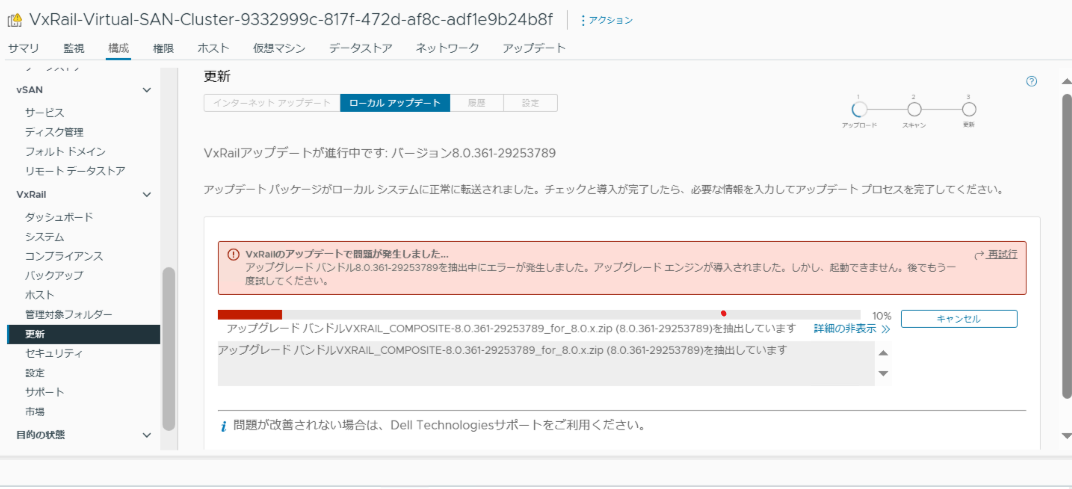
8.0.214から8.0.361へのアップグレード中(10%)、アップグレードバンドル8.0.361-29253789を抽出中にエラーが発生しました。
アップグレードエンジンが導入されました。しかし、起動できません。後でもう一度試してください。
lcm-web.log
2025-10-06T10:20:48.713Z <b8534fce5e8c87f90d1e3b8d9b730422> lcm [ERROR] <200> CompositeBundleFileUnpacker.java processFailedLogger() (485): verifyBootstrap process falied. Error message:
2025-10-06T10:20:48.713Z <b8534fce5e8c87f90d1e3b8d9b730422> lcm [ERROR] <200> SurrogateLcmDeployer.java deploy() (136): Invalid upgrade bundle detected, validateBundleContent failed.
2025-10-06T10:20:48.713Z <b8534fce5e8c87f90d1e3b8d9b730422> lcm [ERROR] <200> SurrogateLcmDeployer.java deploy() (156): LCM Surrogate deployment failed. Use the legacy upgrade instead.
com.vce.lcm.exception.LCMException: Invalid upgrade bundle detected, validateBundleContent failed.
        at com.vce.lcm.service.SurrogateLcmDeployer.deploy(SurrogateLcmDeployer.java:137)
        at com.emc.mystic.manager.upgrade.process.BundleDeployProcessService.deploySurrogate(BundleDeployProcessService.java:604)
        at com.emc.mystic.manager.upgrade.process.BundleDeployProcessService.performBundleDeploy(BundleDeployProcessService.java:384)
        at com.emc.mystic.manager.upgrade.process.BundleDeployProcessService.lambda$clearUpThenHandleSurrogate$0(BundleDeployProcessService.java:299)
        at java.base/java.util.concurrent.Executors$RunnableAdapter.call(Executors.java:515)
        at java.base/java.util.concurrent.FutureTask.run(FutureTask.java:264)
        at java.base/java.util.concurrent.ThreadPoolExecutor.runWorker(ThreadPoolExecutor.java:1128)
        at java.base/java.util.concurrent.ThreadPoolExecutor$Worker.run(ThreadPoolExecutor.java:628)
        at java.base/java.lang.Thread.run(Thread.java:829)
VxRail managerにアップロードされたアップグレードバンドルのチェックサムは正しいが、zipinfoコマンドでアップグレードバンドルの圧縮されたファイル一覧が表示されません。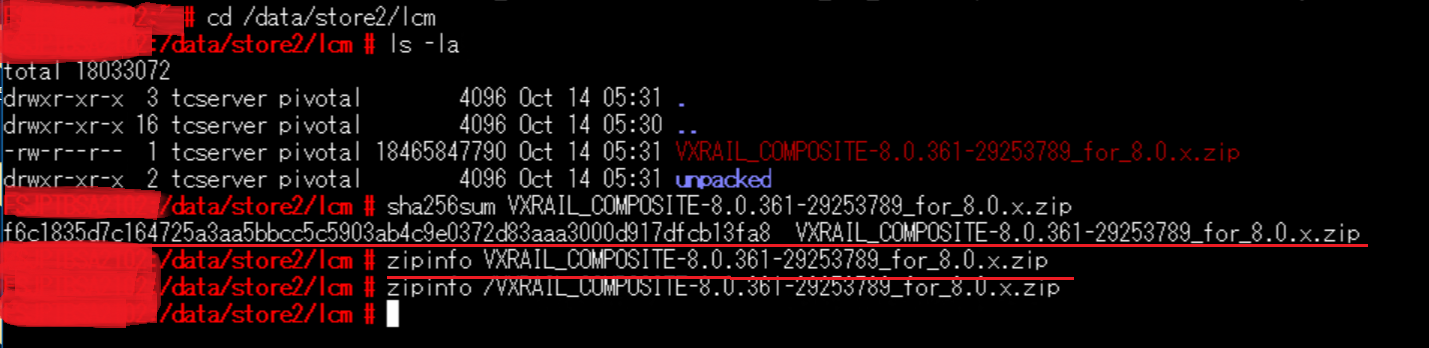
上記のコマンドを実行した結果、何もunzipされておらず、LCMsigninput.bootstrap.txtのファイルサイズが0でした。
	cd /data/store2/lcm/unpacked
	find ./ -ls
	---
	[2025-10-09 10:45:10.522] FSJPTBSA2102:/data/store2/lcm/unpacked # find ./ -ls
	[2025-10-09 10:45:26.041]   4194307      4 drwxr-xr-x   2 tcserver pivotal      4096 Oct  9 01:35 ./
	[2025-10-09 10:45:26.041]   4194308      0 -rw-r--r--   1 tcserver pivotal         0 Oct  9 01:35 ./LCMsigninput.bootstrap.txt
	[2025-10-09 10:45:26.041] FSJPTBSA2102:/data/store2/lcm/unpacked #
---
Cause
unzipパッケージの一部が破損してファイルサイズが0となっており、unzipを実行してもファイルが展開されずに終了していました。
	for f in `rpm -ql unzip` ;do ls -la $f ;done

	lrwxrwxrwx. 1 root root 21 Jun  5  2021 /etc/alternatives/funzip -> /usr/bin/funzip-plain
	lrwxrwxrwx. 1 root root 20 Jun  5  2021 /etc/alternatives/unzip -> /usr/bin/unzip-plain
	lrwxrwxrwx. 1 root root 23 Jun  5  2021 /etc/alternatives/unzipsfx -> /usr/bin/unzipsfx-plain
	lrwxrwxrwx. 1 root root 22 Jun  5  2021 /etc/alternatives/zipgrep -> /usr/bin/zipgrep-plain
	lrwxrwxrwx 1 root root 24 Sep 22  2022 /usr/bin/funzip -> /etc/alternatives/funzip
	-rwxr-xr-x 1 root root 22864 Sep 22  2022 /usr/bin/funzip-plain
	lrwxrwxrwx 1 root root 23 Sep 22  2022 /usr/bin/unzip -> /etc/alternatives/unzip
	-rwxr-xr-x 1 root root 0 Sep 22  2022 /usr/bin/unzip-plain *この部分が0サイズ
	lrwxrwxrwx 1 root root 26 Sep 22  2022 /usr/bin/unzipsfx -> /etc/alternatives/unzipsfx
	-rwxr-xr-x 1 root root 76536 Sep 22  2022 /usr/bin/unzipsfx-plain
	lrwxrwxrwx 1 root root 25 Sep 22  2022 /usr/bin/zipgrep -> /etc/alternatives/zipgrep
	-rwxr-xr-x 1 root root 2953 Sep 22  2022 /usr/bin/zipgrep-plain
	lrwxrwxrwx 1 root root 5 Sep 22  2022 /usr/bin/zipinfo -> unzip
Résolution
-
アップグレードのキャンセルボタンよりキャンセルしても失敗するため、VxRail manger VMのアップグレード前のスナップショットよりアップグレード前に戻します。
-
アップグレード前のVxRailバージョンのアップグレードバンドルより、unzipのrpmパッケージファイル取得します。
元のVxRailバージョンが8.0.214の場合、以下のアップグレードバンドルよりVxRail managerのアップデートパッケージファイルを抽出します。
VXRAIL_COMPOSITE-8.0.214-29023538_for_8.0.x.zip\bundles\VXRAIL_Manager-8.0.214.00000-29023537-updaterepo.zipVxRail managerのアップデートパッケージファイルよりunzipのrpmパッケージファイルを取得します。
VXRAIL_Manager-8.0.214.00000-29023537-updaterepo\package-pool\unzip-6.00-150000.4.11.1.x86_64.rpm -
VxRail managerにてunzipパッケージを削除し再インスールします。
rpm -e unzip
rpm -i unzip-6.00-150000.4.11.1.x86_64.rpm
-
unzipコマンドを実行し、Usageのメッセージが出力されることを確認します。
# unzip UnZip 6.00 of 20 April 2009, by Info-ZIP. Maintained by C. Spieler. Send bug reports using http://www.info-zip.org/zip-bug.html; see README for details. Usage: unzip [-Z] [-opts[modifiers]] file[.zip] [list] [-x xlist] [-d exdir] Default action is to extract files in list, except those in xlist, to exdir; file[.zip] may be a wildcard. -Z => ZipInfo mode ("unzip -Z" for usage). -p extract files to pipe, no messages -l list files (short format) -f freshen existing files, create none -t test compressed archive data -u update files, create if necessary -z display archive comment only -v list verbosely/show version info -T timestamp archive to latest -x exclude files that follow (in xlist) -d extract files into exdir modifiers: -n never overwrite existing files -q quiet mode (-qq => quieter) -o overwrite files WITHOUT prompting -a auto-convert any text files -j junk paths (do not make directories) -aa treat ALL files as text -U use escapes for all non-ASCII Unicode -UU ignore any Unicode fields -C match filenames case-insensitively -L make (some) names lowercase -X restore UID/GID info -V retain VMS version numbers -K keep setuid/setgid/tacky permissions -M pipe through "more" pager See "unzip -hh" or unzip.txt for more help. Examples: unzip data1 -x joe => extract all files except joe from zipfile data1.zip unzip -p foo | more => send contents of foo.zip via pipe into program more unzip -fo foo ReadMe => quietly replace existing ReadMe if archive file newer -
アップグレードを実施します。(アップグレードバンドルのアップロードから開始)