La batterie ne se charge pas lorsque l’ordinateur s’allume avec un message d’avertissement du BIOS et une LED indiquant 1A1 W
Résumé: La batterie ne se charge pas lorsque l’ordinateur se met sous tension avec un message d’avertissement du BIOS.
Cet article concerne
Cet article ne concerne pas
Cet article n’est associé à aucun produit spécifique.
Toutes les versions du produit ne sont pas identifiées dans cet article.
Symptômes
Plates-formes concernées :
- Dell 14 DC14255
- Dell 14 Plus 2-en-1 DB04255
- Dell 14 Plus DB14255
- Dell 16 Plus DB16255Dell Pro 14 Essential PV14255
- Inspiron 13 5320
- Inspiron 13 5330
- Inspiron 14 5420
- Inspiron 14 5425
- Inspiron 14 5430
- Inspiron 14 5435
- Inspiron 14 série 7425 2-en-1
- Inspiron 14 7430 2-en-1
- Inspiron 14 7435 2-en-1
- Inspiron 14 7445 2-en-1
- Inspiron 14 Plus 7420
- Inspiron 16 5620
- Inspiron 16 5630
- Inspiron 16 5635
- Inspiron 16 7630 2-en-1
- Inspiron 16 7635 2-en-1
- Inspiron 16 Plus 7620
- Inspiron 5410
- Inspiron 5418
- Inspiron 5510
- Inspiron 5518
- Inspiron 5625
- Latitude 3330
- Latitude 3420
- Latitude 3430
- Latitude 3520
- Latitude 3530
- Vostro 16 5630
- Vostro 5320
- Vostro 5410
- Vostro 5510
- Vostro 5620
- Vostro 7620
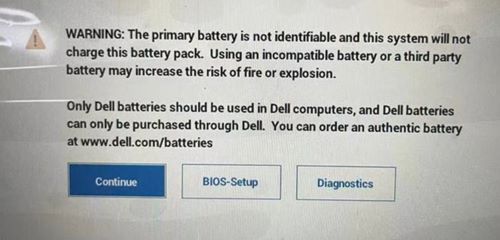
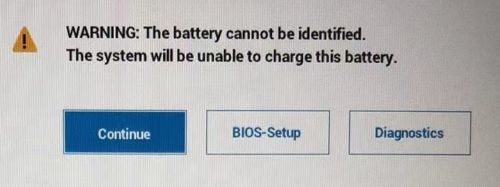
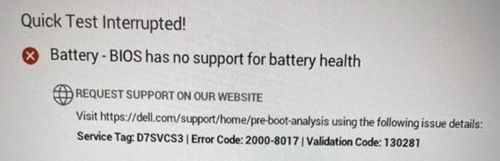
Lorsque l’ordinateur est mis sous tension, l’ordinateur bloque le message d’avertissement du BIOS et l’ordinateur ne peut pas charger la batterie.
Cause
Le contrôleur de boîtier ne peut pas obtenir d’informations relatives à la batterie et arrête la charge en raison d’un échec de l’authentification et a déterminé qu’il s’agit d’une batterie non Dell.
Résolution
Confinement lorsque le problème s’est déjà produit :
- Pour les plates-formes Intel, les utilisateurs finaux doivent retirer l’alimentation secteur et éteindre l’ordinateur pendant au moins deux minutes, puis le remettre sous tension.
- Pour les plates-formes AMD, les utilisateurs finaux doivent retirer l’adaptateur secteur et éteindre l’ordinateur pendant au moins deux minutes, puis le redémarrer deux fois.
Mettez à jour le BIOS pour résoudre le problème :
| Ordinateur Dell | Version du BIOS |
|---|---|
| Dell 14 DC14255 | La version 1.6.2 sera disponible en décembre 2025 |
| Dell Pro 14 Essential PV14255 | |
| Inspiron 14 7445 2-en-1 | |
| Dell 14 Plus 2-en-1 DB04255 | La version 1.6.1 sera disponible en décembre 2025 |
| Dell 14 Plus DB14255 | |
| Dell 16 Plus DB16255 | |
| Latitude 3420/3520 | 1.26.0 |
| Latitude 3430/3530 | 1.8.0 |
| Inspiron 14 5425 | |
| Inspiron 5625 | |
| Inspiron 14 série 7425 2-en-1 | |
| Inspiron 5410/5418 | 2.19.0 |
| Inspiron 5510/5518 | |
| Vostro 5410 | |
| Vostro 5510 | |
| Inspiron 13 5320 | 1.10.0 |
| Vostro 5320 | |
| Inspiron 14 5420 | 1.13.0 |
| Inspiron 16 5620 | |
| Vostro 5620 | |
| Inspiron 14 Plus 7420 | 1.12.0 |
| Inspiron 16 Plus 7620 | |
| Vostro 7620 | |
| Latitude 3330 | |
| Inspiron 13 5330 | 1.2.0 |
| Inspiron 14 7430 2-en-1 | 1.2.1 |
| Inspiron 14 5430 | |
| Inspiron 16 5630 | |
| Inspiron 16 7630 2-en-1 | |
| Vostro 16 5630 | |
| Inspiron 14 7435 2-en-1 | 1.0.0 |
| Inspiron 14 5435 | |
| Inspiron 16 5635 | |
| Inspiron 16 7635 2-en-1 |
Produits concernés
Dell 14 Plus 2-in-1 DB04255, Dell 14 Plus DB14255, Dell 16 Plus DB16255, Dell 14 DC14255, Dell Pro 14 Essential PV14255, Inspiron 13 5320, Inspiron 13 5330, Inspiron 14 5410/5418, Inspiron 14 5420, Inspiron 14 5425, Inspiron 14 5430, Inspiron 14 5435
, Inspiron 14 Plus 7420, Inspiron 14 7425 2-in-1, Inspiron 14 7430 2-in-1, Inspiron 14 7435 2-in-1, Inspiron 14 7445 2-in-1, Inspiron 15 5510/5518, Inspiron 16 5620, Inspiron 16 5625, Inspiron 16 5630, Inspiron 16 5635, Inspiron 16 Plus 7620, Inspiron 16 7630 2-in-1, Inspiron 16 7635 2-in-1, Latitude 3330, Latitude 3420, Latitude 3430, Latitude 3520, Latitude 3530, Vostro 5320, Vostro 14 5410, Vostro 15 5510, Vostro 5620, Vostro 16 5630, Vostro 7620
...
Propriétés de l’article
Numéro d’article: 000214810
Type d’article: Solution
Dernière modification: 18 May 2026
Version: 7
Trouvez des réponses à vos questions auprès d’autres utilisateurs Dell
Services de support
Vérifiez si votre appareil est couvert par les services de support.