Как определить версию главного установщика Dell Data Security
Résumé: Узнайте, как определить версию главного установщика Dell Data Security (ранее Dell Data Protection), следуя этим пошаговым инструкциям.
Cet article concerne
Cet article ne concerne pas
Cet article n’est associé à aucun produit spécifique.
Toutes les versions du produit ne sont pas identifiées dans cet article.
Instructions
Примечание.
- По состоянию на май 2022 г., обслуживание Dell Endpoint Security Suite Enterprise прекращено. Этот продукт и статьи по нему больше не обновляются Dell.
- По состоянию на январь 2019 г., техническое обслуживание пакета Dell Endpoint Security Suite Pro прекращено. Этот продукт и статьи по нему больше не обновляются Dell.
- Подробнее см. в статье Политика жизненного цикла продукта (окончание поддержки и окончание срока эксплуатации) для Dell Data Security. Если у вас возникли вопросы по альтернативным статьям, обратитесь в отдел продаж или по адресу endpointsecurity@dell.com.
- Дополнительные сведения о текущих продуктах см. в разделе Endpoint Security.
Версию главного установщика Dell Data Security (ранее Dell Data Protection) можно использовать, чтобы выполнять следующие действия:
- выявлять известные проблемы;
- изучать изменения рабочего процесса;
- проверять системные требования.
Затронутые продукты:
- Dell Encryption Enterprise
- Dell Data Protection | Enterprise Edition
- Dell Encryption Personal
- Dell Data Protection | Personal Edition
- Dell Endpoint Security Suite Enterprise
- Dell Endpoint Security Suite Pro
Затронутые операционные системы:
- Windows
- Перед определением версии необходимо скачать [ГЛАВНЫЙ УСТАНОВЩИК].
- Название [ГЛАВНОГО УСТАНОВЩИКА] зависит от приложения.
DDSSetup.exeDDSSetup.exe для Dell Encryption EnterpriseDDSSetup.exeDDSSetup.exe для Dell Encryption PersonalDDSSuite.exeDell Endpoint Security Suite Enterprise2DDSSuite.exeдля Dell Endpoint Security SuiteDDPSetup.exeDDPSetup.exe для Dell Data Protection | Enterprise EditionDDPSetup.exeDDPSetup.exe для Dell Data Protection | Personal EditionDDPSuite.exeDDPSuite.exe для Dell Data Protection | Endpoint Security SuiteDDPSuite.exeDDPSuite.exe для Dell Data Protection | Endpoint Security Suite Enterprise
Информацию о скачивании DDSSetup или DDPSetup см. в статье Как скачать Dell Encryption Enterprise или Dell Encryption Personal.
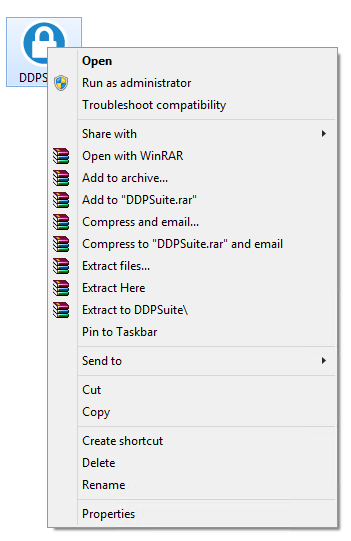
- Нажмите правой кнопкой мыши на [ГЛАВНЫЙ УСТАНОВЩИК] и выберите пункт Свойства.
- Откройте вкладку Details.

- Запишите версию продукта.
 Версия продукта в клиенте может отличаться от указанной на снимке экрана выше.
Informations supplémentaires
Vidéos
Produits concernés
Dell Encryption, Dell Endpoint Security Suite Pro, Dell Endpoint Security Suite EnterprisePropriétés de l’article
Numéro d’article: 000124917
Type d’article: How To
Dernière modification: 06 Aug 2026
Version: 12
Trouvez des réponses à vos questions auprès d’autres utilisateurs Dell
Services de support
Vérifiez si votre appareil est couvert par les services de support.