如何為 VMware Carbon Black Cloud Endpoint 授予完整磁碟存取權限。
Résumé: 瞭解如何依照以下指示,為執行 macOS Mojave 或更新版本的電腦上的 VMware Carbon Black Cloud Endpoint 授予完整磁碟存取。
Cet article concerne
Cet article ne concerne pas
Cet article n’est associé à aucun produit spécifique.
Toutes les versions du produit ne sont pas identifiées dans cet article.
Symptômes
若要在 macOS Mojave (10.14.5) 和更新版本上備份所有資料時,需要完整磁碟存取。本文說明如何為 VMware Carbon Black Cloud Endpoint 啟用完整磁碟存取。
受影響的產品:
- VMware Carbon Black Cloud Endpoint
受影響的作業系統:
- macOS Mojave (10.14.5) 和更新版本
Cause
不適用
Résolution
Apple 在 2018 年 9 月 24 日推出了 macOS Mojave (10.14)。此作業系統更新包含名為「完整磁碟存取」的新安全性功能。「完整磁碟存取」可封鎖第三方應用程式存取特定檔案路徑,並可能會使 VMware Carbon Black Cloud Endpoint 感應器無法完整保護裝置。
完整磁碟存取權限可透過手動或行動裝置管理 (MDM) 軟體授予。如需詳細資訊,請按一下適當的程序。
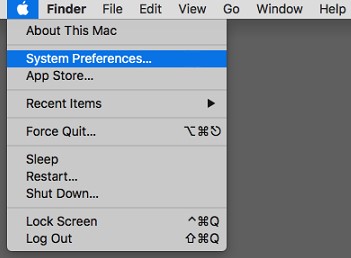
- 在桌面功能表列上,按一下 Apple 圖示,然後選取系統偏好設定。
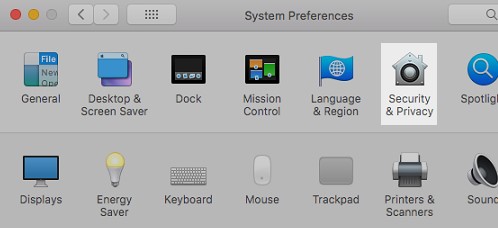
- 在「系統偏好設定」功能表中,按兩下安全性與隱私。
- 在「隱私」標籤上,選取完整磁碟存取。
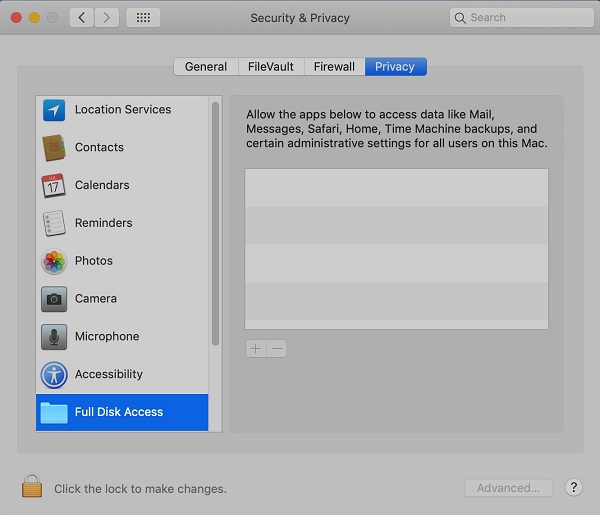
- 如有需要,請按一下掛鎖圖示,並提供本機系統管理員帳戶登入資料 (非 Apple ID),以允許變更。

- 按一下反白顯示的「完整磁碟存取」右側的 + 按鈕。

- 在「應用程式」下,選取 Confer,然後按一下開啟。
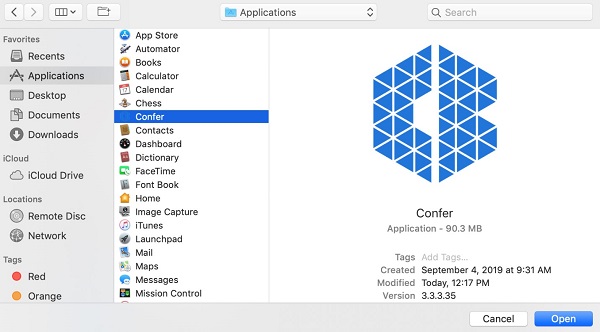
註:
- VMware Carbon Black Cloud Endpoint 之前稱為「Confer」。
- 您環境中的版本可能會有所不同。
- 按一下立即退出。
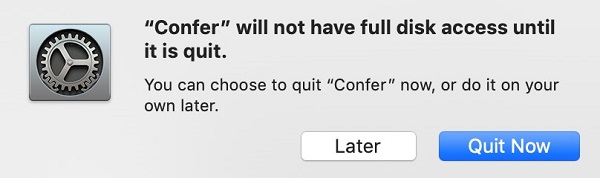
- 重新啟動電腦
針對所有第三方 MDM 軟體,Dell 和 VMware 均不為其背書,亦不提供支援。ProSupport 可能會協助您驗證必填欄位,但無法建立、部署或針對負載進行故障診斷。
為應用程式授予「完整磁碟存取」權限是使用在 MDM 軟體上設定隱私偏好裝載完成。
要授予完整磁碟存取權限的欄位包括:
- Identifier: CbDefense
- Identifier type: Bundle ID
- Code requirement: identifier CbDefense and anchor apple generic and
certificate 1[field.1.2.840.113635.100.6.2.6] /* exists */ and
certificate leaf[field.1.2.840.113635.100.6.1.13] /* exists */ and
certificate leaf[subject.OU] = "7AGZNQ2S2T"
- App or Service: SystemPolicyAllFiles
- Access: Allow
Informations supplémentaires
Vidéos
Produits concernés
VMware Carbon BlackPropriétés de l’article
Numéro d’article: 000126225
Type d’article: Solution
Dernière modification: 10 Aug 2026
Version: 12
Trouvez des réponses à vos questions auprès d’autres utilisateurs Dell
Services de support
Vérifiez si votre appareil est couvert par les services de support.