如何确定 Dell Data Security 主安装程序的版本
Résumé: 按照这些分步说明了解如何识别 Dell Data Security(以前称为 Dell Data Protection)主安装程序的版本。
Cet article concerne
Cet article ne concerne pas
Cet article n’est associé à aucun produit spécifique.
Toutes les versions du produit ne sont pas identifiées dans cet article.
Instructions
注:
- 从 2022 年 5 月起,Dell Endpoint Security Suite Enterprise 停止维护。戴尔不再更新本产品及其文章。
- 从 2019 年 1 月起,Dell Endpoint Security Suite Pro 停止维护。戴尔不再更新本产品及其文章。
- 有关详细信息,请参阅 Dell Data Security 产品生命周期(结束支持和停售)政策。如果您对其他文章有任何疑问,请联系您的销售团队或联系 endpointsecurity@dell.com。
- 请参阅端点安全性,了解有关当前产品的其他信息。
Dell Data Security(旧称 Dell Data Protection)主安装程序的版本可用于:
- 识别已知问题。
- 了解工作流更改。
- 验证系统要求。
受影响的产品:
- Dell Encryption Enterprise
- Dell Data Protection | Enterprise Edition
- Dell Encryption Personal
- Dell Data Protection | Personal Edition
- Dell Endpoint Security Suite Enterprise
- Dell Endpoint Security Suite Enterprise
受影响的操作系统:
- Windows
- 在确定版本之前,必须已下载[主安装程序]。
- [主安装程序]产品名称因应用程序而异:
DDSSetup.exeDDSSetup.exe (Dell Encryption Enterprise)DDSSetup.exeDDSSetup.exe (Dell Encryption Personal)DDSSuite.exeDell Endpoint Security Suite EnterpriseDDSSuite.exe适用于 Dell Endpoint Security SuiteDDPSetup.exeDDPSetup.exe (Dell Data Protection | Enterprise Edition)DDPSetup.exeDDPSetup.exe (Dell Data Protection | Personal Edition)DDPSuite.exeDDPSuite.exe (Dell Data Protection | Endpoint Security Suite)DDPSuite.exeDDPSuite.exe (Dell Data Protection | Endpoint Security Suite Enterprise)
有关获取 DDPSetup.exe 的信息,请参阅如何下载 Dell Encryption Enterprise 或 Dell Encryption Personal。
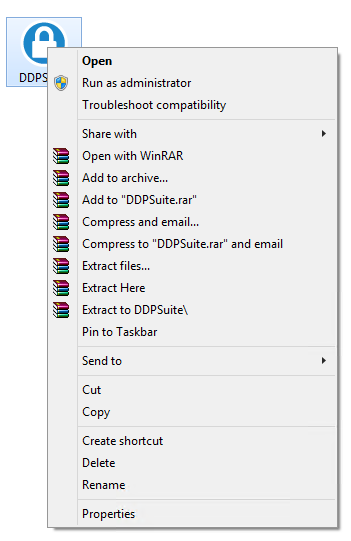
- 右键单击[主安装程序],然后选择 Properties。
- 单击详细信息选项卡。

- 记下产品版本。
 您的客户端的产品版本可能与上面的屏幕截图不同。
Informations supplémentaires
Vidéos
Produits concernés
Dell Encryption, Dell Endpoint Security Suite Pro, Dell Endpoint Security Suite EnterprisePropriétés de l’article
Numéro d’article: 000124917
Type d’article: How To
Dernière modification: 06 Aug 2026
Version: 12
Trouvez des réponses à vos questions auprès d’autres utilisateurs Dell
Services de support
Vérifiez si votre appareil est couvert par les services de support.