How to Run the Dell D1918H, D2421H, D2421DS, and D2721H Monitor Self-Test
Summary: The following article provides information about running the self-test on Dell D1918H, D2421H, D2421DS, and D2721H monitors.
Ez a cikk a következő(k)re vonatkozik:
Ez a cikk nem vonatkozik a következő(k)re:
Ez a cikk nem kapcsolódik egyetlen konkrét termékhez sem.
Ez a cikk nem azonosítja az összes termékverziót.
Instructions
Monitor Self-Test
The self-test (integrated diagnostic tool) helps you determine if any screen abnormality you experience is an inherent problem with: (For example: Your monitor, video cable, video card, driver, or computer.)
Steps for running the self-test:
- Disconnect all video cables from the monitor and turn off your monitor.
- Turn on the monitor.
- When the Dell logo disappears and the screen shows "No signal," press buttons 2 + 3 + 5 on the monitor simultaneously.
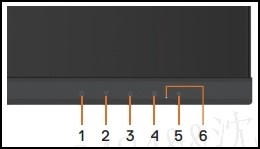
The monitor enters the self-test screen. - Carefully inspect the screen for abnormalities as the display turns to red, green, blue, black, and white automatically.
- Press button 5 to exit the self-test screen.
If you do not detect any screen abnormalities while using the self-test tool, the monitor is functioning properly. Check your video cable, video card, drivers, and computer.
Érintett termékek
Dell D1918H, Dell D2421H, Dell D2721HTermék tulajdonságai
Article Number: 000188980
Article Type: How To
Utoljára módosítva: 13 nov. 2025
Version: 12
Választ kaphat kérdéseire más Dell-felhasználóktól
Támogatási szolgáltatások
Ellenőrizze, hogy a készüléke rendelkezik-e támogatási szolgáltatással.