How to Identify the CrowdStrike Falcon Sensor Version
Riepilogo: Learn to identify the CrowdStrike Falcon Sensor version for issue solutions, process changes, or system requirements. Follow the steps for Windows, Mac, or Linux.
Questo articolo si applica a
Questo articolo non si applica a
Questo articolo non è legato a un prodotto specifico.
Non tutte le versioni del prodotto sono identificate in questo articolo.
Sintomi
Knowing the CrowdStrike Falcon Sensor version allows you to:
- Identify known issues
- Understand process changes
- Understand system requirements
Affected Products:
- CrowdStrike Falcon Sensor
Affected Operating Systems:
- Windows
- Mac
- Linux
Causa
Not applicable
Risoluzione
For instructions about how to identify the CrowdStrike Falcon Sensor version, click on Windows, Mac, or Linux.
Note:
- The CrowdStrike Falcon Sensor must be installed before identifying the version. For information about the installation process, reference How to Install CrowdStrike Falcon Sensor.
- For more information about checking the CrowdStrike Falcon Sensor, reference https://supportportal.crowdstrike.com/s/article/Checking-Falcon-Sensor-Version-Locally
.
Windows
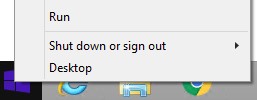
- Right-click the Windows start menu, and then click Run.
- In the Run UI, type
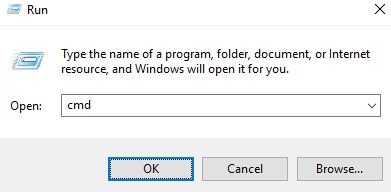
cmd, and then press OK.
- In Command Prompt, type
"C:\Program Files\CrowdStrike\CSSensorSettings.exe" –versionand then press Enter.

- Record the Version. In the example, 7.04.17605.0 is the Version.

Note: The Version of your sensor may differ from the above screenshot.
Mac
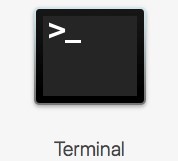
- Locate and then double-click Terminal.
- In Terminal, type
sysctl cs.versionand then press Enter.

- Record the version. In the example, the version is 4.18.8013.0.

Note: The Version of your sensor may differ from the above screenshot.
Linux
- On the targeted endpoint, open Terminal.

- In Terminal, type
sudo /opt/CrowdStrike/falconctl -g --versionand then press Enter.

- Populate the sudo account Password and then press Enter.
- Record the version. In the example, 4.20.6602.0 is the version.

Note: The Version of your sensor may differ from the above screenshot.
To contact support, reference Dell Data Security International Support Phone Numbers.
Go to TechDirect to generate a technical support request online.
For additional insights and resources, join the Dell Security Community Forum.
Prodotti interessati
CrowdStrikeProprietà dell'articolo
Numero articolo: 000126120
Tipo di articolo: Solution
Ultima modifica: 26 gen 2024
Versione: 21
Trova risposta alle tue domande dagli altri utenti Dell
Support Services
Verifica che il dispositivo sia coperto dai Servizi di supporto.