How to Identify the Dell Data Security Server Front End Version
Riepilogo: Learn step-by-step instructions to identify the version of the Dell Data Security (formerly Dell Data Protection) server front end.
Questo articolo si applica a
Questo articolo non si applica a
Questo articolo non è legato a un prodotto specifico.
Non tutte le versioni del prodotto sono identificate in questo articolo.
Istruzioni
Knowing the version of the Dell Data Security (formerly Dell Data Protection) server front end allows an administrator to:
- Identify known issues
- Understand workflow changes
- Verify system requirements
Affected Products:
- Dell Security Management Server
- Dell Data Protection | Enterprise Edition Server
Affected Operating Systems:
- Windows
Note: This article identifies the version of the front end server for Dell Security Management Server or Dell Security Management Server Virtual. To identify the version of the back end, reference How to Identify the Dell Data Security Server Version.
Versioning can be determined through the:
- Installer
- Windows user interface (UI)
Click the appropriate process for more information.
Installer
- Extract the Security Management Server .zip.
- Go to
[LOCATION]\Security Management Server\x64.Note:[LOCATION]= Location of the extracted .zip file - Right-click
setup.exeand then select Properties.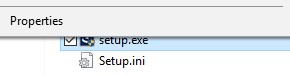
- Click the Details tab.
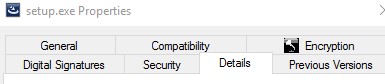
- Record the Product version. In the example, the Product version is 9.9.2.
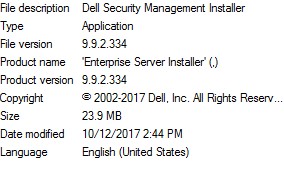 Note: The version of the file may differ from the above screenshot.
Windows
- As an administrator, right-click the Windows start menu and then click Run.
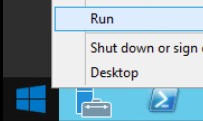
- In the Run UI, type
appwiz.cpland then press OK.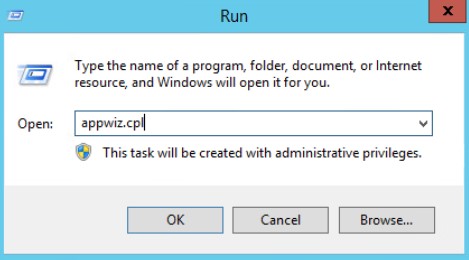
- In Programs and Features, locate Dell Security Management Server x64.
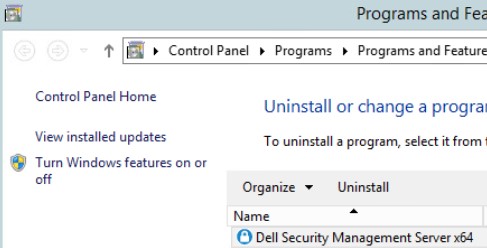 Note: Some versions of the server may say Dell Enterprise Server instead of Dell Security Management Server.
 - Record the Version. In the example, the product version is 10.2.3.
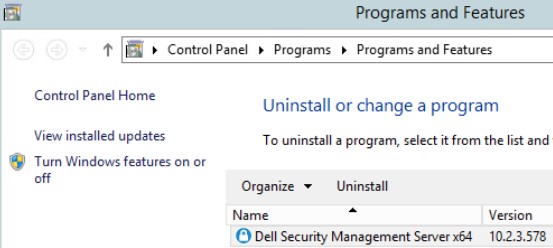 Note: The version may differ from the above screenshot.
To contact support, reference Dell Data Security International Support Phone Numbers.
Go to TechDirect to generate a technical support request online.
For additional insights and resources, join the Dell Security Community Forum.
Prodotti interessati
Dell EncryptionProprietà dell'articolo
Numero articolo: 000130588
Tipo di articolo: How To
Ultima modifica: 10 giu 2025
Versione: 10
Trova risposta alle tue domande dagli altri utenti Dell
Support Services
Verifica che il dispositivo sia coperto dai Servizi di supporto.