Data Domain: VMware virtual hardware versions supported on Data Domain Virtual Edition (DDVE) and PowerProtect DD Management Console (DDMC)
요약: This article outlines the supported VMWARE virtual hardware versions on Data Domain Virtual Edition (DDVE) and PowerProtect DD Management Console (DDMC).
이 문서는 다음에 적용됩니다.
이 문서는 다음에 적용되지 않습니다.
이 문서는 특정 제품과 관련이 없습니다.
모든 제품 버전이 이 문서에 나와 있는 것은 아닙니다.
지침
DDVE and DDMC support virtual hardware versions of virtual machines up to the latest version of the ESXi in use, and minimum supported version 9.
| ESXi Version | Up to Virtual Hardware version |
|---|---|
| ESXi 6.5 | 13 |
| ESXi 6.0 | 11 |
| ESXi 5.5 | 10 |
Consult VMware's latest documentation for any virtual hardware version upgrades.
Note: A Virtual Machine cannot be powered on when an unsupported virtual hardware version is installed.
To confirm the Virtual Machine hardware version:
-
In Vcenter, highlight the VM that you want to check then go to: Inventory -> Virtual machine -> Edit settings
-
You get this, and the version is on top. In this example, it shows the one that is on version 8.
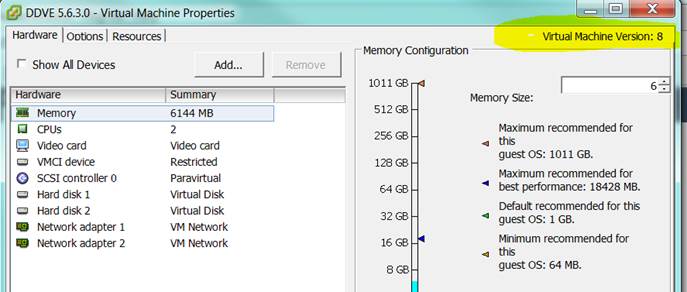
You can upgrade the Hardware version on the same menu.
-
In Recent tasks you see:

-
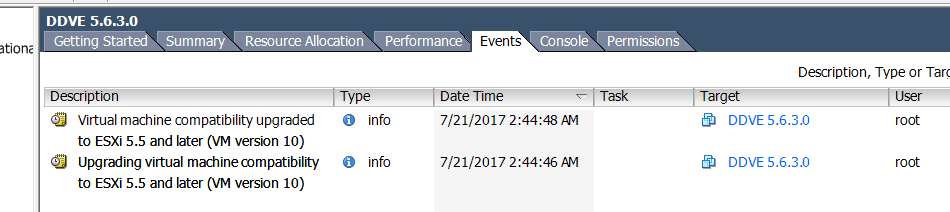
In Events, you see that it was upgraded to version 10. You do not get a choice of versions, if upgraded to the latest for the ESXi version. It upgrades the hardware version to version 10.
추가 정보
Power off the virtual machine before upgrading Virtual Hardware Version.
해당 제품
Data Domain Virtual Edition, PowerProtect Data Domain Management Center문서 속성
문서 번호: 000019132
문서 유형: How To
마지막 수정 시간: 29 7월 2025
버전: 4
다른 Dell 사용자에게 질문에 대한 답변 찾기
지원 서비스
디바이스에 지원 서비스가 적용되는지 확인하십시오.