Dell Parts and Repairs Selector
요약: The Dell Parts and Repairs selector show what Dell-certified memory, storage, drives, media, batteries, parts, and upgrades are available for purchase.
이 문서는 다음에 적용됩니다.
이 문서는 다음에 적용되지 않습니다.
이 문서는 특정 제품과 관련이 없습니다.
모든 제품 버전이 이 문서에 나와 있는 것은 아닙니다.
지침
To determine what parts and repairs are available for your Dell devices, perform the following steps.
- Browse to the Dell Support Homepage.
- Identify your Dell device.
- Select the listing for your computer under View This PC.
Note: When there is no listing for your computer under View This PC, select Download & Install SupportAssist, which automatically identifies your computer for you. Follow the prompts to download and install SupportAssist. For more information, go to the Dell SupportAssist page.
- Enter the Service Tag, Dell Product ID, or Model, select the Search button, and then select your computer from the list.
- Select Browse all products: You must select the type of device you have, the brand name, and then the product model.
Note: For more information, see How to find the product model number of your Dell computer.
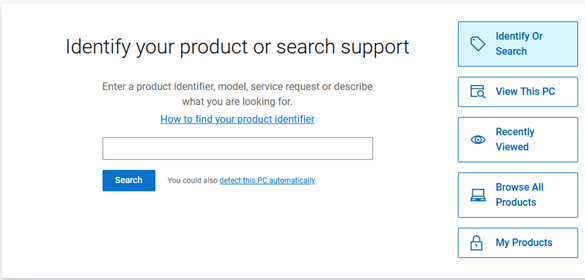
- Select the listing for your computer under View This PC.
- When you get to the product support page for your computer, select the Parts & Repairs tab on the left.
 Note: Depending on your country or region, you get different options on what parts are available for your computer. When there is not a Parts & Repairs tab, then no parts are available in your country or region.
 - Select which kind of parts that you are interested in to see which ones are available.
해당 제품
Alienware, Inspiron, OptiPlex, Vostro, XPS, G Series, G Series, Alienware, Dell Pro, Dell Pro Max, Dell Pro Premium, Inspiron, Latitude, Vostro, XPS, Fixed Workstations, Mobile Workstations문서 속성
문서 번호: 000130752
문서 유형: How To
마지막 수정 시간: 31 7월 2025
버전: 14
다른 Dell 사용자에게 질문에 대한 답변 찾기
지원 서비스
디바이스에 지원 서비스가 적용되는지 확인하십시오.