TPM Must Be Cleared Before Using A Deployment Task Sequence
요약: How to Disable Trusted Platform Module Auto provisioning.
이 문서는 다음에 적용됩니다.
이 문서는 다음에 적용되지 않습니다.
이 문서는 특정 제품과 관련이 없습니다.
모든 제품 버전이 이 문서에 나와 있는 것은 아닙니다.
증상
TPM for BitLocker
Deployment task sequences (such as Dell Client Configuration Toolkit (CCTK)) that attempt to prepare the TPM for BitLocker during deployment fails if the TPM ownership has already been taken. This is most often seen in systems that were previously deployed and are being reimaged to be sent out to new users.
원인
The TPM must be cleared manually in the BIOS or in the Operating System (OS) before running the task sequence. If the TPM is cleared from within the OS and the system is running Windows 10, the TPM auto provisioning must be disabled or Windows will immediately take ownership again.
해결
The steps below can be followed to disable auto provisioning.
- Click Start and type PowerShell in the search box.
- Right-click PowerShell (x86) and select Run as admin.
- Type the following PowerShell command Disable-TpmAutoProvisioning and press Enter.
- Confirm the result AutoProvisioning: Disabled
AutoProvisioning: Disabled PowerShell setting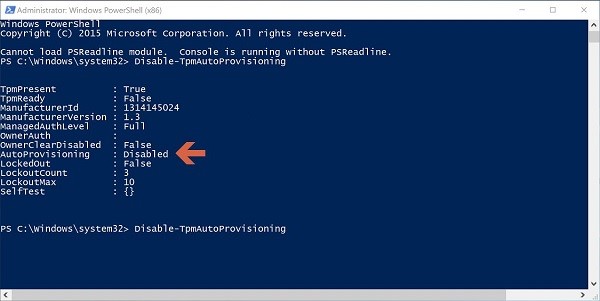
- Click Start and type tpm.msc in the search box, then press Enter.
- In the right-side Actions pane, select Clear TPM.
- Reboot and press F12 to proceed with clearing when prompted.
문서 속성
문서 번호: 000143337
문서 유형: Solution
마지막 수정 시간: 18 8월 2025
버전: 4
다른 Dell 사용자에게 질문에 대한 답변 찾기
지원 서비스
디바이스에 지원 서비스가 적용되는지 확인하십시오.