EQLXPerf not started
Samenvatting: The service EQLXPerf not starting in operation system.
Dit artikel is van toepassing op
Dit artikel is niet van toepassing op
Dit artikel is niet gebonden aan een specifiek product.
Niet alle productversies worden in dit artikel vermeld.
Symptomen
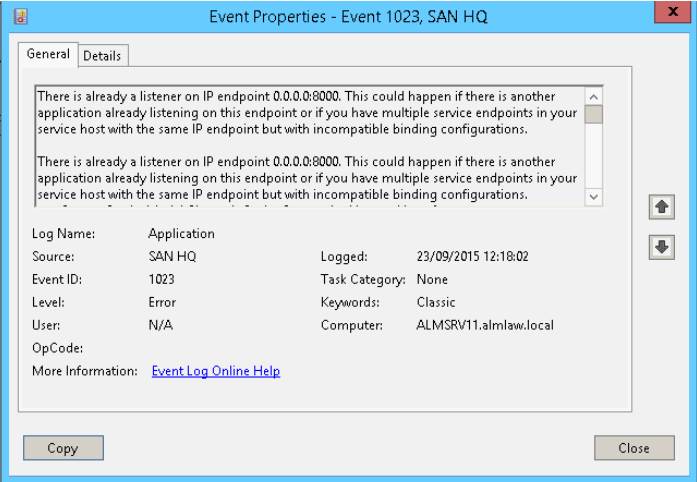
Service EQLXPerf not starting and generating Event ID: 1023 in system event Logs in Operation System.
Trying to start it manually, this error will be displayed after a few seconds:
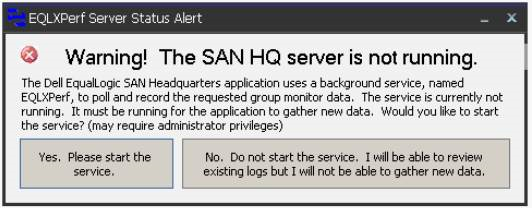
In the Operating System Event Logs, the event ID: 1023 is recorded. There is already a listener on IP endpoint 0.0.0.0:8000.
Trying to start it manually, this error will be displayed after a few seconds:
In the Operating System Event Logs, the event ID: 1023 is recorded. There is already a listener on IP endpoint 0.0.0.0:8000.
Oplossing
Use the Command netstat -an in prompt to verify the ports and programs running.

After, search in the archive for 0.0.0.0:8000 and verify the state.
If the state is LISTENING, another application is already using this port.
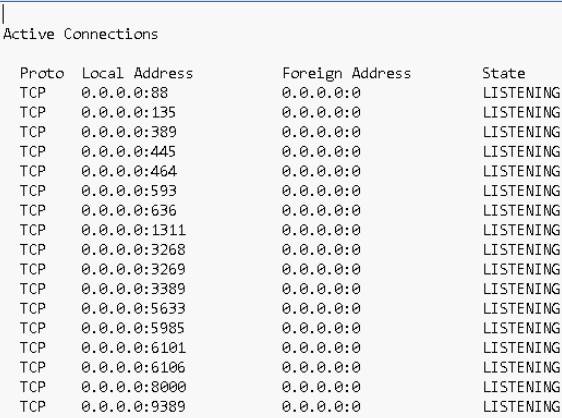
In this case we must change the port of San HeadQuarters or the application that is using port 8000.
To change the port in San Headquarters access the option:
Settings -> Server Settings.
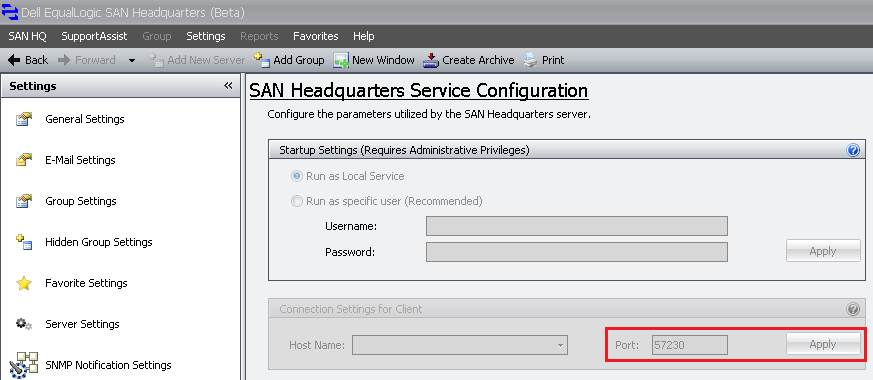
After changing the port, start the EQLXPerf service in the Operatig System.
After, search in the archive for 0.0.0.0:8000 and verify the state.
If the state is LISTENING, another application is already using this port.
In this case we must change the port of San HeadQuarters or the application that is using port 8000.
To change the port in San Headquarters access the option:
Settings -> Server Settings.
After changing the port, start the EQLXPerf service in the Operatig System.
Getroffen producten
Legacy Storage ModelsArtikeleigenschappen
Artikelnummer: 000136708
Artikeltype: Solution
Laatst aangepast: 01 jun. 2026
Versie: 4
Vind antwoorden op uw vragen via andere Dell gebruikers
Support Services
Controleer of uw apparaat wordt gedekt door Support Services.