Monitor Cable Types Explained VGA HDMI DisplayPort and More
Sammendrag: Different types of monitor cables including HDMI, DisplayPort, DVI, and VGA (learn which video cable types of support UHD, FHD, and other resolutions for optimal display performance).
Denne artikkelen gjelder for
Denne artikkelen gjelder ikke for
Denne artikkelen er ikke knyttet til noe bestemt produkt.
Det er ikke produktversjonene som identifiseres i denne artikkelen.
Instruksjoner
Unable to configure optimal resolution
Modern LCD monitors have greater resolution capabilities than displays manufactured only a few years earlier. The new Ultra-High Definition and High Definition displays require modern cable connections to transmit the ever-increasing volume of data required to support these resolutions.
Modern high-resolution monitor options:
- 8k Ultra High Definition (UHD) (7680 x 4320)
- 5k Ultra High Definition (UHD) (5120 x 2880)
- 4k Ultra High Definition (UHD) (3840 x 2160)
- Quad High Definition (QHD) (2560 x 1600)
- Wide Ultra eXtended Graphics Array (WUXGA) (1920 x 1200)
- Full High Definition (FHD) (1920 x 1080)
Display cable capabilities
Here are the most common monitor cable connection types and the maximum resolution they support:
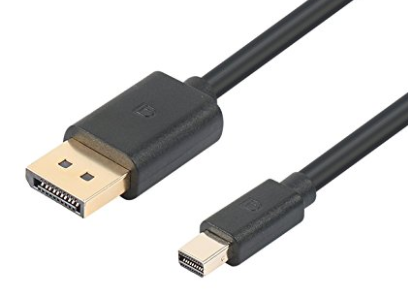
- DisplayPort (DP) and Mini-DisplayPort (mDP) 1.3 - 8192 x 4320 @ 60 Hz (Figure 1.)
- DisplayPort (DP) and Mini-DisplayPort (mDP) 1.2 (Dual Cable Connection) - 5120 x 2880 @ 60 Hz (Figure 1.)
- DisplayPort (DP) and Mini-DisplayPort (mDP) 1.2 (Single Cable Connection) - 3840 x 2160 @ 60 Hz (Figure 1.)
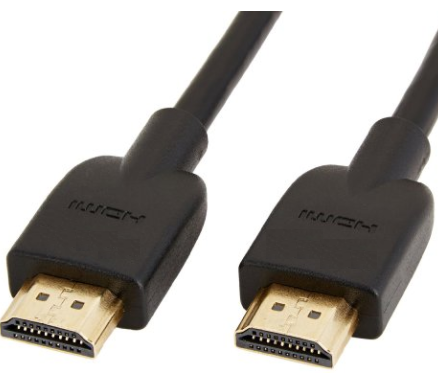
- High Definition Multimedia Interface (HDMI) 2.0 - 3820 x 2160 @ 60 Hz (Figure 2.)
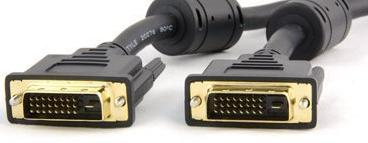
- Digital Visual Interface (DVI) (Dual Link)- 2560 × 1600 @ 60 Hz (Figure 3.)
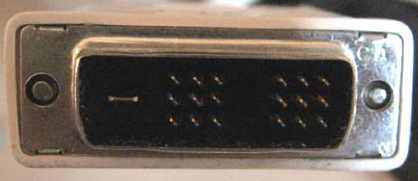
- Digital Visual Interface (DVI) (Single Link) - 1900 x 1200 @ 60 Hz (Figure 4.)
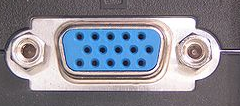
- Video Graphics Array (VGA) - 2048 x 1536 @ 85 Hz (Figure 5.)
DisplayPort Comparison
The DisplayPort interface accommodates both personal computer and home entertainment applications and does so at a lower manufacturing cost. The table below shows a comparison of display interface connectivity. This table compares DisplayPort with VGA, DVI, composite, component, S-video, and HDMI cables.
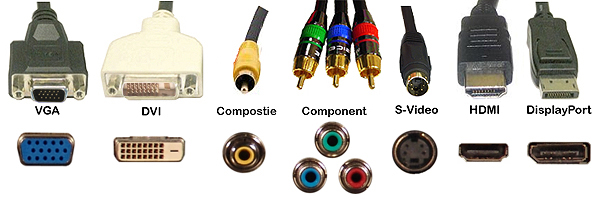
| Video Cable Comparison Table | |||||||
|---|---|---|---|---|---|---|---|
| VGA | DVI | Composite | Component | S-Video | HDMI | DisplayPort | |
| Signal Type | Analog | Digital | Analog | Analog | Analog | Digital | Digital |
| Audio | No | No | No | No | No | Yes | Yes |
| Connections | Monitor Projector |
Monitor Projector |
H.E.* Monitor (limited) Projector |
H.E.* Monitor (limited) |
H.E.* Monitor (limited) Projector |
H.E.* Monitor (limited) Projector |
H.E.* Monitor (limited) Projector |
Berørte produkter
Alienware and Dell Gaming Monitors, C Series, D Series, E Series, P Series, S Series, SE Series, UltraSharp Premier (UP) Series, UltraSharp (U) Series, Dell Monitors, Dell Plus Monitors, Dell Pro Plus MonitorsArtikkelegenskaper
Artikkelnummer: 000143545
Artikkeltype: How To
Sist endret: 22 jul. 2025
Versjon: 8
Få svar på spørsmålene dine fra andre Dell-brukere
Støttetjenester
Sjekk om enheten din er dekket av støttetjenestene.