PowerEdge: How to install Windows Server Backup using PowerShell
Resumo: How to install Windows Server Backup using PowerShell for Windows Server. Follow these steps for installation and manage your server backups efficiently.
Este artigo aplica-se a
Este artigo não se aplica a
Este artigo não está vinculado a nenhum produto específico.
Nem todas as versões do produto estão identificadas neste artigo.
Instruções
- To start Windows PowerShell Type in the Command Prompt window
Start PowerShell - To install Windows Server Backup Type
Install-WindowsFeature Windows-Server-Backup
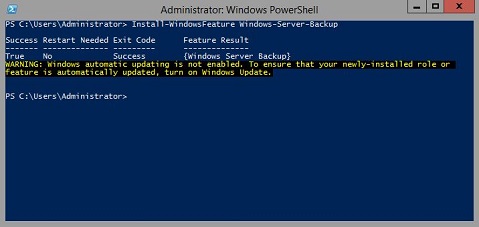
Additional Information:
Windows Server Backup https://learn.microsoft.com/en-us/previous-versions/windows/it-pro/windows-server-2012-r2-and-2012/jj614621(v=ws.11)

Windows Server Backup Windows PowerShell Cmdlets https://learn.microsoft.com/en-us/powershell/module/windowsserverbackup/?view=windowsserver2022-ps
Produtos afetados
Microsoft Windows 2012 Server, Microsoft Windows 2012 Server R2Produtos
C Series, HS Series, Modular Infrastructure, Rack Servers, Tower Servers, XE Servers, XR Servers, OEM Server Solutions, Microsoft Windows Server 2016, Microsoft Windows Server 2019, Microsoft Windows Server 2022, Microsoft Windows 2008 Server R2
, Microsoft Windows 2008 Server Service Pack 2, Microsoft Windows 2012 Server, Microsoft Windows 2012 Server R2
...
Propriedades do artigo
Número do artigo: 000122393
Tipo de artigo: How To
Último modificado: 05 set. 2025
Versão: 9
Encontre as respostas de outros usuários da Dell para suas perguntas.
Serviços de suporte
Verifique se o dispositivo está coberto pelos serviços de suporte.