VPLEX: How to address Issues with VIAS (VPlex Integrated Array Services)
Resumo: This article details the steps to generate a SolVe Desktop procedure to address issues with VIAS.
Este artigo aplica-se a
Este artigo não se aplica a
Este artigo não está vinculado a nenhum produto específico.
Nem todas as versões do produto estão identificadas neste artigo.
Instruções
This procedure can be found in Solve Desktop Procedure Generator at the following location:
VPlex -> Miscellaneous -> Troubleshooting -> Troubleshooting Documents -> VIAS
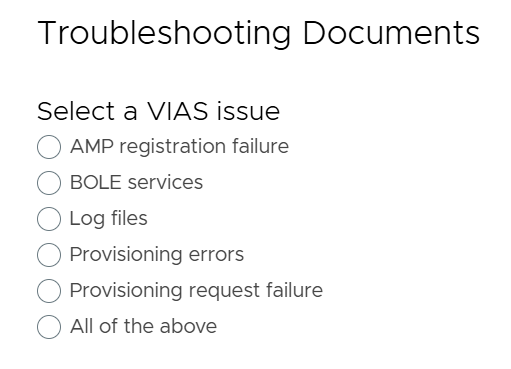
A procedure is generated based on the VIAS issue from the following options:
NOTE:
If SolVe Desktop is required, follow KB How to Download and Install SolVe Desktop for installation. (A Dell Support account is required to view this article)
Mais informações
Note:
- When the storage-volume unclaim command is used with VIAS based and non VIAS based storage volumes the result of the command will be different.
- VIAS based virtual volumes will be removed from VPLEX they will no longer be visible.
- Non VIAS based storage volumes will be marked as unclaimed. This is the intended behaviour.
Note:
- During VPLEX Integrated Array Services (VIAS) virtual volume provisioning, the virtual volume can be added to new or existing VPLEX consistency groups using VPLEX GUI.
- However, VPLEX command line interface will only support adding virtual volumes to existing VPLEX consistency groups.
PROVISIONING WITH EMC VPLEX INTEGRATED ARRAY SERVICES
http://www.emc.com/collateral/white-paper/h13049-provisioning-emc-vplex-integration.pdf
Produtos afetados
VPLEX SeriesProdutos
VPLEX Series, VPLEX VS2, VPLEX VS6Propriedades do artigo
Número do artigo: 000158224
Tipo de artigo: How To
Último modificado: 11 mar. 2026
Versão: 5
Encontre as respostas de outros usuários da Dell para suas perguntas.
Serviços de suporte
Verifique se o dispositivo está coberto pelos serviços de suporte.