Dell Parts and Repairs Selector
摘要: The Dell Parts and Repairs selector show what Dell-certified memory, storage, drives, media, batteries, parts, and upgrades are available for purchase.
本文适用于
本文不适用于
本文并非针对某种特定的产品。
本文并非包含所有产品版本。
说明
To determine what parts and repairs are available for your Dell devices, perform the following steps.
- Browse to the Dell Support Homepage.
- Identify your Dell device.
- Select the listing for your computer under View This PC.
Note: When there is no listing for your computer under View This PC, select Download & Install SupportAssist, which automatically identifies your computer for you. Follow the prompts to download and install SupportAssist. For more information, go to the Dell SupportAssist page.
- Enter the Service Tag, Dell Product ID, or Model, select the Search button, and then select your computer from the list.
- Select Browse all products: You must select the type of device you have, the brand name, and then the product model.
Note: For more information, see How to find the product model number of your Dell computer.
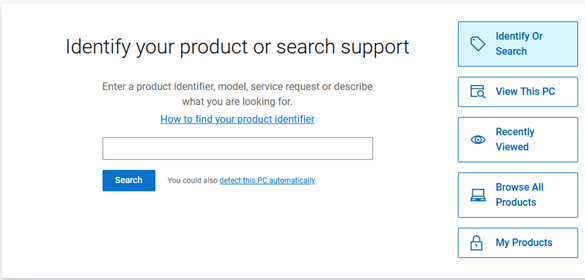
- Select the listing for your computer under View This PC.
- When you get to the product support page for your computer, select the Parts & Repairs tab on the left.
 Note: Depending on your country or region, you get different options on what parts are available for your computer. When there is not a Parts & Repairs tab, then no parts are available in your country or region.
 - Select which kind of parts that you are interested in to see which ones are available.
受影响的产品
Alienware, Inspiron, OptiPlex, Vostro, XPS, G Series, G Series, Alienware, Dell Pro, Dell Pro Max, Dell Pro Premium, Inspiron, Latitude, Vostro, XPS, Fixed Workstations, Mobile Workstations文章属性
文章编号: 000130752
文章类型: How To
上次修改时间: 31 7月 2025
版本: 14
从其他戴尔用户那里查找问题的答案
支持服务
检查您的设备是否在支持服务涵盖的范围内。