MD Series: MD34/38xx How to replace a hard drive in predictive failure
摘要: This tutorial explains how to replace a disk in predictive or impending failure in a MD34xx or MD38xx storage array.
本文适用于
本文不适用于
本文并非针对某种特定的产品。
本文并非包含所有产品版本。
说明
Definition:
A disk is always a bit bigger than specified because it has space to relocate bad blocks. It is allowed to have a couple of read/write errors. But if a threshold is reached, the controller changes the status of the disk to "predictive failure" because the relocation table is full.
The disk continues to work but the probability that the hard drive fails soon is high. As this disk is still working and fully part of the RAID, the disk has to be put offline before replacement. This tutorial covers the steps to offline the hard disk before replacement.
Prerequisite:
Modular Disk Storage Manager (MDSM) has to be installed for this procedure. The management station must be able to access to the storage array.
Steps:
Launch MDSM. If there are several PowerVault arrays, select the storage with the predictive failure.
Double-click the array to access to the matrix manager.
Click Hardware and then select the disk to be put offline.
Figure 1: MDSM Hardware tab
Do a right click and select Advanced, then Fail.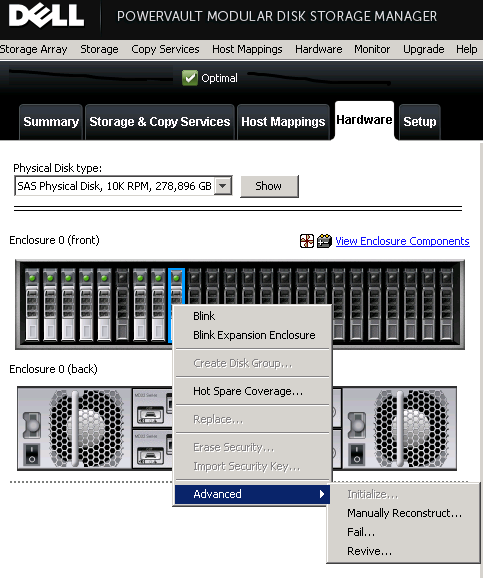
Figure 2: MDSM Hardware menu showing where to manually fail a drive.
To validate the operation, a menu asking to confirm the manual disk failing opens. Confirm by typing "Yes."
- If there is a hot spare disk, leave the box "Copy contents of hard drive before failing" checked
- The data of the impending disk failure is copied to the spare disk, to avoid any degradation of a RAID
- If there are no hot spare disks, clear the "Copy contents of hard drive before failing" box
The disk changes to a red X, and the status changes to "Failed." The last step is to physically replace the drive.
受影响的产品
MD Series, PowerVault MD3400, PowerVault MD3420, PowerVault MD3460, PowerVault MD3800f, PowerVault MD3800i, PowerVault MD3820f, PowerVault MD3820i, PowerVault MD3860f, PowerVault MD3860i文章属性
文章编号: 000140798
文章类型: How To
上次修改时间: 27 3月 2025
版本: 5
从其他戴尔用户那里查找问题的答案
支持服务
检查您的设备是否在支持服务涵盖的范围内。