How to Determine the Amount of Random Access Memory (RAM) Installed in your Chromebook
摘要: This article provides the steps for looking up the amount of RAM in a Chromebook.
本文适用于
本文不适用于
本文并非针对某种特定的产品。
本文并非包含所有产品版本。
说明
Memory Installed
Chromebook Users may not be aware of the process to show the amount of RAM installed in a Chromebook.
Show RAM Installed
To find out the amount of memory that is installed in a Chromebook complete the steps below:
- Open a browser and type the following on the address line: chrome://system/
- Scroll down the list until you find: Memory_spd_info
- Click expand and you can see the multiple lines. Look for Size_MB.
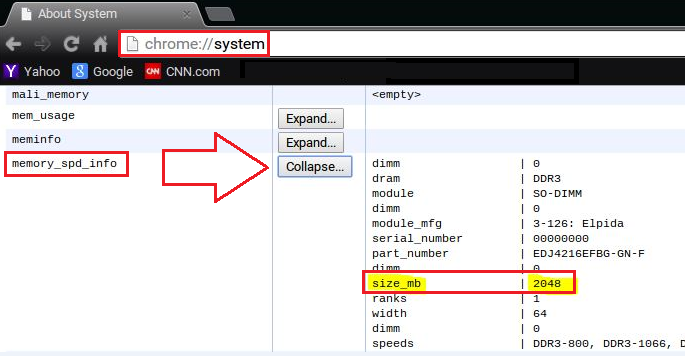
- This is the amount of memory that is installed in the Chromebook.
受影响的产品
Chromebook, Chromebook 11, Chromebook 3120 (End of Life), Chromebook 11 3180, Chromebook 11 3189, Chromebook 7310文章属性
文章编号: 000146742
文章类型: How To
上次修改时间: 22 8月 2025
版本: 5
从其他戴尔用户那里查找问题的答案
支持服务
检查您的设备是否在支持服务涵盖的范围内。