Newly deployed SRM cannot discover previously discovered XtrmIO
摘要: Newly deployed SRM cannot discover previously discovered XtrmIO
本文适用于
本文不适用于
本文并非针对某种特定的产品。
本文并非包含所有产品版本。
症状
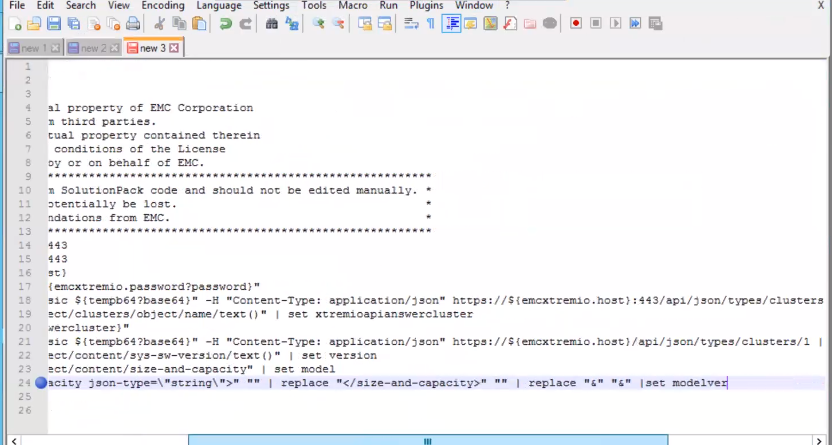
Issue shown below:

原因
The discovery script was trying to replace substring "& ;" with "&" even though it was not present in model property.
解决方案
Workaround:
Replace substring "&" with "&". This way, it will replace the substring only if it contains "& ;"
Procedure:
1. Log into the SRM collector VM running the SolutionPack for Dell EMC XtremiO in question
2. Go to this directory /opt/APG/Tools/Script-Engine/Default/data/emc-xtremio-collect-emc-
xtremio
3. Backup a copy of emc-xtremio-collect.sc1
cp emc-xtremio-collect.sc1 emc-xtremio-collect.sc1-backup
4. Edit this file emc-xtremio-collect.sc1 as followed:
Replace line:24
print ${model} | replace "<size-and-capacity json-type=\"string\">" "" | replace "</size-and-capacity>" "" | replace "&" "&" |set modelver
with this new line:
print ${model} | try replace "<size-and-capacity json-type=\"string\">" "" | try replace "</size-and-capacity>" "" | try replace "&" "&" |set modelver
Contents of a correctly modified script emc-xtremio-collect.sc1 looks like this:
# Copyright (c) 2023, EMC Corporation.
# All Rights Reserved.
#
# This software contains the intellectual property of EMC Corporation
# or is licensed to EMC Corporation from third parties.
# Use of this software and the intellectual property contained therein
# is expressly limited to the terms and conditions of the License
# Agreement under which it is provided by or on behalf of EMC.
#**********************************************************************************************
# This file has been auto-generated from SolutionPack code and should not be edited manually. *
# Any manual changes in this file can potentially be lost. *
# Edit this file only on formal recommendations from EMC. *
#**********************************************************************************************
step testrestfulapi ${emcxtremio.host} 443
ssl-connect -t 30 ${emcxtremio.host} 443
step testrestfulapiauth ${emcxtremio.host}
set tempb64 "${emcxtremio.username}:${emcxtremio.password?password}"
http-get -k -t 30 -H "Authorization: Basic ${tempb64?base64}" -H "Content-Type: application/json" https://${emcxtremio.host}:443/api/json/types/clusters | json2xml | set xtremioapianswer
print ${xtremioapianswer} | xpath "/object/clusters/object/name/text()" | set xtremioapianswercluster
print ${xtremioapianswer} | xpath "(/object/clusters/object/href/text())[1]" | set xtremioclusterapi
println "Found cluster: ${xtremioapianswercluster}"
http-get -k -t 30 -H "Authorization: Basic ${tempb64?base64}" -H "Content-Type: application/json" ${xtremioclusterapi}| json2xml | set xtremioapianswer
print ${xtremioapianswer} | xpath "/object/content/sys-sw-version/text()" | set version
print ${xtremioapianswer} | xpath "/object/content/size-and-capacity" | set model
print ${model} | try replace "<size-and-capacity json-type=\"string\">" "" | try replace "</size-and-capacity>" "" | try replace "&" "&" |set modelver
println "Firmware Version: ${version}"
println "Model: ${modelver}"
5. Try the XtremIO discovery again and it should be successful this time
文章属性
文章编号: 000217570
文章类型: Solution
上次修改时间: 13 11月 2023
版本: 2
从其他戴尔用户那里查找问题的答案
支持服务
检查您的设备是否在支持服务涵盖的范围内。