PowerEdge: How to Replace a CMOS Battery
摘要: To replace a CMOS battery, remove the air shroud, disconnect and remove any expansion cards, locate the battery socket, and carefully pry out the CMOS battery. After installing a new CMOS battery, you must reinstall the expansion cards, install the air shroud, and restore the BIOS settings, ensuring the battery is operating properly and the correct data and time are set in the System Setup. ...
本文适用于
本文不适用于
本文并非针对某种特定的产品。
本文并非包含所有产品版本。
说明
Process:
- Complete a BIOS settings backup - click here for backup information.
Note: If your CMOS battery has already failed, you must set the BIOS settings manually again or restore from a previous backup.
- Remove the air shroud
- Disconnect the power or data cables from the expansion card riser (if applicable)
- Remove the expansion card risers (if installed)
- Remove the PCIe expansion cards (if installed)
- Locate the battery socket
CAUTION: To avoid damage to the battery connector, you must firmly support the connector while installing or removing the battery.
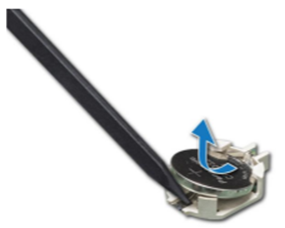
- Use a plastic scribe to pry out the system battery
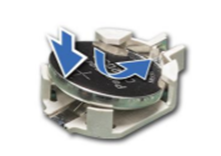
- To install a new system battery, hold the battery with the positive side facing and slide it under the securing tabs
- Press the battery into the connector until it snaps into place
Reassemble the system.
- Install the low-profile PCIe cards (if applicable)
- Install the expansion card riser and connect the power or data cables to the expansion card risers (if applicable)
- Install the air shroud
Verify the system.
- While booting, press F2 to enter the System setup
- Ensure that the battery is operating properly
- Enter the correct data and time in the System Setup Time and Date fields
- Restore the BIOS settings (if applicable)
- Exit the system setup
Example Video
How to remove or install a System battery on the PowerEdge R650.
Duration: 00:01:24 (hh:mm:ss)
When available, closed caption (subtitles) language settings can be chosen using the CC icon on this video play.
受影响的产品
C Series, HS Series, Modular Infrastructure, Rack Servers, Tower Servers, XE Servers, XR Servers, OEM Server Solutions文章属性
文章编号: 000234357
文章类型: How To
上次修改时间: 02 9月 2026
版本: 13
从其他戴尔用户那里查找问题的答案
支持服务
检查您的设备是否在支持服务涵盖的范围内。