Dell Command PowerShell Provider Advanced Battery Charge feature
摘要: Learn how to Deploy, Manage, Secure and Virtualize BYOD, Enterprise Client, and Mobility Solutions from Experts and Peers.
本文章適用於
本文章不適用於
本文無關於任何特定產品。
本文未識別所有產品版本。
症狀
Affected Products:
- Dell Command | PowerShell Provider
原因
Not Applicable
解析度
Advanced Battery charge maximizes battery health while still supporting heavy use during the workday. Essentially what the advanced battery charge feature does, ExpressCharge is used for accelerated battery charging from Beginning of Day and lasting for Work Period. At all other times, Standard Charge is used for maximum battery health. BIOS presents this feature.
It is clear that the user is provided fields Beginning Of Day and Work Period for each day of the week and there is a checkbox for Enabling/Disabling this feature for all the days of the week. The user can set the time and set a work duration during which ExpressCharge would be used.
Dell Command | PowerShell Provider (DCPP) has strived hard to adhere to provide this feature as close to the F2 screen as possible. DCPP provides two attributes through which the user can get and set advanced battery charge namely AdvancedBatteryChargeCfg and AdvancedBatteryChargeConfiguration. This is shown below:
AdvancedBatteryChargeCfg is a simple enumerated attribute which takes only the values Enabled and Disabled to respectively enable or disable the advanced battery charging feature. An example to set this attribute is shown below: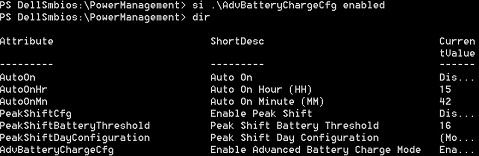
AdvancedBatteryChargeConfiguration is a more complex attribute which provides an interface to the user similar to BIOS through which the user can get and set advanced battery charge data.
Dir AdvancedBatteryChargeConfiguration|select – ExpandProperty CurrentValue
To set data for a specified day of the week:
Set-item AdvancedBatteryChargeConfiguration Sunday – BeginningOfDay "13:45" –WorkPeriod "1:30"
The user has set advanced battery charge data for Sunday with the beginning of the day as "13:45" and work duration as "1:30."
Note:
- The validation that minutes have to be in multiples of fifteen (for example, zero, fifteen, thirty, and forty-five).
- If either system or admin password is set, then it has to be provided with a
–Passwordswitch. - An example is:
Set-item AdvancedBatteryChargeConfiguration Sunday – BeginningOfDay "13:45" –WorkPeriod "1:30" –Password mySysPassword
其他資訊
Related Articles:
受影響的產品
Dell Command | Powershell Provider文章屬性
文章編號: 000146339
文章類型: Solution
上次修改時間: 24 10月 2025
版本: 7
向其他 Dell 使用者尋求您問題的答案
支援服務
檢查您的裝置是否在支援服務的涵蓋範圍內。