How to Stop and Start Services in Dell Security Management Server
摘要: Dell Security Management Server services may be stopped or started by following these instructions.
本文章適用於
本文章不適用於
本文無關於任何特定產品。
本文未識別所有產品版本。
說明
Dell Security Management Server (formerly Dell Data Protection Enterprise Edition) services may be stopped or started for:
- Changing configuration parameters
- Installing certificates
- General troubleshooting
- Database migrations
- Upgrading the server software
Affected Products:
- Dell Security Management Server
- Dell Data Protection Enterprise Edition
- Credant Mobile Guardian Server
Affected Versions:
- v6.0.0 and Later
A Windows administrator can either Stop or Start Dell Security Management Server services. Click the appropriate section for more information.
Stop
The stop Process for Dell Security Management Server can be performed in any Order. Click the appropriate section for more information.
Process
- Right-click the Windows start menu and then click Run.
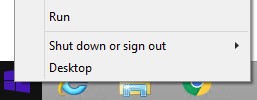
- In the Run UI, type
services.mscand then press OK.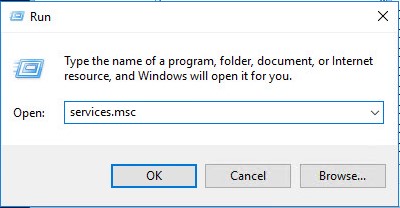
- In the Services UI, right-click the appropriate service and then select Stop.
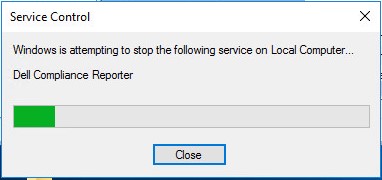
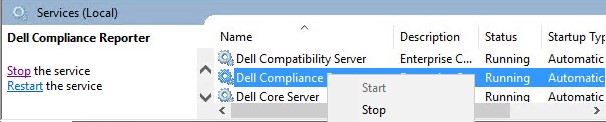 Note: Once the progress bar completes:
- The service shows a null Status.
- The Stop and Restart options are replaced with the ability to Start the service.

Order
Dell Security Management Server (formerly Dell Data Protection Enterprise Edition) does not require a specific service stop order.
Start
The start Process for Dell Security Management Server must be done in a specific Order. Click the appropriate section for more information.
Note: If your environment has Dell Data Security frontend servers, restart frontend services after the backend server’s services have started.
Process
- Right-click the Windows start menu and then click Run.

- In the Run UI, type
services.mscand then press OK.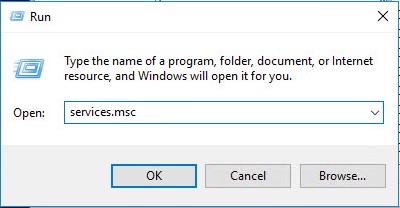
- In the Services UI, right-click the appropriate service and then select Start.
 Note: Once the progress bar completes:
- The service shows a Status of Running.
- The Start option is replaced with the ability to Stop or Restart the service.


Order
Click the appropriate version of Dell Security Management Server for the service start order.
- v11.3.0 and Later
- v10.2.13 to 11.2.0
- v10.2.10
- v10.2.9
- v10.2.5 to 10.2.7
- v10.1.0 to 10.2.4
- v9.5.0 to 10.0.0
- v9.2.0 to 9.4.0
- v8.5.0 to 9.1.5
- v8.3.1
- v7.5.0 to 8.1.0
- v7.3.0 to 7.3.1
- v7.2.3
- v7.2.1 to 7.2.2
- v7.0.0 to 7.1.5
- v6.7.0 to 6.8.2
- v6.0.0 to 6.6.0
For more information, reference How to Identify the Dell Data Security Server Version.
v11.3.0 and Later
Service start order:
- Dell PostgreSQL 10.7
- Dell Message Broker
- Dell Compatibility Server
- Dell Core Server
- Dell Security Server
- Dell Device Server
- Dell Key Server
- Dell Policy Proxy
- Dell Recovery Server
v10.2.13 to 11.2.0
Service start order:
- Dell PostgreSQL 10.7
- Dell Message Broker
- Dell Compatibility Server
- Dell Core Server
- Dell Security Server
- Dell Compliance Reporter
- Dell Device Server
- Dell Key Server
- Dell Policy Proxy
- Dell Recovery Server
v10.2.10
Service start order:
- Dell PostgreSQL 10.7
- Dell Message Broker
- Dell Compatibility Server
- Dell Core Server
- Dell Security Server
- Dell Compliance Reporter
- Dell Device Server
- Dell Key Server
- Dell Policy Proxy
v10.2.9
Service start order:
- Dell PostgreSQL 10.7
- Dell Message Broker
- Dell Compatibility Server
- Dell Core Server
- Dell Security Server
- Dell Access Groups
- Dell Compliance Reporter
- Dell Device Server
- Dell Key Server
- Dell Policy Proxy
v10.2.5 to 10.2.7
Service start order:
- Dell PostgreSQL 10.7
- Dell Message Broker
- Dell Compatibility Server
- Dell Core Server
- Dell Security Server
- Dell ACL Service
- Dell Compliance Reporter
- Dell Device Server
- Dell Key Server
- Dell Policy Proxy
v10.1.0 to 10.2.4
Service start order:
- Dell PostgreSQL
- Dell Message Broker
- Dell Compatibility Server
- Dell Core Server
- Dell Security Server
- Dell ACL Service
- Dell Compliance Reporter
- Dell Device Server
- Dell Key Server
- Dell Policy Proxy
v9.5.0 to 10.0.0
Service start order:
- Dell PostgreSQL
- Dell Message Broker
- Dell Compatibility Server
- Dell Core Server
- Dell Security Server
- Dell Compliance Reporter
- Dell Device Server
- Dell Key Server
- Dell Policy Proxy
v9.2.0 to 9.4.0
Service start order:
- Dell Message Broker
- Dell Compatibility Server
- Dell Core Server
- Dell Security Server
- Dell Compliance Reporter
- Dell Device Server
- Dell Key Server
- Dell Policy Proxy
v8.5.0 to 9.1.5
Service start order:
- Dell Message Broker
- Dell Compatibility Server
- Dell Core Server
- Dell Security Server
- Dell Compliance Reporter
- Dell Console Web Services
- Dell Device Server
- Dell Key Server
- Dell Policy Proxy
v8.3.1
Service start order:
- Dell Message Broker
- Dell Compatibility Server
- Dell Core Server
- Dell Security Server
- Dell Identity Server
- Dell Compliance Reporter
- Dell Console Web Services
- Dell Device Server
- Dell Key Server
- Dell Policy Proxy
v7.5.0 to 8.1.0
Service start order:
- Dell Document Store
- Dell Message Broker
- Dell Compatibility Server
- Dell Core Server
- Dell Security Server
- Dell Identity Server
- Dell Compliance Reporter
- Dell Console Web Services
- Dell Device Server
- Dell Key Server
- Dell Policy Proxy
Note: Identity Server may not be present in all environments.
v7.3.0 to 7.3.1
Service start order:
- Credant Compatibility Server
- Credant Core Server
- Credant Security Server
- Credant Identity Server
- Remaining Credant Services
Note: Identity Server may not be present in all environments.
v7.2.3
Service start order:
- Dell Compatibility Server
- Dell Core Server
- Dell Security Server
- Dell Identity Server
- Remaining Dell Services
Note: Identity Server may not be present in all environments.
v7.2.1 to 7.2.2
Service start order:
- Dell Compatibility Server
- Dell Core Server
- Remaining Dell Services
v7.0.0 to 7.1.5
Service start order:
- Credant Core Server
- Credant Compatibility Server
- Remaining Credant Services
v6.7.0 to 6.8.2
Service start order:
- CMG Server [Version]
- Credant Core Management Server [Version]
- CMG Device Server [Version]
- Credant Compliance Reporter [Version]
- Remaining CMG Services
v6.0.0 to 6.6.0
Service start order:
- CMG Server [Version]
- Credant Compliance Reporter [Version]
- Remaining CMG Services
Note: Compliance Reporter is an add-on component and may not be present in all environments.
To contact support, reference Dell Data Security International Support Phone Numbers.
Go to TechDirect to generate a technical support request online.
For additional insights and resources, join the Dell Security Community Forum.
受影響的產品
Dell Encryption文章屬性
文章編號: 000148683
文章類型: How To
上次修改時間: 22 9月 2025
版本: 13
向其他 Dell 使用者尋求您問題的答案
支援服務
檢查您的裝置是否在支援服務的涵蓋範圍內。