How to Check What Processor You Have in Your Computer
摘要: Learn how to check what processor you have in your Dell computer. Follow simple steps for Windows and Linux to check the processor generation and model.
本文章適用於
本文章不適用於
本文無關於任何特定產品。
本文未識別所有產品版本。
說明
Whether a processor (also known as a CPU) is from Intel, AMD, or Qualcomm, these instructions guide you through the process of identifying the processor.
Identifying your processor can be important for various reasons, such as:
- Identifying known issues
- Understanding workflow changes
- Verifying compatible resolutions
Learn how to identify your processor (Intel, AMD, or Qualcomm) on Windows or Linux. Click the appropriate option for instructions about how to check the processor that you have in your computer.
Windows
- Click the Start button.

- Type
aboutand then click About your PC.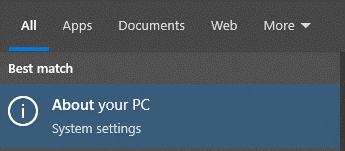
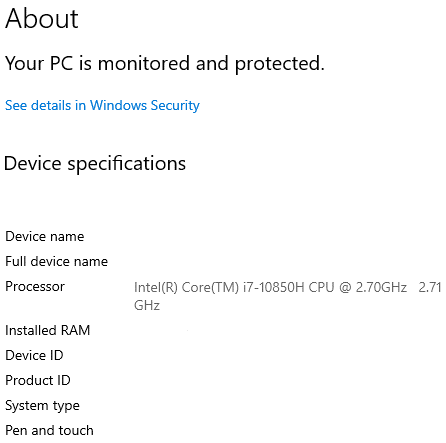
- Locate the Processor specifications to identify the processor that is used in your computer.
 Note:
Note:- In this example image, the Processor value is
Intel(R) Core(TM) i7-10850H CPU @ 2.70GHz 2.71 GHz. The10that immediately follows thei7-indicates that the processor is a 10th generation processor. - For more information about an Intel processor, go to Intel Product Specifications
. Locate the search field in the upper-right corner of the page, type in the model of the Intel processor, and then select it in the search results. The processor code name can be found in the information under Essentials.
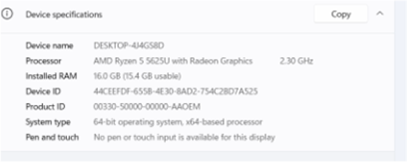 Note: In this example image, the Processor value is
AMD Ryzen 5 5625U with Radeon Graphics 2.30 GHz. The first number (5) that leads the5625Uindicates that the processor is a fifth-generation processor.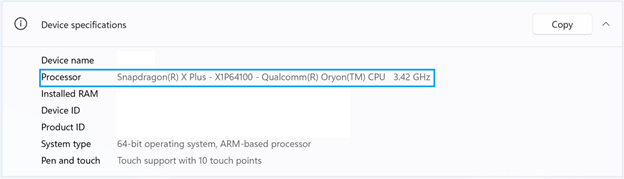 Note: In this example image, the Processor value is
Snapdragon(R) X Plus - X1P64100 - Qualcomm(R) Oryon(TM) CPU 3.42GHz. - In this example image, the Processor value is
Linux
- Press CTRL+ALT+T to open Terminal.
- Type
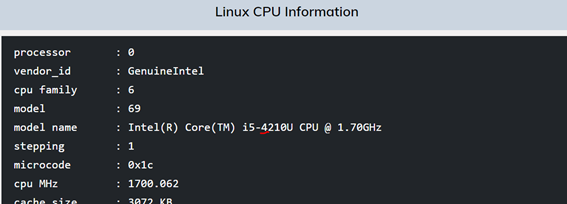
/proc/cpuinfoand then press Enter. - Locate the model name value to identify the processor that is used in your computer.
 Note:
Note:- In this example image, the model name value is
Intel(R) Core(TM) i5-4210U CPU @ 1.70GHz. The4that immediately follows thei5-indicates that the processor is a fourth-generation processor. - For more information about an Intel processor, go to Intel Product Specifications
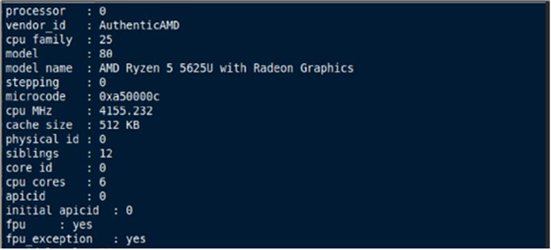 Note: In this example image, the model name value is
AMD Ryzen 5 5625U with Radeon Graphics. The first number (5) that leads the5625Uindicates that the processor is a fifth-generation processor. - In this example image, the model name value is
受影響的產品
Chromebox, Alienware, Dell All-in-One, Dell Pro All-in-One, Dell Pro Max Micro, Dell Pro Max Slim, Dell Pro Max Tower, Dell Pro Micro, Dell Pro Slim, Dell Pro Tower, Dell Slim, Dell Tower, Inspiron, Legacy Inspiron Models, Legacy Desktop Models
, OptiPlex, Vostro, XPS, Legacy XPS Models, G Series, Chromebook, G Series, Alienware, Dell Plus, Dell Pro, Dell Pro Max, Dell Pro Plus, Dell Pro Premium, Inspiron, Latitude, Dell Pro Rugged, Vostro, XPS, Legacy Laptop Models, Fixed Workstations, Mobile Workstations, Dell Pro Max Micro XE FCM2250
...
文章屬性
文章編號: 000204117
文章類型: How To
上次修改時間: 16 7月 2025
版本: 9
向其他 Dell 使用者尋求您問題的答案
支援服務
檢查您的裝置是否在支援服務的涵蓋範圍內。