安裝 Dell Pair 1.1.3 版後,未重新連接無線 Dell 鍵盤或滑鼠
摘要: Dell Pair 版本 1.1.3 的相關資訊會導致無線 Dell 鍵盤與滑鼠重新連線問題。
本文章適用於
本文章不適用於
本文無關於任何特定產品。
本文未識別所有產品版本。
症狀
Dell Pair 版本 1.1.3
如果使用藍牙連線連接 Dell Pro Premium 協作鍵盤 KB900、Dell Pro Premium 滑鼠 MS900 或 Dell 藍牙旅行用滑鼠 MS700,則會安裝 Dell Pair 版本 1.1.3。Dell Pro Premium 協作鍵盤 KB900、Dell Pro Premium 滑鼠 MS900 或 Dell 藍牙旅行用滑鼠 MS700 裝置無法重新連線。
受影響的鍵盤和滑鼠:
- Dell Pro Premium 協作鍵盤 KB900
- Dell Pro Premium 滑鼠 MS900
- Dell 藍牙便攜滑鼠 MS700
受影響的平台:
- Inspiron 14 5435
- Inspiron 16 5625
- Inspiron 16 5635
- Inspiron 14 7435 二合一
- Inspiron 16 7635 二合一
- Vostro 5625
- Vostro 16 5635
原因
Dell Pair 1.1.3 版會以舊版命令格式傳送「廠商專屬」掃描命令,違反 BT SIG 測試案例「HCI/GEV/BV-03-C [禁止混用舊版和延伸掃描命令]」。
解析度
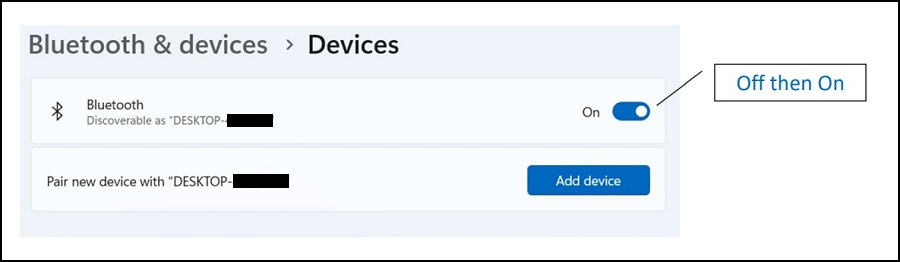
受影響的產品
Dell Bluetooth Travel Mouse MS700, Dell Pro Premium Collaboration Keyboard KB900, Dell Pro Premium Mouse MS900, Inspiron 14 5435, Inspiron 14 7435 2-in-1, Inspiron 16 5625, Inspiron 16 5635, Inspiron 16 7635 2-in-1, Vostro 5625, Vostro 16 5635文章屬性
文章編號: 000217617
文章類型: Solution
上次修改時間: 19 5月 2026
版本: 5
向其他 Dell 使用者尋求您問題的答案
支援服務
檢查您的裝置是否在支援服務的涵蓋範圍內。