
UNSOLVED
Diagnostics Error code 2000-0416
hi.....my Laptop model is Inspiron 1420 (out of warranty).....it starts up but then just before displaying the user accounts it goes black .....so i turned off ....and on restart i run the diagnostics ..it came up with an error code 2000-0146......i even changed the Bios to default settings and ran the diagnostics again and it shows the same error code.....is this an indication of bad sectors on my hard disk ...do i have to replace it...please help....thanks in advance.
hi Appu......
thanks a ton for every little detail..
I ran the initial Diagnostics...as usual it came up with Error code 2000-0146....and i went on with other tests(memory tests) without coming across any further errors.....but then there was no pop window asking whether to run 32 bit Diagnostics in Pre-boot system assessment build.
After the memory tests as u said there was pop-up "no Diagnostic utility partition found"....i inserted the Drivers and Utilities CD and restarted the system trying to boot from the CD......all i got there was to either Run 32 Bit Diagnostics or to Quit.
when i selected Quit ...this was what shown exactly on my screen
" your CD/DVD drive during this boot cycle is f:
A RAMDISK drive is available for this boot cycle is D:
It contains several Hard Drive setup tools. Please use these tools only under the direction of dell Support Staff.
F:\> "
so i went with 32 bit diagnostics...then there was pop window ..the one with " Express test, Extended test . Custom test and Symptom Tree"
I clicked all the way from custom test to SATA....................................It took almost 5.5 hrs ...in the process it came with 2 Errors
" Error Code 0F00:0244
Msg : Block 27426421 : Uncorrectable data error or media is write protected
Error Code 0F00:1A44
Msg : Block 27426421 : Uncorrectable data error or media is write protected "
So.....???????// u think i should replace my Hard Drive..?
Once again thanks a lot for your time and effort .
DELL-Appu S
6 Operator
•
3079 Posts
4138
0
Posted May 11th, 2013 09:00
Hi vin_syd,
Thank you for the detailed response; appreciate it. Error Code 0F00:0244 indicates an issue with the hard drive. I would suggest you to back up your important information (if possible) and replace the hard drive.
Let me know if you need any further assistance.
Hi brimenon,
It is an issue with the hard drive of your computer and might need replacement. Depending on the warranty status we can help you further, please use the link below to check the warranty status.
Please punch in the system service tag or express service code. In case your system warranty has expired please contact the Out of Warranty department 1-800-288-4410 (U.S.Customer only). In case your system is under warranty please send me the system service tag or express service code through a private chat, so that I can help you further.
Click on my username select start conversation and send me the details.
RetiredHi,
I have an XPS 1330 laptop. On running the diagnostics I got the error 0146 and error msg 2000-0146. As suggested ran the Custom test but that didnt show the hard drive on the list.
All other tests results were 'pass' .
Early last year too I got this error but when I ran the test again late last year, there was no error. Is this a 'false positive'? Do I need to change the hard drive?
Pl advise
Hi R A,
I am sorry about the situation; the Error code 2000-0146 indicates that the hard drive has gone bad.
Depending on the warranty status we can help you further, please use the link below to check the warranty status.
Please punch in the system service tag or express service code. In case your system warranty has expired please contact the Out of Warranty department 1-800-288-4410 (U.S.Customer only). In case your system is under warranty please send me the system service tag or express service code through a private chat, so that I can help you further.
Click on my username select start conversation and send me the details.
Retired

DELL-Appu S
6 Operator
•
3079 Posts
4138
0
Posted May 10th, 2013 03:00
Hi vin_syd,
Error code 2000: 0146 may imply a possible 'hard drive' failure. For more decisive results, I recommend you to run a 'Custom Test' on the 'Hard Drive'. 'Custom Test' is an advanced diagnostic test and is capable of producing more reliable results. Please follow the steps listed below to launch the hard drive custom test:
From the factory the system's 'hard drive' will include a hidden partition with 32 bit Dell Diagnostics. After the completion of basic diagnostic process, you will be asked to continue to this Diagnostics program. If for some reason the hidden partition is not found on the hard drive, you will be presented with the option to insert the Resource DVD. Following screen appears in that case:

If required, use the Resource CD and follow the steps given below:
- Insert Recovery CD
- Shut down and restart the desktop
- When Dell logo appears, immediately tap repeatedly
NOTE: If you wait too long and the operating system logo appears, continue to wait until you see the Microsoft Windows desktop; then shut down your computer and try again.
- When the boot device list appears, highlight the option CD/DVD/CD-RW and press
- Boot from CD-ROM from the menu that appears and press
- This message appears ‘Press any key to boot from the CD’
- Promptly hit
NOTE: If you wait too long and Dell Diagnostic screen does not appear, then, shut down your computer and repeat all steps.
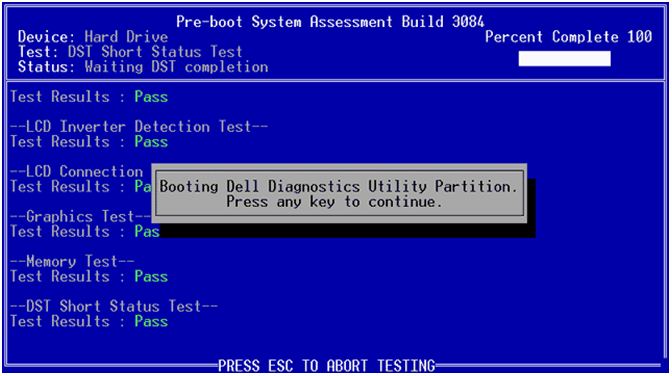
(Following screen appears):
- Press

When the Dell Diagnostics main menu appears, select the test you want to run
- Select Custom Test (Refer to image below)
- Click <+> sign besides 'Hard Drive' (Refer to image below)
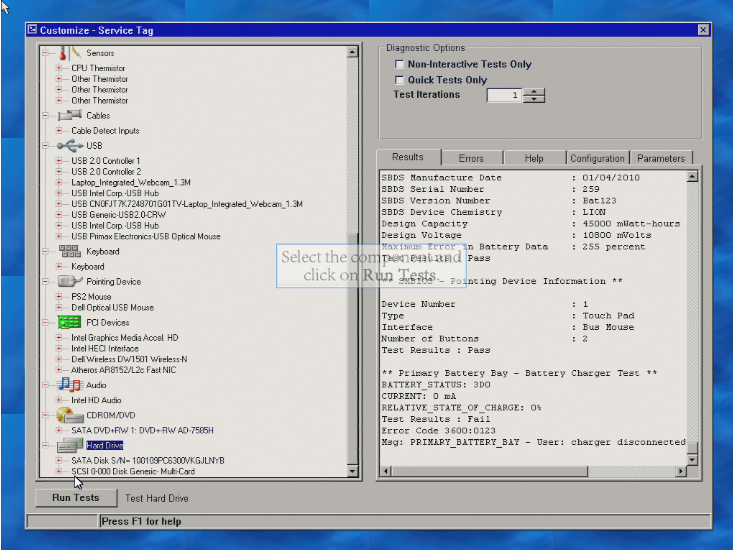
- Highlight 'SATA Disk'
- Place a tick mark in 'Non-Interactive Tests Only'
- Click 'Run Test'
- For any problem encountered during a test, a message appears with an error code and a description of the problem
- Write down the error code and problem description exactly as it appears
Do reply with the findings.