
UNSOLVED
N1524 VLAN NOT WORKING
Good Day Team,
I have a Dell EMC N1524 switch which need to configure VLANs. The switch have 24 ports and I assigned Te1/0/1 for pfSense router firewall. The IP and DHCP are from this pfSense include internet services. Te rest 23 ports are assigned as 23 vlans, so each port can't meet each other unless the port connecting to the pfSense. When I configure VLANs on this switch, all access ports unable to access to the internet. Currently I factory-default the switch for internet connection to all the ports which is bad.
Can someone assist on this?
The access ports/community failed to get internet/ unable to ping to the gateway once the VLAN config uploads.
DELL-Erman O
Moderator
•
2984 Posts
•
14874 Points
484
0
Posted October 3rd, 2022 05:00
Hello, I can't directly help with configuration but it might be related to your VLAN routing and inter-VLAN please check page 1213-1216 https://dell.to/3rqFdJi
Please check VLANs are interconnected through to router. I would check ping to the router gateway IP reachable or not and I'd check to see if routes to those VLANs have been added to the router gateway.
Hope that helps!
DELL-Erman O
Social Media and Communities Professional
Dell Technologies | Enterprise Support Services
#IWork4Dell
Did I answer your query? Please click on ‘Mark as Accepted Answer’. ‘Thumbs up’ the posts you like!Hi Erman,
Thank you for reply.
The VLANs are within same network. For example: The pfsense which connects to Dell EMC N1524 switch thru gateway 172.16.0.1. When I configured switch for management IP:
interface vlan 1
ip address 172.16.0.254 /16
ip default-gateway 172.16.0.1,I'm able to ping gateway and able to access to the management web interface thru 172.16.0.254. When I starts to configure vlans, the connection from switch has been disconnected. Do we need IP routing even the switch handling data within same network? If need, can assist on how to configure the IP routing?
Thanks.
DELL-Erman O
Moderator
•
2984 Posts
•
14874 Points
479
0
Posted October 3rd, 2022 07:00
Hi, I'm not sure really. We missing something. Maybe between the firewall and switch port needed to configure as a trunk port. I was trying to find out a whitepaper or best practice for the N series. The closest thing I could find is this. https://dell.to/3RvQIJV
Also, this article might be helpful to brainstorm please take a look at it. This is why I thought inter-vlan and routing, it's a very good article https://dell.to/3SxDpKi
DELL-Erman O
Social Media and Communities Professional
Dell Technologies | Enterprise Support Services
#IWork4Dell
Did I answer your query? Please click on ‘Mark as Accepted Answer’. ‘Thumbs up’ the posts you like!Hi Erman,
Really appreciate your help.
I have gone through the documents from the link you gave. Since the pfsense that connects to the Dell switch are through pfsense gw 172.16.0.1. The hosts that connect to the Dell switch must contain IP's from 172.16.0.2 to 172.16.0.254. In this case my PC's IP is 172.16.0.25. When I configured Dell switch pfsense connect interface te1/0/1 as trunk, my PC able to access internet and access the firewall webui and the switch able to ping to gw 172.16.0.1. When I starts configuring switch ports to VLAN, the connections down. I even plugged-out pfsense cable from Dell switch when config and reboots still the same no connection.
We know that we miss something. Can please assist is this because of adding DNS IP to the switch?
DELL-Charles R
Moderator
•
4730 Posts
•
25476 Points
473
0
Posted October 3rd, 2022 13:00
Hello Dell3MC,
This may help if you like to take a look.
Dell EMC Networking N Series VLAN access and trunk mode
Configuring a Private VLAN
Page 830 : https://dell.to/3RvQIJV
As Erman mentioned we don't really do initial configuration on the forum. We have Deployment Service that can be contracted for that. If you need that you could contact Sales for a quote.
DELL-Charles R
Social Media and Communities Professional
Dell Technologies | Enterprise Support Services
#IWork4Dell
Did I answer your query? Please click on ‘Accept as Solution’. ‘Thumbs up’ the posts you like!

Dell3MC
5 Posts
492
0
Posted October 2nd, 2022 23:00
I will attach the diagram and the configurations of the N1524 switch.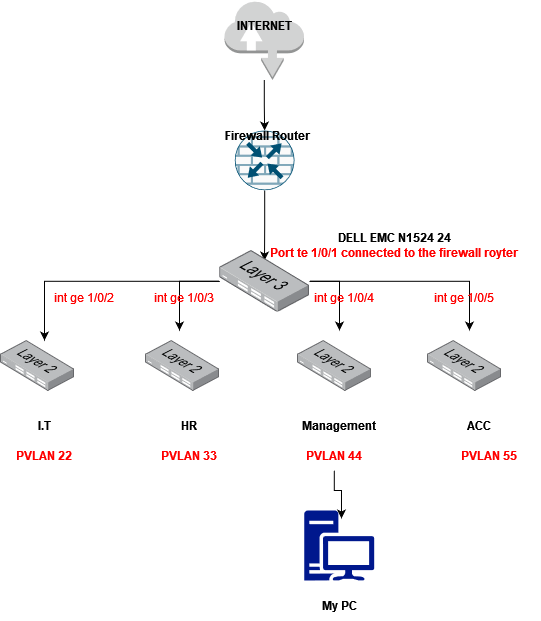
interface range gigabitethernet 1/0/2,gigabitethernet1/0/4
no shutdown
switchport mode access
switchport access vlan 10
----
vlan 10
private-vlan primary
vlan 11
private-vlan community
vlan 12
private-vlan community
vlan 13
private-vlan community
vlan 14
private-vlan community
vlan 15
private-vlan community
vlan 16
private-vlan community
vlan 17
private-vlan community
vlan 18
private-vlan community
vlan 19
private-vlan community
vlan 20
private-vlan community
vlan 21
private-vlan community
vlan 22
private-vlan community
vlan 23
private-vlan community
vlan 24
private-vlan community
vlan 25
private-vlan community
vlan 26
private-vlan community
vlan 27
private-vlan community
vlan 28
private-vlan community
vlan 29
private-vlan community
vlan 30
private-vlan community
vlan 31
private-vlan community
vlan 32
private-vlan community
vlan 33
private-vlan community
----
vlan 10
private-vlan association add 11,12 to ------ 33
----
interface tengigabitethernet 1/0/1
switchport mode private-vlan promiscuous
switchport private-vlan mapping 10 add 11,12,13 to ------- 33
----
interface tengigabitethernet 1/0/2
description vlan11
switchport mode private-vlan host
switchport private-vlan host-association 10 11
interface tengigabitethernet 1/0/3
description vlan12
switchport mode private-vlan host
switchport private-vlan host-association 10 12
interface tengigabitethernet 1/0/4
description vlan13
switchport mode private-vlan host
switchport private-vlan host-association 10 13
interface tengigabitethernet 1/0/5
description vlan14
switchport mode private-vlan host
switchport private-vlan host-association 10 14
interface tengigabitethernet 1/0/6
description vlan15
switchport mode private-vlan host
switchport private-vlan host-association 10 15
interface tengigabitethernet 1/0/7
description vlan16
switchport mode private-vlan host
switchport private-vlan host-association 10 16
interface tengigabitethernet 1/0/8
description vlan17
switchport mode private-vlan host
switchport private-vlan host-association 10 17
interface tengigabitethernet 1/0/9
description vlan18
switchport mode private-vlan host
switchport private-vlan host-association 10 18
interface tengigabitethernet 1/0/10
description vlan19
switchport mode private-vlan host
switchport private-vlan host-association 10 19
interface tengigabitethernet 1/0/11
description vlan20
switchport mode private-vlan host
switchport private-vlan host-association 10 20
interface tengigabitethernet 1/0/12
description vlan21
switchport mode private-vlan host
switchport private-vlan host-association 10 21
interface tengigabitethernet 1/0/13
description vlan22
switchport mode private-vlan host
switchport private-vlan host-association 10 22
interface tengigabitethernet 1/0/14
description vlan23
switchport mode private-vlan host
switchport private-vlan host-association 10 23
interface tengigabitethernet 1/0/15
description vlan24
switchport mode private-vlan host
switchport private-vlan host-association 10 24
interface tengigabitethernet 1/0/16
description vlan25
switchport mode private-vlan host
switchport private-vlan host-association 10 25
interface tengigabitethernet 1/0/17
description vlan26
switchport mode private-vlan host
switchport private-vlan host-association 10 26
interface tengigabitethernet 1/0/18
description vlan27
switchport mode private-vlan host
switchport private-vlan host-association 10 27
interface tengigabitethernet 1/0/19
description vlan28
switchport mode private-vlan host
switchport private-vlan host-association 10 28
interface tengigabitethernet 1/0/20
description vlan29
switchport mode private-vlan host
switchport private-vlan host-association 10 29
interface tengigabitethernet 1/0/21
description vlan30
switchport mode private-vlan host
switchport private-vlan host-association 10 30
interface tengigabitethernet 1/0/22
description vlan31
switchport mode private-vlan host
switchport private-vlan host-association 10 31
interface tengigabitethernet 1/0/23
description vlan32
switchport mode private-vlan host
switchport private-vlan host-association 10 32
interface tengigabitethernet 1/0/24
description vlan33
switchport mode private-vlan host
switchport private-vlan host-association 10 33