
UNSOLVED
Optiplex 7060
I Found a optiplex 7060 tower when scraping. If has a no bootable devices found. Look up some fixes but been unable to confirm if the bitlocker was enabled or not. Would it be best to do w window reinstall or update to windows 11. Before doing a bios update. I not worried about any data because I want only look to factory reset from get go. Help please
0
0
Posted April 28th, 2024 11:23
Yes it has a SSD. Like this one. Under the dvd drive
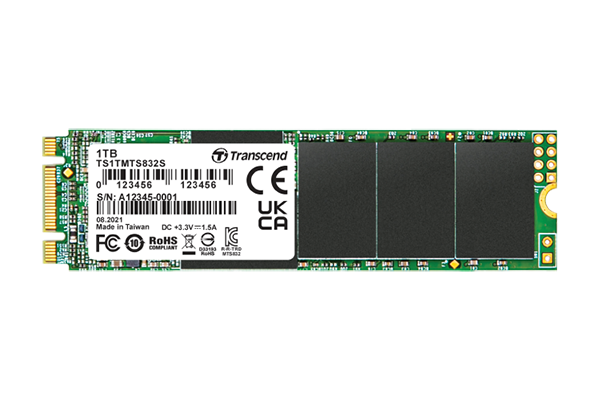 i do have a extra HHD drive on hand too. Check all connections.
 0
0
Posted April 28th, 2024 20:11
It seems the hardware side is ready. Prior to proceeding with a clean Windows 11 installation assuming that it was activated for Windows 10. You can use the BIOS maintenance option to wipe (erase) the storage and get rid of any unwanted, left over from previous user(s).
Set BIOS to default settings then making adjustment to the following: set UEFI boot mode, enable Secure Boot, enable AHCI in SATA operation, enable TPM. The system should be ready for Win 11 installation.
If you prefer to reset or reinstallation previously shipped operating system, you can review the options for reset of operating system here https://www.dell.com/support/kbdoc/en-us/000192698/reset-or-reinstall-windows-11-on-your-dell-computer
0
0
Posted April 30th, 2024 00:05
@Chino de Oro Hi,
Support for Win10 doesn't end until Oct. 2025.
0
0
Posted April 30th, 2024 00:12
Thanks Brad for having my back. I edited my post to strike out the mistake.


Chino de Oro
11 Legend
•
8458 Posts
•
46451 Points
0
0
Posted April 28th, 2024 10:14
Sometimes, the error message of no bootable devices found also meant that there is no physical boot drive. Just remove the side panel and inspect for any SSD/HDD being installed.
Once you have establish a physical drive, you can create a Windows 11 installation USB using Windows Creation Tool and perform a clean Windows installation. Because Windows 10 will be end of support in October, therefore, you don't want to install it and having to change operating system in a few months.
While working inside the machine, give it a new coin cell battery as a low cost basic maintenance.
https://www.dell.com/support/manuals/en-us/optiplex-7060-desktop/opti_7060_tower_service_manual/removing-coin-cell-battery?guid=guid-25aeb843-7a64-40c7-985a-69e47c7c0b73&lang=en-us
(edited)