
selenduna

updated

1 month ago

S

selenduna

1 Rookie

•

2 Posts

•

22 Points

0

215

September 22nd, 2026 23:44

datacenter equipment

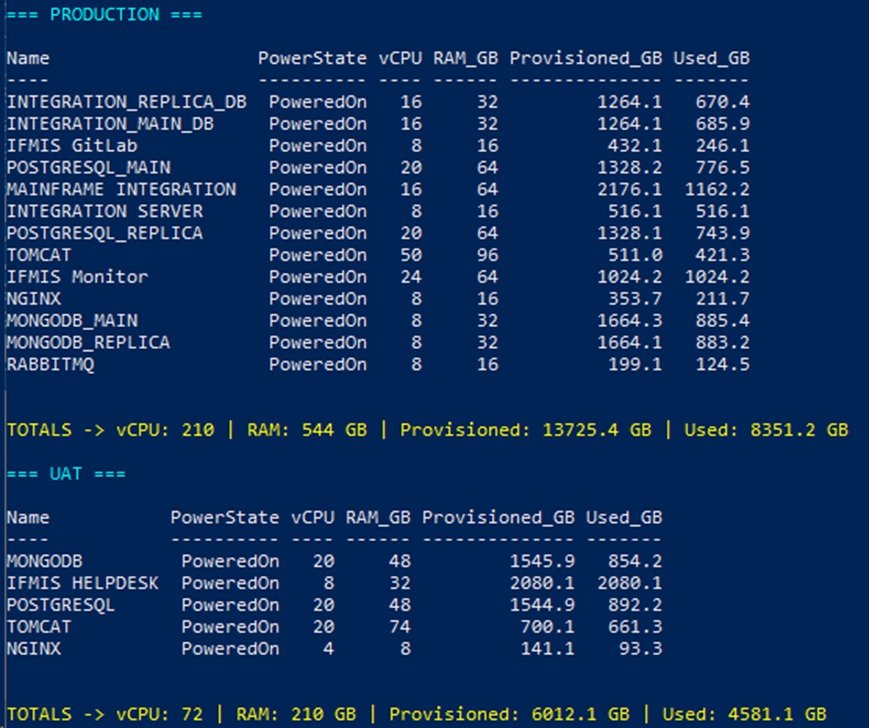
I have the following virtual servers on my datacenter running vmware as hypervisor. I need help with new specs for the new secondary enviroment for both Servers and Storage. I would also prefer a physical SAN setup and backup for all serves both Production and UAT. In any specs provided should have future scaliability. both Server and storage should consist of HDD not SSD. Im looking forward fo the complete infustructure Solotion with BOM 
1 Attachment

  • Dell-ArunK

    Moderator

    •

    31 Posts

    •

    93 Points

    0

    0

    Posted September 23rd, 2026 04:14

    Hi selenduna


    Here is a comprehensive, scalable datacenter infrastructure architecture and preliminary Bill of Materials (BOM) tailored for your secondary (DR/Secondary Production & UAT) environment, based on your workload metrics.


    Workload Sizing Summary

    Metric
    Production
    UAT
    Total Combined
    Target Sizing (with ~40–50% Headroom / N+1)
    vCPU
    210
    72
    282 vCPUs
    ~96–128 Physical Cores (at a conservative 2:1 to 3:1 consolidation ratio)
    RAM
    544 GB
    210 GB
    754 GB
    1.5 TB – 2 TB (to accommodate N+1 high availability)
    Storage (Used)
    8.4 TB
    4.6 TB
    13 TB
    40 TB – 60 TB Usable (growth & RAID parity)
    Storage (Provisioned)
    13.7 TB
    6.0 TB
    19.7 TB
    —
     
    • Compute Cluster: 3-Node VMware vSphere cluster configured in N+1 redundancy. If one host fails or requires maintenance, the remaining two nodes can seamlessly run all Production and UAT workloads.
    • Primary SAN Storage (All-HDD): Dell PowerVault ME5024 populated with 10K RPM Enterprise SAS drives in RAID 10 / RAID 6. Because SSDs are excluded and your environment hosts several transactional databases (PostgreSQL, MongoDB), 10K/15K RPM SAS drives are critical to deliver sufficient IOPS compared to slower 7.2K drives.
    • Dedicated SAN Fabric: Dual redundant 16Gb/32Gb Fibre Channel (FC) switches for low latency, deterministic throughput, and zero-loss storage traffic.
    • Dedicated Backup Target: A high-capacity storage server utilizing cost-effective 7.2K RPM NL-SAS drives configured for local and cross-site backup repository retention (compatible with Veeam, Dell PowerProtect, or Commvault).

    Detailed Bill of Materials (BOM)

    1. Compute Layer (3x Virtualization Hosts)

    • Model: 3x Dell PowerEdge R660 (1U) or R760 (2U)
    • Processor: 2x Intel® Xeon® Gold 5418Y (24 Cores / 48 Threads, 2.0 GHz) per host (Total cluster: 144 physical cores / 288 threads)
    • Memory: 512 GB DDR5 ECC RAM (16x 32GB RDIMMs) per host (Total cluster: 1.5 TB RAM)
    • Storage Controller (Boot): Dell BOSS-N1 Controller with 2x M.2 SATA/NVMe (RAID 1) dedicated for ESXi OS boot
    • Local Drive Bay: 2x 600GB 10K SAS HDDs (RAID 1 for scratch/local diagnostics, if required)
    • FC HBA: Dual-Port Emulex/QLogic 16Gb/32Gb Fibre Channel Host Bus Adapter
    • Network Interfaces: Dual-Port 10/25GbE SFP28 (for vMotion, Management, VM Network) + Dual-Port 1GbE BASE-T
    • Power & Management: Dual redundant Hot-plug Titanium/Platinum PSUs (800W–1100W), iDRAC9 Enterprise
     

    2. Physical SAN Storage Layer (Enterprise HDD)

    • Model: 1x Dell PowerVault ME5024 Storage Array (2U, 24x 2.5" Drive Bays)
    • Controllers: Dual Active-Active SAN Controllers (16Gb FC / 10/25Gb iSCSI multi-protocol)
    • Drive Configuration:
      • 24x 2.4TB 10K RPM 12Gb SAS 2.5" HDDs
      • Raw Capacity: ~57.6 TB
      • Usable Capacity (RAID 10 / RAID 6 + Hot Spares): ~28 TB to ~40 TB usable
    • Scalability: Supports up to 336 drives via ME412 / ME424 / ME484 JBOD expansion enclosures as your storage footprint grows.
     

    3. SAN Fabric Switches (Redundant SAN Network)

    • Model: 2x Dell Connectrix DS-6610B (or Brocade G610) 32Gb/16Gb Fibre Channel Switches
    • Port Count: 24-Port switch (12 ports active per switch via license)
    • Optics & Cables: 16Gb/32Gb SFP+ SW Optics with OM4 LC-LC Multi-mode Optical Patch Cables (providing full MPIO redundancy between hosts and SAN)
     

    4. Backup Infrastructure (Dedicated Storage Server)

    • Model: 1x Dell PowerEdge R760xd2 (High-Density Storage Server)
    • Processor: 1x or 2x Intel® Xeon® Silver 4410Y (12 Cores / 24 Threads)
    • Memory: 64 GB – 128 GB DDR5 RAM
    • Storage (Backup Repository):
      • 12x 8TB or 12x 12TB 7.2K RPM NL-SAS 3.5" HDDs (RAID 6)
      • Raw Capacity: 96 TB – 144 TB
      • Usable Capacity: ~70 TB – ~110 TB (accommodates 30–60+ days of retention for both Prod and UAT)
    • Network Interfaces: Dual-Port 10/25GbE SFP28 (for high-speed backup data transfer across LAN/VLAN)
    • Backup Software Compatibility: Dell PowerProtect Data Manager, Veeam Backup & Replication, or equivalent.
     

    Key Scalability & Operational Advantages

    1. Independent Compute & Storage Scaling: Using a dedicated physical SAN allows you to add compute nodes (PowerEdge hosts) or expand storage capacity (via ME-series expansion shelves) independently without disruption.
    2. Database Performance on HDD: Deploying 10K SAS drives in high-spindle counts (24 drives) helps maximize spindle IOPS for write-heavy databases (PostgreSQL, MongoDB) while remaining strictly within the HDD requirement.
    3. High Availability (HA) & DR Readiness: In the event of a primary site failure, this secondary configuration can run the entire workload (282 vCPUs / 754 GB RAM) with headroom to spare.


    Dell-ArunK

    Social Media and Communities Professional

    Dell Technologies | Enterprise Support Services

    #IWork4Dell

    Did I answer your query? Please click on ‘Mark as Accepted Answer’. ‘Thumbs up’ the posts you like!

  • selenduna

    1 Rookie

    •

    2 Posts

    •

    22 Points

    12

    0

    Posted September 23rd, 2026 09:55

    @Dell-ArunK​ Thanks for your advice 

  • Dell-ArunK

    Moderator

    •

    31 Posts

    •

    93 Points

    11

    0

    Posted September 23rd, 2026 09:56

    Hi selenduna Welcome ! 


    Dell-ArunK

    Social Media and Communities Professional

    Dell Technologies | Enterprise Support Services

    #IWork4Dell

    Did I answer your query? Please click on ‘Mark as Accepted Answer’. ‘Thumbs up’ the posts you like!

  • shaj

    1 Rookie

    •

    1 Message

    •

    5 Points

    10

    0

    Posted September 25th, 2026 13:35

    @Dell-ArunK​ rtgertge

  • Dell-Martin S

    Moderator

    •

    3872 Posts

    •

    25777 Points

    9

    0

    Posted September 25th, 2026 13:42

    Hi,

    what did you mean with that message?

    with kind regards Martin/ Liebe Grüße Martin

    Did I answer your query? Please click on ‘Mark as Accepted Answer’. ‘Thumbs up’ the posts you like!

    DELL-Martin S

    Social Media and Communities Professional

    Dell Technologies | Enterprise Support Services

    #IWork4Dell