
UNSOLVED
Adding new primary Moniitor
GPU cabling Q for W11 PC
I have a Gigabyte Radeon RX 7800 XT 16GB Graphics Card - GDDR6 256-bit.
Currently have a Dell HD monitor plugged in by HDMI cable.
Just purchased an Alienware 4K 180Hz Utra HD 27” monitor which I will connect by DisplayPort
This will be the new primary monitor.
Have purchased an 80GB Display Port cable. V2.1
Can I use any Display Port and HDMI Sockets on the GPU, or is there a ‘preferred’ pair to use.
Is there any configuration needed on PC … or will the combination set up using plug & play.
0
0
Posted December 27th, 2025 13:36
Based on the picture and adding labels, I think that they are in sets =
HDMI 1/DP1 HDMI2/DP2
Connect HDMI1 to the P2422HE
Connect DP1 to the AW2725QF#IWork4Dell

0
0
Posted December 27th, 2025 12:58
It's not a Dell computer
This relates to a Dell P2422HD and Dell Alienware AW2725QF monitor?
The Gigabyte Radeon RX 7800 XT does look like that.
Hence the Q if I cable new monitor using DP and an existing monitor using HDMI which socket combination do I use,
0
0
Posted December 27th, 2025 16:43
What socket on the video card you use does not matter.
Under Windows you can assign any connected monitor to be the primary monitor and the rest you can organize based on location as secondary and a few other options like mirror and stretch.
You can use Adrenalin software to setup things like Freesync and bit depth etc... per monitor.


DELL-ChrisM2
Community Manager
•
1681 Posts
•
7681 Points
0
0
Posted December 27th, 2025 12:35
Our users need more data =
Is that Dell computer? If yes, which model?
Is that the Alienware AW2725QF monitor?
What specific monitor model is "Dell HD monitor" ?
Verify, does the Gigabyte Radeon RX 7800 XT 16GB video out ports look like this?
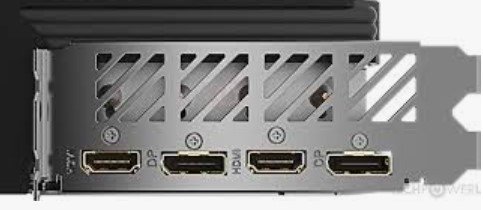
HDMI 2.1/DisplayPort 2.1/HDMI 2.1/DisplayPort 2.1
#IWork4Dell
